
FI OrderFlow Documentation
Complete reference for installing, configuring, and trading with the FI OrderFlow indicator for NinjaTrader 8. Covers all three modes, every signal, and a full glossary of footprint terms.
New to order flow?
Our free learning section covers the concepts behind this indicator in depth:
Building your own strategy?
FIOrderFlow publishes 56 plot series that a NinjaScript strategy can host and read, one value per bar. The full reference lives in your account.
Installation
The FI OrderFlow indicator is delivered as a .zip file that you import directly into NinjaTrader 8.
Download the indicator
Log in to your dashboard and download the latest .zip file. Do not extract the archive.
Import into NinjaTrader 8
Open NinjaTrader 8 and go to Control Center → Tools → Import → NinjaScript Add-On. Select the downloaded .zip file and click Open.
Restart NinjaTrader
Close and reopen NinjaTrader 8 to complete the installation. The indicator will appear in your indicators list as FIOrderFlow.
Add to a chart
Right-click any chart → Indicators → search for FIOrderFlow → click Add.
Set the indicator mode
Before pressing OK, find the IndicatorMode property in the parameters panel. Select the mode that matches your use case:
- FootPrint — Bid/ask volume at every price level, overlaid on the price panel. Best for scalping and real-time tape reading.
- VolumeProfile_And_MarketProfile — Session TPO letters and volume profiles on the price panel. Best for context and value area analysis.
- VolumeProfile_And_CumulativeDelta — Delta candles in a separate panel below the chart. Best for divergence and trend confirmation.
You can change the mode later by opening the indicator properties (right-click chart → Indicators → select FIOrderFlow → edit).
Configure chart settings for your mode
Each mode requires specific NinjaTrader chart settings to work correctly. Set these before applying the indicator:
FootPrint mode
Use Bars instead of Days in the Data Series window. 200 bars keeps the footprint session fast and focused on recent price action. For 5-minute charts and below this is the recommended setup.
VolumeProfile_And_MarketProfile mode
30-minute bars are required for proper TPO letter formation. 14 days provides enough history for composite profiles, naked levels, and value area migration.
VolumeProfile_And_CumulativeDelta mode
The delta panel runs independently below your chart. 3 days of data on a 1m, 2m, or 5m chart gives you enough session history without processing millions of ticks on startup.
Performance note: This indicator uses Calculate on each tick, which means it processes every single tick in your chart history. A single trading day on ES or NQ can contain over a million ticks. On smaller timeframes (1m, range bars, tick charts), we strongly recommend loading no more than 3 days of data. Loading 5+ days on a tick-heavy instrument can mean processing tens of millions of ticks, causing long startup times and high memory usage.
Licensing & Activation
When you first load the indicator, it will prompt you for your license key. You can find your key in your licenses dashboard.
License key format: XXXX-XXXX-XXXX-XXXX
Machine lock: Your license is tied to one machine at a time. If you need to move it to a new computer, use the machine reset option in your dashboard.
Trial licenses: Trial keys give you 5 days of full access. All features are unlocked during the trial period.
Validation: The indicator validates your license periodically. An active internet connection is required for the initial activation.
Indicator Modes
FI OrderFlow operates in three distinct modes. You select the mode via the IndicatorMode property when adding the indicator to your chart. Each mode serves a different analytical purpose.
Mode 1: Footprint
Overlay: Renders directly on the price panel
The core footprint mode. Replaces standard candlesticks with detailed bid/ask volume data at every price level inside each bar. This is the mode you use for reading order flow in real-time: spotting imbalances, absorption, exhaustion, and institutional activity.
Best for: Scalping, intraday entries, reading the tape, identifying aggressive buyers/sellers.
Chart type: Works on any bar type but is most useful on range bars (e.g., 10-tick, 4-range) or short time-based bars (1m, 5m).
Data loading: Footprint mode uses Bars as the data type — not days. The indicator loads a maximum of 200 bars of history, not a full trading day. This keeps startup fast and memory usage low, especially on range and tick charts where a single session can produce thousands of bars.
Mode 2: Volume Profile & Market Profile (TPO)
Overlay: Renders directly on the price panel
Displays session-based volume profiles and TPO (Time Price Opportunity) letter charts. Identifies the Point of Control, Value Area, Initial Balance, single prints, poor highs/lows, and profile shape classification. Supports multi-session composite profiles.
Best for: Context analysis, identifying value areas, support/resistance from prior sessions, understanding market auction structure.
Chart type: Best on 30-minute or 1-hour charts for clear TPO letter formation.
Required: Set your chart timeframe to 30 minutes for proper TPO letter formation. Each 30-minute period generates one TPO letter (A, B, C, etc.) — this is the standard Market Profile convention. Using a different timeframe will produce incorrect letter assignments.
Recommended: Load at least 14 days of 30-minute bars for full analysis. This gives the indicator enough session history for accurate composite profiles, naked level detection, and value area migration analysis.
Mode 3: Volume Profile & Cumulative Delta
Panel: Renders in its own indicator panel below the chart
Plots cumulative delta as candles in a separate panel with optional EMA, Bollinger Bands, and session volume profile overlay. Use this to spot divergences between price and buying pressure across the session.
Best for: Trend confirmation, delta divergence, session-level analysis, swing trading context.
Chart type: Works on all bar types. The delta panel is independent of the price chart above.
Footprint Display Modes
When running in Footprint mode, you can cycle through different display styles using the chart toolbar. Each shows the same underlying data in a different visual format.
Bid / Ask
Two columns per bar showing bid volume on the left and ask volume on the right at every price level. The default and most detailed view.
VP + Imbalances
Volume profile bars at each level with diagonal imbalances highlighted. Quick way to see where aggressive activity is concentrated.
VP + Bid/Ask
Combines volume profile visualization with bid/ask numbers overlaid.
Candle + VP
Standard candlestick body with a session volume profile displayed alongside.
Candle + VP + Imbalance
Candlestick with volume profile and diagonal imbalance highlights.
Delta Profile
Shows net delta (ask minus bid) at each price level as a horizontal histogram. Green bars for positive delta, red for negative.
Depth of Market
The order book can be shown two ways, and both are switched on from the chart right-click menu under Depth of Market. Turn on Mini DOM Enabled to dock the ladder on the chart itself, beside the price axis, or open Popup DOM Window for a separate resizable window you can move to a second monitor. Both read the same book and can run at the same time.
Columns
Seven columns can be shown or hidden individually under Depth of Market → Columns. The price ladder itself is always visible.
PRICE
The ladder itself. Turn on Show Last Trade to mark the current print with an up or down arrow, and Highlight Best Bid/Ask to keep the inside market obvious as the book moves.
Vol
Traded volume at that price for the session. This is volume that actually changed hands, not resting size.
Delta
Buy volume minus sell volume at that price. Positive means the level was bought into on balance, negative means it was sold into.
Bid Depth / Ask Depth
Resting size on each side, shown as a short history rather than a single number. Each row is sliced into 30 cells covering the last 30 seconds, and cell brightness encodes how much size sat at that price at that moment. Quiet rows stay readable next to walls.
P/S Bid / P/S Ask
Pulled and stacked size. Positive bars appear where several consecutive levels are holding unusually large resting orders, which is the signature of a level being defended. Real stacks hold when price arrives; fake stacks vanish before it gets there.
Wall
A dedicated column for the largest resting orders in view, with Show wall sizes to print the contract counts next to them.
Cell Markers
Three markers appear directly on depth rows when the book behaves in a way worth noticing.
Iceberg
A cyan dot, when the displayed size at a level keeps refilling after trades hit it. More size is present than the book is showing.
Spoof
A red square, when a large stack appears and is then pulled without filling. The size was never intended to trade.
Absorption
Marks levels where many trades hit but the resting depth refused to thin. Someone is standing there taking the flow.
Row Aggregation
On a wide instrument a one-tick ladder can be taller than the chart. Tick Aggregation combines several tick levels into one row, and the current setting is shown in the menu as AGG 1, AGG 4, AGG 10 and so on. Leave Auto Tick Agg on and the ladder increases aggregation on its own as you zoom out, so rows stay tall enough for the text to remain readable. Your manual setting acts as the floor it will not go below.
Display options
Column Headers, Show Prices, Show Price/Spread Text, Show vol sizes, Show delta sizes, Show wall sizes, Show totals, Show all levels, Highlight Best Bid/Ask, Highlight Max and Active Tick Flash all toggle independently, so the ladder can be as dense or as bare as you want. Every choice is saved with the chart and comes back the next time it opens.
The Popup DOM Window
The popup is a ladder in its own window with its own settings, not a larger copy of the inline one. Open it from Depth of Market → Popup DOM Window; the same item then reads Close DOM Popup. It docks to the side of the chart, re-anchors when the chart layout changes, and remembers its position and size, so it comes back where you left it, including on a second monitor. It can also be pointed at a different instrument from the chart it was opened on.
Finding the settings
Click a column header, or its chevron, to open that column settings. Right-clicking the header opens the same menu. The gear menu has a Columns submenu mirroring every per-column setting, so there is no setting reachable only one way. The popup also carries its own help window, with a searchable glossary whose terms explain themselves on hover.
Layouts
Presets that change which columns are shown and how wide they are. Start from the one closest to what you are doing, adjust, and save it under your own name.
Standard
The balanced ladder: Delta, Vol, per-bar Ask and Bid, live Bid and Ask Depth, P/S both sides, Abs both sides, Price and T&S. Everything at once.
Profile
Volume-profile focused. Emphasizes the Vol column and the per-bar Ask/Bid split, and hides P/S and Abs. For reviewing where the volume traded.
Heat Zones
Depth-heavy. Bid and Ask Depth at full width with the heatmap on, everything else shrunk. For working the inside market, where walls and pulls are what matter.
Compact
Delta, Price, Bid Depth and Ask Depth only, for the widest possible price ladder.
Columns
Price
The center ladder, with the last trade highlighted. Sticky centering holds it in place until price drifts into the top or bottom tenth of the visible rows. This column also carries the master toggle for every level line, and the position overlay.
Delta
Buy minus sell volume at each price, with an optional dot marking rows where one side exceeds the other by your threshold ratio.
Vol
Traded volume at each price for the session, drawn as a profile.
Ask and Bid (per-bar)
The buying and selling split for the current bar, rather than the whole session.
Bid Depth and Ask Depth
Resting size on each side, shown as history rather than one number: each row is sliced into 30 cells covering the last 30 seconds, and brightness encodes how much size sat there at that moment.
P/S Bid and P/S Ask (Pull / Stack)
Where size is being stacked onto a level or pulled off it. Consecutive levels holding unusually large size is the signature of a level being defended.
Abs Bid and Abs Ask (Absorption)
Trade volume divided by depth pulled, over a rolling window you set (0.5 to 60 seconds, 5 by default). A high ratio means many trades hit the level and the resting depth refused to thin. Rows past your threshold glow.
T&S (Time & Sales)
Recent prints, newest first, tinted by side, with a minimum size filter so you can ignore small prints and watch only size.
Each column carries its own width, alignment and colors, and what you set is what stays set.
Row Markers
Iceberg
A cyan dot where displayed size keeps refilling after trades hit it. More size is there than the book is showing.
Spoof
A red square where a large stack appears and is then pulled without filling. The size was never meant to trade.
Large-order glow
Lights rows whose resting size meets your threshold, colored per side.
Peak-fade trail
Leaves a fading mark showing the largest depth that recently sat at a price, which is how you spot walls that have already been chewed through.
Effects are separate from markers and mostly change how the ladder reads at a glance: gradient bars, time decay on the P/S columns, a pulse when stacks appear, trade dots on T&S, and a speed-of-tape pulse on the T&S header showing trades per second and which way the aggression leans. Depth can be drawn as the heatmap or as saturated zones; those two are alternatives to each other, not layers.
Levels on the Ladder
Reference lines drawn across the ladder, each toggled separately, with one master switch that clears them all for a clean ladder.
VWAP-24
Resets at the session boundary
VWAP-S
RTH only, resets at 09:30 ET
POC
Most-traded price of the session
Value Area
VAH and VAL
Session H/L
Highs and lows so far
Prior Day
PDH, PDL, PDO and PDC
Initial Balance
First hour high and low
Opening Range
First 30 minutes
Your own lines
Added at a price and named
Your Position on the Ladder
With a position open, the entry row is tinted, green for long and red for short, and a pill in the Price column shows side and size, so L 2 is a two-lot long. Your working stop and target are drawn on the ladder too. Those lines come from Chart Trader: the ladder shows where they sit relative to the resting size around them, and you move them where you always did.
Six themes ship with it, three dark and three light, and the heatmap brushes follow whichever you pick.
Liquidity Visualizer
Open it from the chart right-click menu under Liquidity Visualizer. Where the DOM shows you the book right now, the visualizer shows the book painted across time. Each horizontal band is a price, and color intensity is how much resting limit-order size sits, or sat, there. Brighter and warmer means a bigger wall. Trade prints are drawn as bubbles sized by volume, so you can watch aggression arrive at a level and see what the level does about it.
The one rule worth memorizing
A real defender leaves the order there when price arrives. A spoofer pulls it as price gets close. That difference is most of what the visualizer is for, and it is only visible over time, which is why a still snapshot of the book cannot tell you which one you are looking at.
The Life of a Wall
1. A wall forms
A long horizontal bright band. One price has held heavy resting size for many seconds. At this stage it could be a genuine defender or it could be a spoof. Nothing has tested it yet, so wait.
2. Absorption
Bubbles slam into the band and the band stays just as bright. Heavy aggression is hitting the level and the wall is not thinning, which means someone is absorbing the flow at that price.
3. The wall gets eaten
The band starts bright, several bubbles hit, then it fades. The defender ran out of size. The wall was real, but it has been chewed through, and price tends to push past levels that have already given way.
Book Bias (COB)
The COB reading is a distance-weighted bid divided by ask ratio across the top ten levels of each side, so size close to the inside market counts for more than size parked far away. Green is bid-heavier, red is ask-heavier, 1.0x is balanced, and anything above roughly 3x means there is a real wall on one side rather than an ordinary lean.
Tuning What You See
Heatmap contrast
The main dial. Turn it down and only the biggest walls show; turn it up and the whole book lights up. Start low while you learn what a wall looks like on your instrument.
Liquidity Walls
Marks the levels the visualizer considers walls, as bars or as lines, with an optional column of contract counts.
Max Wall Width
Caps how wide a wall marker can be drawn, so one enormous level does not swamp the panel.
Fading by Volume
Fades bands as the size behind them trades away, which makes the eaten-wall pattern above much easier to spot.
Large-order glow
Adds a halo to the largest resting orders so they stand out at a glance.
Saturated zones
Emphasizes the areas where resting size is most concentrated instead of coloring every level evenly.
Big Trade Bubbles
Draws aggressive prints as bubbles, with a size control. This is what you watch hitting a wall.
Save liquidity to disk
Keeps the recorded book so the visualizer still has history after a restart, with Keep capturing while closed if you want it recording even when the window is not open.
Recorded liquidity accumulates over time. If the folder grows larger than you want, use Purge storage now in the menu to prune and shrink it. Pair the visualizer with the Big-Lot Alert in Sound Alerts if you would rather hear large prints than watch for them.
GEX / Dealer Positioning
Switched on from the chart right-click menu under GEX (Dealer Positioning). It plots three option-derived reference levels on the chart. These are not order flow signals and they do not come from the order book. They are structural levels that describe where option dealers are likely to be hedging, which is useful context for the levels price keeps reacting to for no visible reason.
Call Wall (CW)
The strike with the largest positive dealer gamma above spot. Dealers hedge by selling into rallies here, which tends to make it act as resistance and as a magnet for price.
Put Wall (PW)
The strike with the largest positive dealer gamma below spot. Dealers hedge by buying dips here, which tends to make it act as support.
Zero Gamma (0G)
The strike where cumulative net dealer gamma flips sign, and the most useful of the three. Above it, positive gamma leans mean-reverting and range-bound. Below it, negative gamma leans trending, because hedging now amplifies moves instead of dampening them.
Show 0DTE narrows the levels to options expiring the same day, which is the sharpest read for an index day session, and Show Weekly widens it out for swing context. On the chart the levels are labeled GEX CW, GEX PW and GEX 0G so they are never confused with your own drawings.
Signal Reference
Every signal can be toggled on or off independently. They are grouped by category below. All signals work in Footprint mode and appear on the Order Flow panel.
Imbalance & Volume Signals
Diagonal Imbalance
NeutralWhen askDefinitionThe lowest price someone is currently willing to sell at. If you buy at market, this is what you pay. volume at one price exceeds the bidDefinitionThe highest price someone is currently willing to pay to buy. If you sell at market, this is what you get. volume at the price below (or vice versa) by the imbalanceDefinitionA price level where one side overwhelms the other by 3:1 or more. Shows where big players committed. threshold ratio (default 3x). Indicates aggressive one-sided activity.
Stacked Imbalances
InstitutionalThree or more consecutive diagonal imbalancesDefinitionA price level where one side overwhelms the other by 3:1 or more. Shows where big players committed. in the same direction across price levels. Stronger signal than a single imbalance — shows sustained institutional aggression.
Big Imbalance
NeutralRaw volume at a single level exceeding the volume threshold. Highlights levels where unusually large orders were filled.
Oversized Imbalance
InstitutionalExtreme ratio imbalanceDefinitionA price level where one side overwhelms the other by 3:1 or more. Shows where big players committed. where one side dwarfs the other far beyond the standard threshold. Rare but high-conviction signal.
Inverse Imbalance
BearishStacked imbalancesDefinition3+ consecutive price levels where one side overwhelms the other by 3:1. Marks institutional zones. that contradict the bar's direction. For example, stacked sell imbalances inside a green bar. Signals potential reversal or hidden weakness.
Reversal Imbalance
BearishExtreme imbalanceDefinitionA price level where one side overwhelms the other by 3:1 or more. Shows where big players committed. at a price level that contradicts the overall bar direction. A strong sell imbalance at the top of a bull bar, for instance.
Big Trades
InstitutionalAbnormally large individual block trades at a price level. Flags potential institutional iceberg orders or large program trades.
Relative Volume
NeutralPrice levels where volume significantly exceeds the average for that session. Highlights where the real action is happening.
Delta & Momentum Signals
Big Delta
NeutralNet deltaDefinitionAsk volume minus bid volume. Positive = more buying. Negative = more selling. Shows who is more aggressive. (askDefinitionThe lowest price someone is currently willing to sell at. If you buy at market, this is what you pay. minus bidDefinitionThe highest price someone is currently willing to pay to buy. If you sell at market, this is what you get.) for the entire bar exceeds 2x the chart's running average. Shows abnormally strong one-sided activity for that bar.
Max Delta
NeutralHighlights the price level within each bar that had the highest positive or negative deltaDefinitionAsk volume minus bid volume. Positive = more buying. Negative = more selling. Shows who is more aggressive.. Shows where the most aggressive trading occurred.
Exhaustion
BearishA bar makes a new high but has no meaningful buying at the top (or a new low with no selling at the bottom). The move is running out of fuel. Classic reversal signal.
Absorption
InstitutionalLarge volume is absorbed at a price level without moving price further. Passive limit orders are soaking up aggressive market orders. Often precedes a reversal.
Delta Divergence
BearishPrice makes a new high/low but cumulative deltaDefinitionRunning total of buying vs selling across the session. Shows who has been in control overall. does not confirm. Buyers are pushing price up but the underlying order flow is weakening.
Delta Rise
BullishFour or more consecutive bars with increasing deltaDefinitionAsk volume minus bid volume. Positive = more buying. Negative = more selling. Shows who is more aggressive.. Momentum is building — buyers are getting more aggressive with each bar.
Delta Drop
BearishFour or more consecutive bars with decreasing deltaDefinitionAsk volume minus bid volume. Positive = more buying. Negative = more selling. Shows who is more aggressive.. Momentum is fading — the move is losing participation.
POC Momentum Wave
NeutralThe Point of ControlDefinitionThe price level with the highest volume. Represents fair value — where the market attracted the most interest. shifts consistently higher or lower across consecutive bars. Shows where the heaviest volume is migrating — a strong directional signal.
Fading Momentum
BearishCross-bar analysis detecting declining deltaDefinitionAsk volume minus bid volume. Positive = more buying. Negative = more selling. Shows who is more aggressive. acceleration even as price continues. Early warning that trend participants are pulling back.
Institutional Patterns
Delta Slingshot
InstitutionalDramatic momentum reversal — extreme deltaDefinitionAsk volume minus bid volume. Positive = more buying. Negative = more selling. Shows who is more aggressive. builds in one direction then snaps back like a rubber band. Often occurs at session extremes after stop runs.
Delta Sweep
InstitutionalInstitutional entry clearing multiple thin (low-volume) price levels with strong, one-sided deltaDefinitionAsk volume minus bid volume. Positive = more buying. Negative = more selling. Shows who is more aggressive.. A sweep through an area of minimal resistance.
Delta Trap
InstitutionalPrice pulls back to trap counter-trend traders, then the original trend continues with conviction. The trap is confirmed by deltaDefinitionAsk volume minus bid volume. Positive = more buying. Negative = more selling. Shows who is more aggressive. reversing at the pullback extreme.
Delta Reversal
InstitutionalExtreme intrabar deltaDefinitionAsk volume minus bid volume. Positive = more buying. Negative = more selling. Shows who is more aggressive. swings in both directions — a tug-of-war climax. One side wins decisively by the bar's close. High-conviction turning point.
Delta Tail
InstitutionalA single bar showing contrary deltaDefinitionAsk volume minus bid volume. Positive = more buying. Negative = more selling. Shows who is more aggressive. at its extreme price. For example, strong selling at the very top of a bull bar — reveals hidden absorptionDefinitionHeavy aggressive orders hit a level but price doesn't move — a large passive player is absorbing the flow. and potential reversal.
Volume Sequencing
InstitutionalStaircase pattern of increasing volume at consecutive price levels. Institutional accumulation or distribution — smart money building a position methodically.
Market Sweep
NeutralMultiple consecutive thin-volume price levels. Indicates an area of minimal resistance — price can move quickly through these levels.
Stopping Volume
InstitutionalInstitutional volume that halts a move. Large passive orders absorb aggressive selling/buying and price stops moving despite high activity.
Auction & Profile Signals
Unfinished Auction
NeutralOpposing volume remains at a bar's extreme — buyers at the low or sellers at the high. The auction is incomplete and price is likely to revisit that level.
Thin Prints
NeutralPrice levels with very low volume. These represent levels of minimal interest — price tends to move quickly through thin areas.
POC in Wick
NeutralThe bar's Point of ControlDefinitionThe price level with the highest volume. Represents fair value — where the market attracted the most interest. (highest volume level) is in the wick rather than the body. Indicates price rejection — heavy trading occurred at a level that was subsequently rejected.
POC Gap
NeutralA gap between consecutive bars' Points of Control. Signals a shift in where the market considers fair value.
Continuous POC
NeutralAdjacent bars sharing the same POCDefinitionPoint of Control — the price with the highest volume. Where the most trading happened. price level. The market keeps returning to the same fair value — strong magnet level.
Profile Type
NeutralClassifies the volume distribution shape: P (bullish), b (bearish), D (balanced), B (bimodal/double distribution), T (trend), M (multi-distribution).
Session Volume Profile
NeutralAggregated volume at each price level for the full session. Shows the overall value area, POCDefinitionPoint of Control — the price with the highest volume. Where the most trading happened., VAHDefinitionValue Area High — the upper boundary of the zone where 70% of volume traded., and VAL for context.
Value Area
NeutralThe price range containing 70% of the session's volume. Prices inside the value area represent fair value; moves outside represent initiative activity.
TPO / Market Profile
In Volume Profile & Market Profile mode, the indicator renders TPO (Time Price Opportunity) charts alongside volume profiles. The following TPO features are configurable:
Display Styles
Letters
Classic TPO letters (A, B, C...) per time period
Split
Split profile with separate buy/sell sides
Heatmap
Color gradient based on time spent at each level
Blocks
Solid blocks with multiple style variants
Block Styles (when using Blocks display)
Classic
Traditional block profile
TradingView
TV-style color blocks
Mono
Single-color blocks
Heatmap
Gradient block heat
Session
Color by session period
Clean
Minimal, clean blocks
Spectrum
Full-spectrum gradient across the profile
Custom
Your own colors, set separately for the body, the POC and the Value Area
TPO Features
Initial Balance
The first 60 minutes of Regular Trading Hours (9:30-10:30 ET). Defines the opening range that often sets the day's tone.
IB Bracket
Visual bracket bar showing the Initial Balance range extending across the session.
Single Prints
Price levels with only one TPO. Extreme rejection zones that often act as future support/resistance.
Poor High / Poor Low
Session extremes with 2 or more TPOs — indicating a lack of conviction at the high or low. These levels tend to get revisited.
Naked Levels
Untested POC, VAH, or VAL from previous sessions. Price magnets that tend to eventually get revisited.
Composite Profile
Merges several sessions into one profile for longer-term context. See Composite Profile below for what it can show.
Day Type Classification
Automatically classifies each session as Neutral, Up Trend, Down Trend, or other types based on the profile structure.
Buying / Selling Tails
Excess TPOs extending beyond the main body of the profile. Buying tails push up from the bottom; selling tails push down from the top.
Session Types
RTH
Regular trading hours only
RTH+ETH
Both sessions, split so each is readable
ETH
The overnight session on its own
24 Hour
The full session as one profile
Weekly
Full week
Monthly
Full month
Composite Profile
The composite merges a run of sessions into one profile, so you are reading where the market has spent its time across several sessions rather than only the current one. Switch it on under Composite and set the number of sessions it should span, from two upward. It can be anchored to the right margin, which keeps it beside current price instead of stranded off to the left as the session extends, and its width there is yours to set.
What it is built from
Sessions
How many sessions go into the composite. The profile labels itself with the count, so you always know what you are reading.
Visible Range
Builds from what is currently on screen instead, which follows you as you scroll and zoom.
Volume Profile
Overlays the volume profile on the composite TPO, so time spent and volume traded can be read on one structure. Its row granularity is yours to set, or left on Auto.
VP Layout
How the width is shared between the volume profile and the TPO: TPO Focus, TPO Lean, Balanced or VP Focus, with a percentage control underneath when you want it exact.
Levels and stripes
POC stripe and tip
Extends the composite POC across the chart, with an optional marker at its end, so the level stays visible once the profile is behind you.
VAH and VAL stripes
The same for both edges of the Value Area, each toggled separately, with a thin variant when full-weight lines are too loud.
Naked POC
Composite POCs never traded back through, colored apart from tested levels.
Developing POC
The composite point of control as it develops, rather than only where it finished.
Stats and appearance
The composite can print its own statistics block, positioned and sized where you want it: the number of sessions, the TPO count, the total range, range per session, volume, the Value Area range and the POC. Each figure is toggled on its own, so the block says what you actually use.
For appearance there are separate colors for rows inside and outside the Value Area, across both the TPO cells and the volume profile bars, plus opacity, an outline mode, a cell gradient and glow halos. Bar heights for the POC and the Value Area edges can be set independently, or left on Auto.
Reading the Session as It Develops
Developing POC
The point of control of the session in progress, updating as the auction moves, rather than a level you can only know after the close.
Opening Type
Classifies how the session opened relative to the prior range, which is the earliest structural read available on a day.
Day Type
Classifies the session as it takes shape, so a trend day is labeled as one while there is still session left.
Visible Range POC
The point of control of whatever is currently on screen, which follows you as you scroll and zoom.
Split Profile
Separates buying from selling within the profile instead of showing one merged shape.
Stats
A readout of the profile numbers, POC, VAH and VAL, so you do not have to read them off the axis.
Candlesticks
Profiles and candles compete for the same space, so candle appearance is one picker rather than a set of overlapping toggles. Pick the one you want and everything else follows.
Default
NinjaTrader stock candles, nothing overridden
Hidden
No candles at all, profile only
Ghost
Barely-there candles for reference
Muted
Toned down so the profile leads
Outline
Outlines only, no fill
Solid
Full themed candles
Volume profiles have their own range setting, separate from the TPO session above: Rolling (live), RTH, ETH, Daily, Weekly, Monthly, or Visible Range. Tick aggregation applies here too, so a profile on a wide instrument can be grouped into readable rows.
Overnight Session
Split the overnight (Globex) session from RTH to see each auction independently. The overnight profile establishes its own Value Area, POC, and single prints — reference levels that set the stage for RTH. Right-click any session label to toggle split display, VA shading, and volume profile overlay.
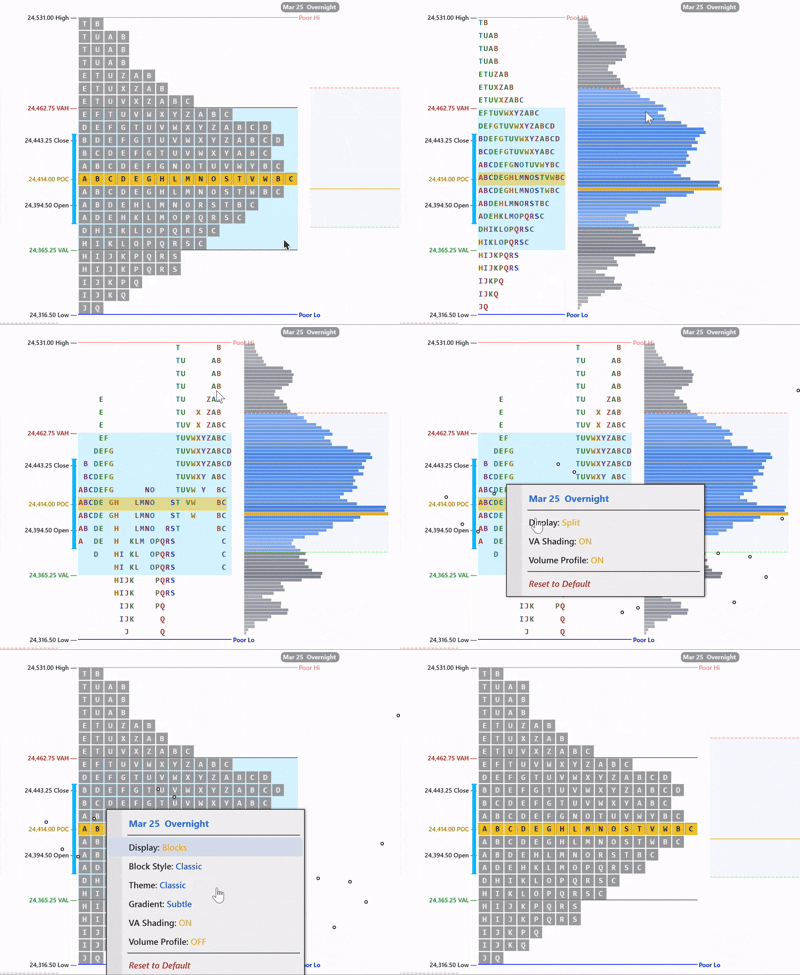
TPO Right-Click Menu
Right-click any session label to toggle split display, VA shading, and volume profile overlay.
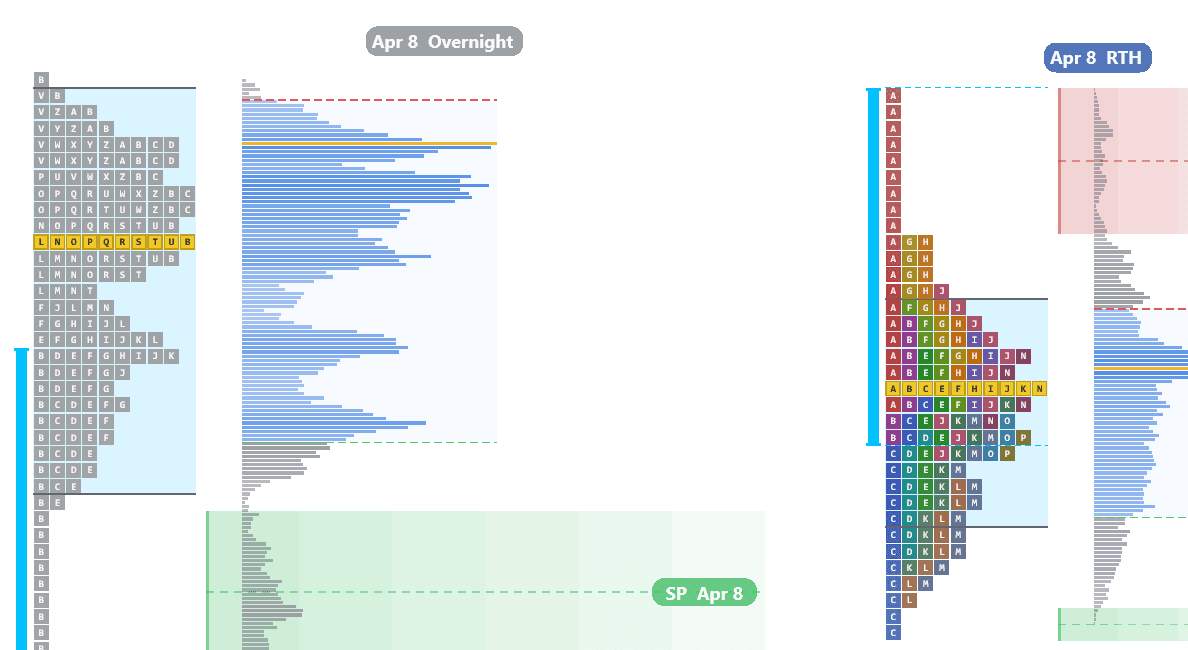
Overnight Single Print Bounce
Single prints left behind during the overnight auction act as support and resistance when RTH revisits those levels.
Trade Panel
The trade panel puts order entry, bracket management and stop automation on the chart itself, so you are not moving between the footprint and a separate order window while a trade is working. It routes through NinjaTrader and your broker connection in the normal way, and every order it places is a real order in your account.
Practice on Sim first
Run the panel on a simulation account until the buttons, the automation and the bracket behavior are all familiar. Automation does exactly what you configured it to do, including at moments when you would rather it had asked.
Order Entry
BUY MKT / SELL MKT
Market order for the quantity in the panel. If an ATM template is selected the bracket attaches on fill.
LIMIT
Places a limit order at the cursor price, so you can rest an order at a level you can actually see on the footprint.
Chase limit
Walks a working entry limit toward the market instead of leaving it behind when price moves away.
FLATTEN
Closes the position and cancels the bracket in one action.
FLATTEN+LOCK
Flattens and then blocks further entries. This is the button for the moment you have decided you are done for the day.
Confirm reverse
Requires a confirmation before a reverse goes through, so a mis-click cannot flip you into the opposite position.
Moving Orders on the Chart
A working order can be dragged by its line straight on the chart. Drop it at the new price and the change is sent for you. When the order is one half of an OCO bracket, its partner is kept linked through the move, so a dragged stop does not leave you with an orphaned target or two live orders that no longer cancel each other.
ATM Templates
ATM is the bracket engine built into NinjaTrader. Pick one of your existing ATM templates in the panel and the stop and target attach automatically on fill; the panel shows you which bracket will be applied before you send the order. There is also an editor for adjusting a template without leaving the chart. If the list is empty, you have no ATM templates saved in NinjaTrader yet.
Stop Automation
Stop to Breakeven
A single button that moves the stop to your entry, plus whatever offset you have set, so a trade that has worked cannot turn into a loser.
Auto Breakeven
The same move, made automatically once open profit reaches the trigger you set. The offset lets you lock a tick or two rather than exactly flat.
Auto-Trail: Bar
Parks the stop one tick past the low, or high, of the last N closed chart bars.
Auto-Trail: EMA
Parks the stop past an EMA of the closes on the chart timeframe, with an offset.
Auto-Trail: SSL
Trails to the SSL trend line drawn on the chart, and only while that line agrees with the side you are on. This mode needs FI Market Structure for the line.
Swing-Trail
Trails behind the most recent swing rather than a fixed distance.
3-step trail
Your own staged rules, each with its own trigger and stop distance, for tightening in stages as a trade extends.
Two things worth knowing
One chart owns the panel. Automation runs on the chart that owns the trade panel, not on every chart with the indicator loaded. The panel tells you which chart that is, and the trail runs on that chart timeframe.
Simulated stops are not in the book. The sim stop option holds your stop internally and sends the exit when it is touched, instead of resting a live stop order. Nothing is visible to the market, and nothing protects you if the platform is not running.
Daily Loss Limit and Trailing Drawdown stop new entries once you hit the numbers you set, and there is a repair option that puts the working stop back in sync with the position if the two ever drift apart.
Sim Trading Guards
These live in the indicator properties under Sim Trading and govern automated exits and when trading is allowed to continue. Set them before you arm anything, not while a trade is open.
Stop Loss ($)
Maximum loss per trade in dollars before a forced exit.
Profit Lock Threshold ($)
Unrealized profit has to reach this before the profit lock becomes active at all.
Profit Lock %
Once active, exit if profit falls back to this percentage of its peak. Set 50 to give back at most half of what the trade had.
Day Halt Peak ($)
Day profit has to reach this before the trailing day stop arms.
Day Halt Give-back %
Halt trading for the day if day profit falls to this percentage of its peak. Set 65 to stop after giving back 35 percent.
Cutoff Hour (ET)
No new entries after this hour, Eastern Time. Set 11 and nothing new opens after 11am ET.
Contracts
Contracts per trade. Micros such as MNQ, MES, MYM and M2K are detected automatically and the dollar figures above scale to match, so a stop set in dollars means the same thing on either contract size.
Sound Alerts
Every alert takes a path to an MP3 or WAV file, and leaving a path empty disables that alert. Sounds are useful for the things you should not have to stare at the screen to catch.
Sound: New Trade
Plays when a new entry occurs.
Sound: Armed
Plays when the system arms.
Sound: Disarmed
Plays when the system disarms, including when a cutoff or day halt stops it for you.
Big-Lot Alert
Plays when a print lands at or above your contract threshold, so a large trade hitting a level reaches you even when you are looking elsewhere. Enable it, set the threshold, choose the file, and set playback volume from 0 to 100.
Renderer & Performance
The indicator draws a great deal on every chart update, and the renderer setting decides how that drawing gets done. If charts feel heavy, this is the first place to look, before you start switching features off.
Renderer: Ultra D3D11 (GPU)
The fastest option, and the one to use on a modern graphics card. Required for the inline DOM.
Renderer: Ultra DX 9
The older accelerated path, for machines where D3D11 is unavailable or unstable.
Renderer: Default
Standard drawing. Slower under heavy load, but the safest fallback if you see visual artifacts.
Renderer: Off
Turns the overlay off entirely and leaves the inline DOM running over native NinjaTrader candles. Use this when you want the ladder and the book without the full footprint canvas.
Frame Rate
Caps how often the overlay repaints. Lowering it is the cheapest way to reclaim CPU.
Days to Load (Tick Data)
How many days of tick data load at startup. The single biggest factor in how long a chart takes to open.
Throttle Heavy On Position
Caps the heavy drawing paths while you have a position open. NinjaTrader repaints faster to keep P&L live, and this keeps that from costing you CPU at the worst moment. Off by default.
If a chart is slow, work through it in this order: reduce Days to Load, lower the Frame Rate, then switch off the heaviest visuals, which are usually the liquidity heatmap and the full footprint canvas. Reach for a different renderer before you give up features.
Footer Metrics
The footer row below each footprint bar displays configurable summary metrics. Each cell can be toggled on or off independently.
| Metric | Description |
|---|---|
| Bid/Ask Ratio | Ratio of total bid volume to total ask volume for the bar |
| Delta % | Net delta as a percentage of total volume |
| Delta Change | Absolute change in delta from the previous bar |
| Delta Change % | Percentage change in delta from the previous bar |
| Max Delta | Highest positive delta level in the bar |
| Min Delta | Lowest (most negative) delta level in the bar |
| Volume Change % | Percentage change in total volume from the previous bar |
| COT High | Commitment of Traders High — cumulative delta since the bar made its high. Shows if buyers or sellers dominated after the high was set. |
| COT Low | Commitment of Traders Low — cumulative delta since the bar made its low. Shows if buyers or sellers dominated after the low was set. |
| Cumulative Delta | Running total of (ask volume - bid volume) across the session |
| Buy Volume | Total ask-side (aggressive buy) volume for the bar |
| Sell Volume | Total bid-side (aggressive sell) volume for the bar |
| Max/Min Spread | Difference between max delta and min delta levels |
| Delta/Vol Ratio | Net delta divided by total volume. Measures how one-sided the bar's activity was. |
Footprint & Order Flow Glossary
- Ask (Buy Volume)
- Volume traded at the askDefinitionThe lowest price someone is currently willing to sell at. If you buy at market, this is what you pay. price. Represents aggressive buyers lifting the offer — they want in now and are willing to pay the higher price.
- Bid (Sell Volume)
- Volume traded at the bidDefinitionThe highest price someone is currently willing to pay to buy. If you sell at market, this is what you get. price. Represents aggressive sellers hitting the bid — they want out now and are willing to accept the lower price.
- Delta
- Ask volume minus bidDefinitionThe highest price someone is currently willing to pay to buy. If you sell at market, this is what you get. volume at a single price level or for an entire bar. Positive deltaDefinitionAsk volume minus bid volume. Positive = more buying. Negative = more selling. Shows who is more aggressive. = more aggressive buying. Negative delta = more aggressive selling.
- Cumulative Delta
- Running total of deltaDefinitionAsk volume minus bid volume. Positive = more buying. Negative = more selling. Shows who is more aggressive. across the session. Tracks the overall balance between aggressive buyers and sellers from the session open.
- Net Delta
- Total askDefinitionThe lowest price someone is currently willing to sell at. If you buy at market, this is what you pay. volume minus total bidDefinitionThe highest price someone is currently willing to pay to buy. If you sell at market, this is what you get. volume for a single bar. The overall buying/selling pressure summary for that bar.
- Point of Control (POC)
- The price level with the highest total volume (bidDefinitionThe highest price someone is currently willing to pay to buy. If you sell at market, this is what you get. + askDefinitionThe lowest price someone is currently willing to sell at. If you buy at market, this is what you pay.) in a bar or session. Represents fair value — where the most business was transacted.
- Value Area High (VAH)
- The upper boundary of the price range containing 70% of the session's volume. Price above VAHDefinitionValue Area High — the upper boundary of the zone where 70% of volume traded. is considered 'expensive' relative to the session's value.
- Value Area Low (VAL)
- The lower boundary of the 70% volume range. Price below VALDefinitionValue Area Low — the lower boundary of the zone where 70% of volume traded. is considered 'cheap' relative to the session's value.
- Diagonal Imbalance
- A comparison of askDefinitionThe lowest price someone is currently willing to sell at. If you buy at market, this is what you pay. volume at one price to bidDefinitionThe highest price someone is currently willing to pay to buy. If you sell at market, this is what you get. volume at the price below (for buy imbalancesDefinitionA price level where one side overwhelms the other by 3:1 or more. Shows where big players committed.) or bid volume at one price to ask volume above (for sell imbalances). The default threshold is 300% — one side must be 3x the other.
- Stacked Imbalance
- Three or more consecutive diagonal imbalancesDefinitionA price level where one side overwhelms the other by 3:1 or more. Shows where big players committed. in the same direction. Represents sustained institutional aggression across multiple price levels.
- Absorption
- When large passive limit orders soak up aggressive market orders without letting price move. High volume at a level with no price continuation indicates a large player defending that price.
- Exhaustion
- A bar pushes to a new extreme but shows no meaningful volume at the extreme price levels. The move has run out of participants. Classic precursor to reversal.
- Unfinished Auction
- Remaining opposing volume at a bar's extreme. Buyers at the low or sellers at the high suggest the auction is not complete and price will likely return.
- Thin Prints
- Price levels with very little volume. Price moved through quickly with minimal resistance. These areas tend to get re-auctioned.
- TPO (Time Price Opportunity)
- A single unit of time spent at a single price level. In market profile, each 30-minute period is assigned a letter (A, B, C...) and placed at every price traded during that period.
- Initial Balance (IB)
- The price range established during the first hour of regular trading hoursDefinition9:30 AM to 4:00 PM ET — when the NYSE is open and most of the day's volume happens. (typically 9:30-10:30 ET). The IBDefinitionInitial Balance — the price range of the first hour of regular trading. Sets the day's reference range. sets the day's reference range and often defines the day's trading type.
- Single Prints
- TPODefinitionTime Price Opportunity — a letter printed at each price level per 30-minute period on a Market Profile chart. levels with only one letter — indicating price moved through quickly. These zones act as support/resistance because they represent areas of rejection.
- Poor High / Poor Low
- A session extreme where multiple TPOsDefinitionTime Price Opportunity — a letter printed at each price level per 30-minute period on a Market Profile chart. (2+) formed. Indicates the extreme was not rejected with conviction and is likely to be revisited.
- Naked Level
- A POCDefinitionPoint of Control — the price with the highest volume. Where the most trading happened., VAHDefinitionValue Area High — the upper boundary of the zone where 70% of volume traded., or VAL from a previous session that has not yet been tested by subsequent price action. Acts as a price magnet.
- COT (Commitment of Traders)
- In this context: cumulative deltaDefinitionRunning total of buying vs selling across the session. Shows who has been in control overall. measured from the point a bar sets its high or low. COT High shows delta since the bar's high was made. COT Low shows delta since the bar's low.
- Volume Profile
- Horizontal histogram showing total volume traded at each price level for a session or time period. Unlike time-based charts, volume profile shows where volume actually occurred.
- Profile Type
- Classification of the volume distribution shape: P (bullish, volume at top), b (bearish, volume at bottom), D (balanced), B (bimodal/double distribution), T (trend), M (multi-distribution with 3+ peaks).
- Tick Aggregation
- Combining multiple tick-level price rows into a single displayed row. Useful for smoothing noisy data on volatile instruments. A setting of 2 combines every 2 ticks into one row.
- Composite Profile
- A volume or TPODefinitionTime Price Opportunity — a letter printed at each price level per 30-minute period on a Market Profile chart. profile aggregated across multiple sessions. Provides longer-term context about value areas and points of control beyond a single day.
- Range Bar
- A bar type where each bar represents a fixed price range (e.g., 4 ticks) rather than a fixed time period. Preferred for footprintDefinitionA chart showing bid and ask volume at every price inside each candle. Reveals who is buying and selling. analysis because each bar captures meaningful price movement.
- Iceberg Order
- A large institutional order that is only partially displayed in the order book. The full size is hidden and refills as it gets hit. Often detected via absorptionDefinitionHeavy aggressive orders hit a level but price doesn't move — a large passive player is absorbing the flow. patterns.
Settings Reference
| Setting | Default | Description |
|---|---|---|
| IndicatorMode | FootPrint | Select operating mode: Footprint, VP + Market Profile, or VP + Cumulative Delta |
Need help?
If you have questions about the indicator or need help with configuration, reach out to our support team.
Contact Support