Built for NinjaTrader 8
Professional OrderFlow
and trading tools for NinjaTrader.
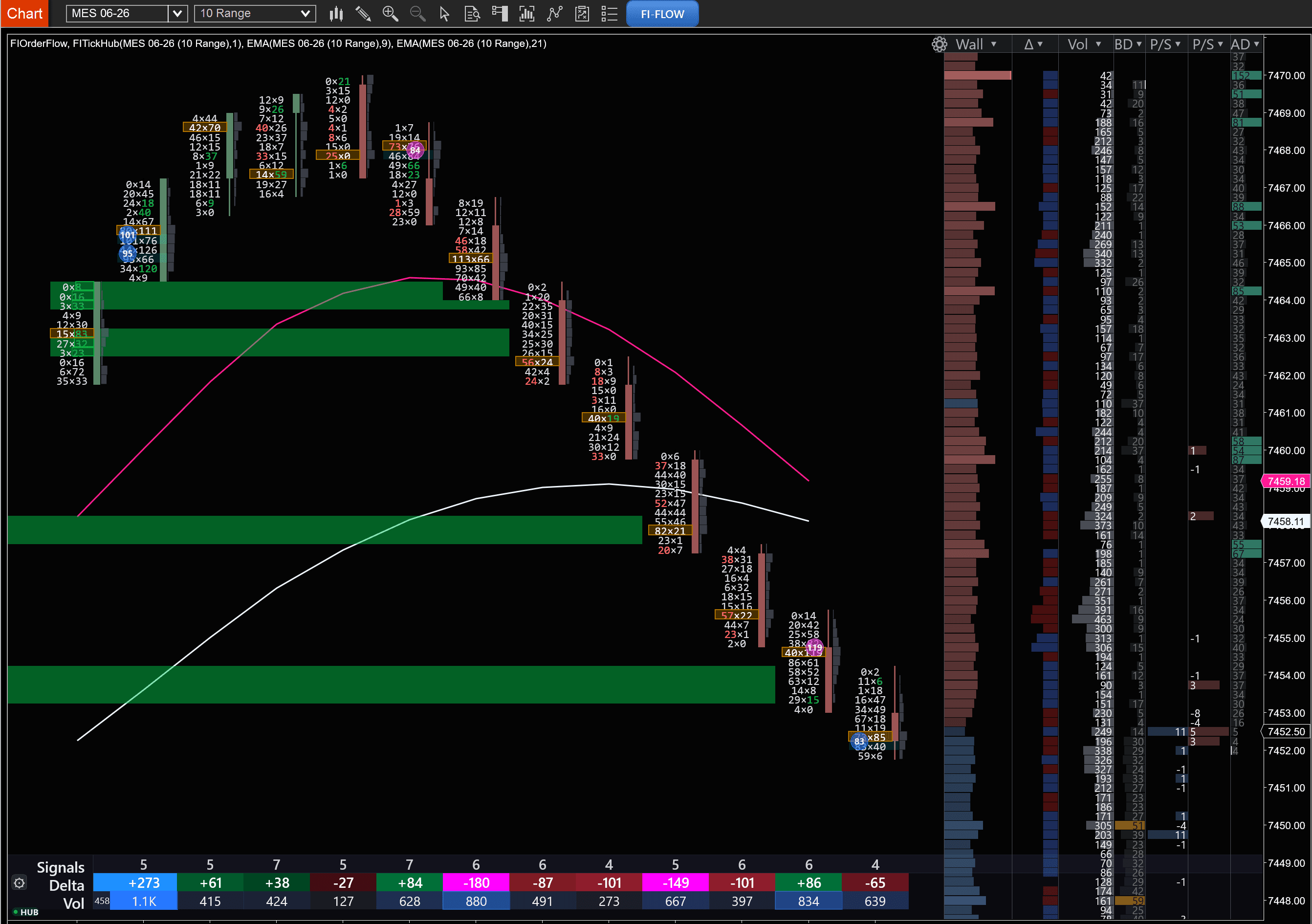
Footprint cells, depth-of-market, cumulative delta, absorption signals — all rendered inline on the same chart pane. Built on a GPU pipeline so the data stays live, not lagged.
The full story, one chart
An aggressive move up — confirmed by two signals below the chart.
The footprint shows the breakout. The Delta Bars histogram confirms buyers won every bar with overwhelming aggression. The Cumulative Delta candle chart confirms the trend held into the close.

BOOK depth ratio + Σ B/A
Live bid-vs-ask depth ratio and cumulative bid/ask volume, pinned to the bottom of the ladder. See which side is stacking, in real time.
Depth heatmap
Graduated bubble column visualizes resting bid/ask size at every price level — spot the walls before they hit price action.
Delta Bars histogram
Per-bar net delta plotted as a histogram beneath the chart. See who won each fight at a glance — green dominant means buyers, red means sellers.
Cumulative Delta candles
Running total of net delta drawn as its own candle chart. The whole order-flow story, bar by bar, in one continuous line.
Unified workspace
Footprint, inline DOM, delta histogram, and cumulative delta candles — all stacked into a single chart pane. Cause and effect, side by side.
Built by traders
Engineered for zero chart lag — not a side project.
Works on GC, NQ, ES, CL
Tested daily on the contracts active futures traders care about.
Free 5-day trial
No card required. See if the indicators fit how you trade.
New walkthrough
Reading Order Flow with Inline DOM
A live MNQ walkthrough of the new inline DOM, synchronized delta footer, BOOK depth ratio, and every new feature shipping in FIOrderFlow.
Built for NinjaTrader 8
The tools and lessons traders actually use.
Indicators for NinjaTrader 8. Free courses. No fluff.
Market structure
See the rhythm of the market.
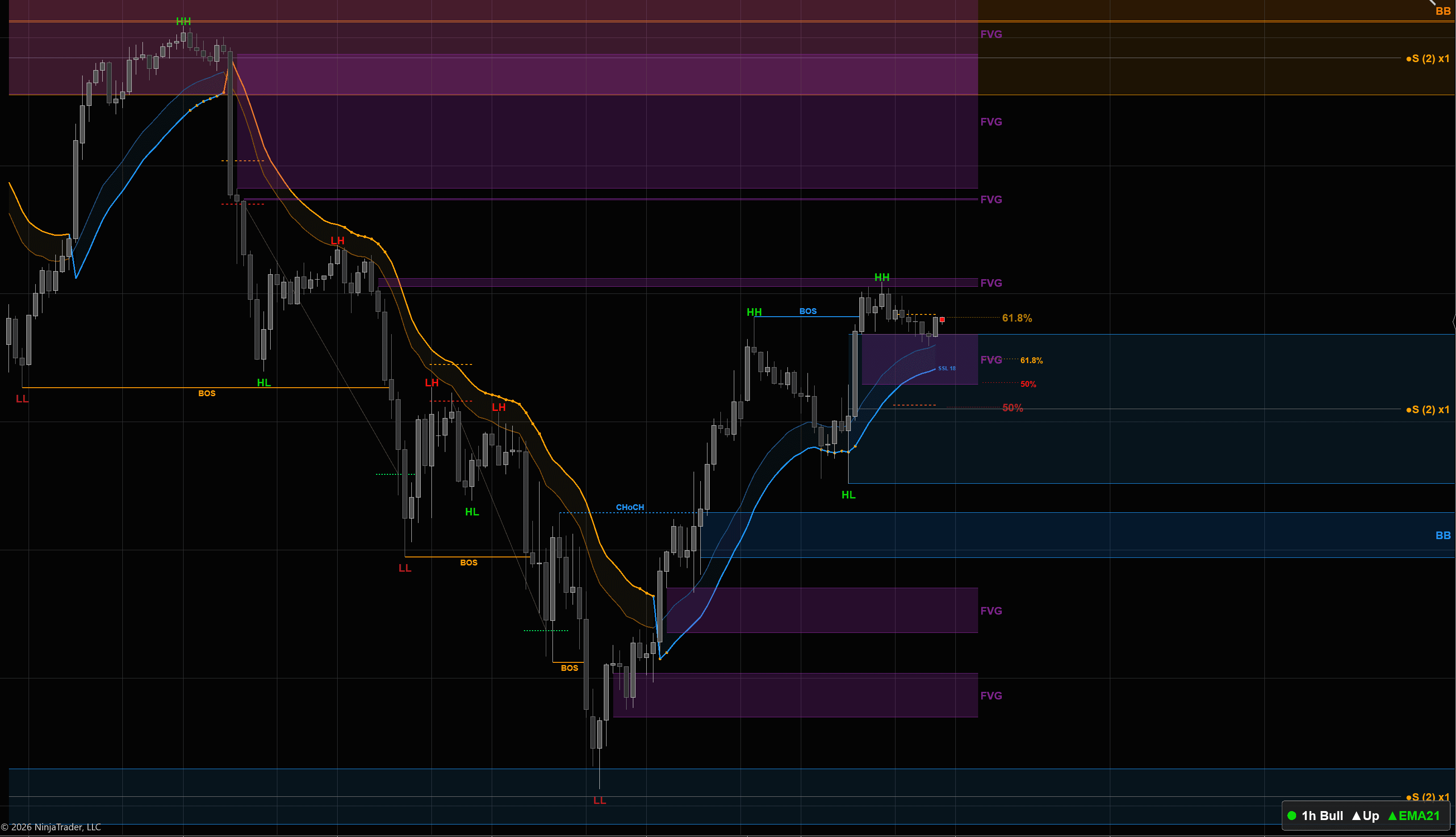
UPTREND CONFIRMED
Every new HH is a fresh BOS
What's in the box
Six tools. Two indicators.
Every chart-reading tool a futures trader needs, packaged into two NinjaTrader 8 indicators — Market Structure and OrderFlow.
Market Structure
Market Structure
Sees the swings, marks the breaks, and labels when the trend flips. BOS, ChoCh, Strong/Weak highs — drawn for you on every chart.
Market Structure
Liquidity Levels
Fair value gaps, order blocks, Asian session highs and lows, Initial Balance, session killzones — the levels big money trades around, plotted automatically.
OrderFlow
Footprint
Each candle opens up to show buying on the right, selling on the left. You see who is winning the fight inside every bar — not just where it closed.
OrderFlow
Cumulative Delta
Tracks buyers vs sellers and adds it up over time. A rising line means buyers are pushing harder. Falling means sellers. Catches divergence price won't show.
OrderFlow
Imbalances
Stacked imbalances auto-plot as support/resistance zones. Absorption, exhaustion, stopping volume — flagged the moment they happen.
OrderFlow
Volume Profile
A bar showing where the most volume traded at each price. The biggest bar (POC) is the magnet. The thin spots are where price moves fast.
Order Flow, step by step
Becoming a pro is information overload.
Theories, strategies, tools, frameworks — every corner of futures has its own jargon and its own gurus. Our goal is to show you all of it, but simply. One concept at a time, until you can read a chart on your own.
Step 1 · Why this matters
Inside every candle, a fight is happening.
A candle just shows you where price opened and closed. That hides the entire fight that happened at every price along the way — who hit the bid, who lifted the ask, where one side stepped in. Order flow tools open the candle up.
Step 2
Trend lines — connect the swings, watch the break.
Trend lines are the simplest tool in trading. Connect two or more swing lows for a rising support line, or two or more swing highs for a falling resistance line. As long as price respects the line, the trend is intact. When price closes through it, the trend may be ending — or pausing before it continues. Either way, the break is where many traders pay attention.
Step 3
Footprint — the candle, opened up.
A footprint puts the buying volume on the right of each row and the selling volume on the left. Each row is one price. Now instead of one closing print, you see exactly how many contracts traded at each level — and which side was more aggressive.
Step 4
Stacked imbalance.
An imbalance is when one side traded a lot more than the other at a price — often 3× or more. Stacked means three (or more) imbalances on top of each other in a row. Some traders watch these zones because price often comes back to test them.
Step 4
Tails — and what happens when price comes back.
Tails are a Market Profile concept. The letters on the profile show how long the market spent at each price — each letter is one period (usually 30 minutes). A buying tail is a column at the bottom where you see only one letter per row, meaning the market only spent one period at each of those prices. That tells you price dropped down there fast and got rejected because buyers stepped in. A selling tail is the mirror at the top with sellers.
When price comes back to test those levels later, some traders watch for the bounce — the market already showed who was defending there once.
Step 6
DOM — the live order book.
Big stack of bids (limit buy orders) below price? Buyers are lined up — try to short into that and your sell can get absorbed, leaving you trapped. Big stack of asks (limit sell orders) above? Sellers cap the move.
Reading the DOM is one of the most advanced skills in trading. Orders flicker, get pulled, and refresh in milliseconds — you are reading intent at the speed of light, plus the psychology behind it: who is bluffing, who is real, who is desperate. Some traders use just the DOM with candlesticks because once you can read the order book, the chart starts to feel obvious.
Step 7
Rolling delta profile — aggression vs liquidity.
Delta tells you who was aggressive at each price — green when buyers lifted offers, red when sellers hit bids. The rolling profile keeps a running view of that over the recent bars.
Where it gets useful: when you see big aggression hitting a price level that has low volume sitting there (few orders waiting), price tends to slice through fast. There is nothing to absorb the push, so the move keeps going. Watch for big sellers hammering through a thin spot, or big buyers ripping through one — those are often the cleanest moves.
Step 8
Volume Profile — where buyers and sellers agreed.
Every trade takes a buyer AND a seller agreeing on a price. The volume profile shows which prices got the most agreement — fat bars mean lots of trades happened there, both sides showing up. The biggest bar is the Point of Control (POC) — the price both sides agreed on the most today. The Value Area is the band where about 70% of that agreement happened, marked by VAH (Value Area High) at the top and VAL (Value Area Low) at the bottom. Those zones often act like magnets because the market already settled there once.
Step 9
TPO — where the market built a position.
TPO (short for Time Price Opportunity) uses letters to mark how much time price spent at each level — each letter is one period, usually 30 minutes. The fat middle is where the market spent the most time, often where bigger players were quietly building a position without moving price too far. Single prints are rows with only one letter — price moved through that level fast and didn't stay. Some traders watch those as gaps that often get revisited.
Two indicators
Stop paying monthly subscriptions for fifteen different tools.
Most futures traders end up stitching together a stack of apps, plugins, and add-ons — each one billing every month, each one a different login. We packed everything you need into two NinjaTrader 8 indicators.
The old way
Eight tabs. Eight subscriptions. Eight things to keep working.
- Footprint appmonthly
- Order flow toolmonthly
- Volume profilemonthly
- TPO softwaremonthly
- Market structuremonthly
- Heatmap DOMmonthly
- Delta trackermonthly
- Indicator packmonthly
FuturesIndicators
Two NinjaTrader 8 indicators. Everything you need, side by side.
- BOS, ChoCh, Strong/Weak highs
- Swing structure with multi-timeframe mode
- FVG, order blocks, breaker blocks
- Supply/demand zones — fresh vs broken
- Measured Moves with Fibonacci confluence
- VWAP, IB, Opening Range, PDH/PDL
- EMAs, SSL Channel, Squeeze Momentum
- Asia / London / NY session shading + alerts
- Footprint — 6 display modes
- Volume profile + TPO — POC, VAH/VAL, IB, single prints
- Cumulative delta candles + EMA / BB overlays
- Imbalances — diagonal, stacked, big, oversized, inverse
- Delta signals — exhaustion, absorption, slingshot, sweep
- Auction reads — unfinished, thin prints, POC in wick
- Composite multi-session profiles
- Footer metrics — bid/ask ratio, delta %, COT, buy/sell volume
No lock-in
Free 5-day trial. Cancel anytime. Your indicators don't disappear if you take a month off.
Free education
Six courses. Free, forever.
Start where you are. Each track moves from basics to live-chart application — no jargon without an explanation, no theory we don't use ourselves.
From the Blog
Trade Ideas & Analysis
What's new in v1.0.22 — TickHub, smoother rendering, and a polished DOM
One of the biggest releases we've shipped for the FI Suite. FI TickHub gives multi-chart workspaces a big performance lift, the chart now renders silky-smooth on fast markets, Pull/Stack reads the same on every machine, and the DOM picked up new layouts, palettes, and persistence fixes.

NQ April Rally — In-Depth Analysis on Market Profile with Market Structure
A breakdown of the NQ rally from March 31 to April 7 — how BOS/CHoCH, measured moves at the 61.8% retracement, single print bounces, and market profile analysis gave traders real-time entries with a 1:5 risk-to-reward target.
New: Free Futures Trading Education — Order Flow, Market Structure, and ICT Concepts
We just launched a completely free education section covering order flow analysis, market structure, and ICT concepts — with custom SVG diagrams, interactive glossary, and real NQ chart examples.

Introducing OrderFlow: Footprint, Volume Profile, Cumulative Delta & Delta Bars in One Indicator
We built the first NinjaTrader indicator that combines a full footprint chart, volume profile, cumulative delta, and delta bars into one tool. No more paying for 4 separate indicators. Here's what it does and why order flow analysis gives you an edge that price action alone never will.
Stay Connected
Latest from FI
Trade ideas, chart breakdowns, and indicator updates — follow along for daily futures content.
Get started
Ready to see the chart the way pros do?
Read a free lesson, watch the indicators in action, or start a free 5-day trial — no card required, no lock-in.
Official NinjaTrader Vendor · Free 5-day trial · Cancel anytime