
See What Traded — and What's About to Trade
Footprint, Depth of Market, Volume Profile, Market Profile (TPO), Cumulative Delta, Delta Bars and a Liquidity Visualizer — plus a built-in Auto Trader — all in one NinjaTrader 8 indicator.
Version 1.0.69·Released
No credit card required. Full access for 5 days.
Seven Indicators + a Built-in Trader
Footprint Chart + Depth of Market + Volume Profile + Market Profile (TPO) + Cumulative Delta + Delta Bars + the new Liquidity Visualizer — plus a built-in Auto Trader with trade management, all in a single NinjaTrader 8 indicator.
Footprint
Bid x Ask at every price inside each candle
Depth of Market
Live order book — inline on chart or pop-out window
Volume Profile
Session & weekly volume distribution with POC/VAH/VAL
Market Profile
TPO charts with IB, profile shapes, and poor highs/lows
Cumulative Delta
Running total of aggressive buying vs. selling
Delta Bars
Per-bar net delta as a color-coded histogram
Liquidity Visualizer
Bookmap-style heatmap of resting orders, walls & trade bubbles
Auto Trader
Built-in chart trader — draggable entries, auto-trail & ATM strategies
Why Order Flow Changes Everything
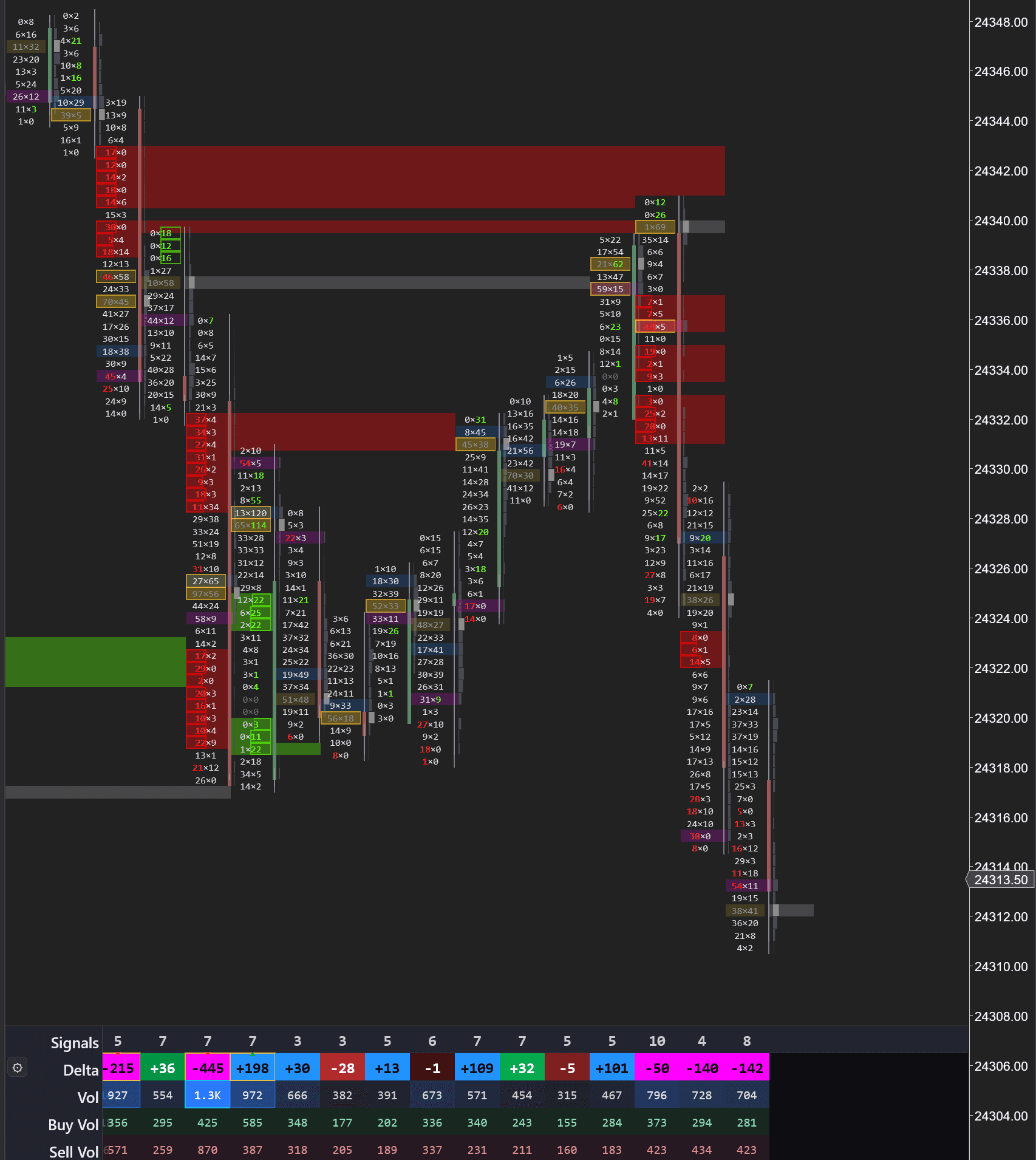
This is a real MNQ (Micro Nasdaq) chart. A standard candlestick chart would show you nothing here — just candles moving down. The footprint tells a completely different story.
1. Stacked Selling Imbalances Form Resistance
The initial sell-off creates stacked imbalances — consecutive price levels where aggressive selling overwhelmed buyers by 3:1 or more. The indicator automatically plots these as red horizontal zones projecting forward. These aren't arbitrary lines on a chart — they mark the exact prices where institutional sellers committed size.
2. Aggressive Buying Pushes into the Zone — +101 Delta on Average Volume
Price rallies back into the stacked imbalance zone with a delta of +101 on average volume (~450 contracts). On a standard chart, this looks like any other pullback. But the footprint tells you what's actually happening: buyers are aggressive enough to push price up, but they're doing it on ordinary volume. They don't have the conviction to break through the zone where institutional sellers already committed size. The tape is showing you a test, not a breakout.
3. Volume Doubles + New Stacked Imbalance = Short Continuation
The moment price touches the stacked imbalance zone, everything changes. Volume nearly doubles — jumping from ~450 to 700-800+ contracts per bar. New selling imbalances stack at the same price levels. Sellers aren't just present, they're aggressive. Delta bars flip hard negative: -50, -140, -142. That's aggressive selling hitting the bid with conviction. The shorts who built positions here are defending them with almost double the volume of the rally that tested them. Price drops away from the zone. Without the footprint, you'd be guessing if the level would hold. With it, you saw the volume surge, the new imbalances forming, and the aggressive negative delta — the trade was confirmed before price even started moving.
This is the core order flow read: imbalance zone + retest + new imbalance = continuation. The footprint shows you the aggressive participants defending their positions in real time, as it prints.
See Inside Every Candle
A standard candlestick tells you four numbers: open, high, low, close. A footprint chart tells you everything that happened inside that candle — every price level, how many contracts traded there, and whether they were aggressive buyers (market orders hitting the ask) or aggressive sellers (market orders hitting the bid).
This is how institutional traders and prop firms read the market. Instead of guessing from price patterns, you see the actual order flow — where large players are placing their bets, where liquidity is being absorbed, and where imbalances signal that one side is about to overwhelm the other.
Thirteen bar styles — switch instantly from the menu:
Every one of them reads the same trades; what changes is what gets drawn inside the candle. These are the three most people start with. The delta profile, which has renderings of its own, follows below.
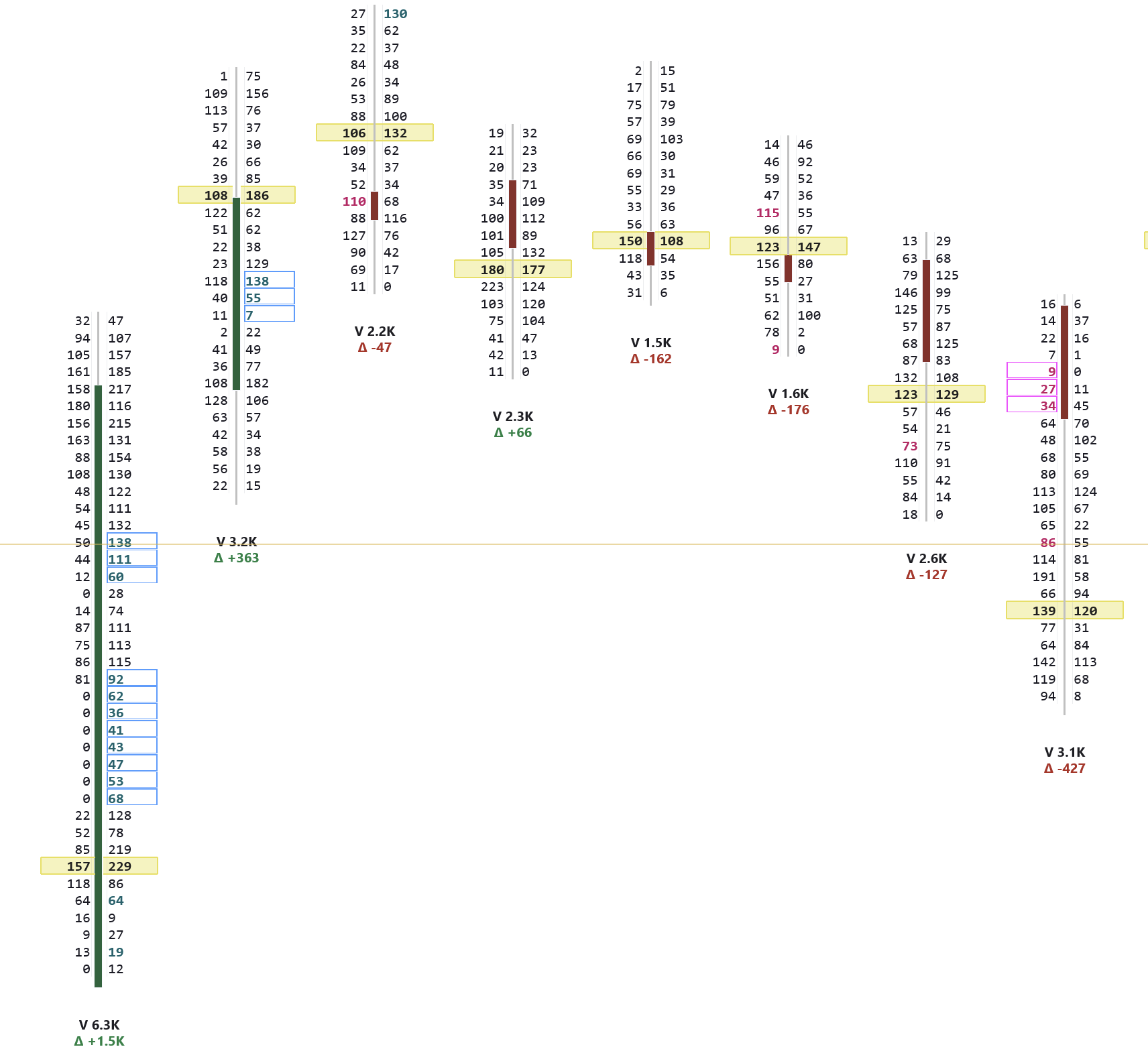
Bid x Ask
The classic footprint view. Left column = volume at the bid (sellers), right column = volume at the ask (buyers). The banded row is where the most traded inside that candle; the outlined rows are imbalances, where one side dominates by 3:1 or more — the signature of aggressive institutional activity. Each bar carries its own volume and delta underneath.
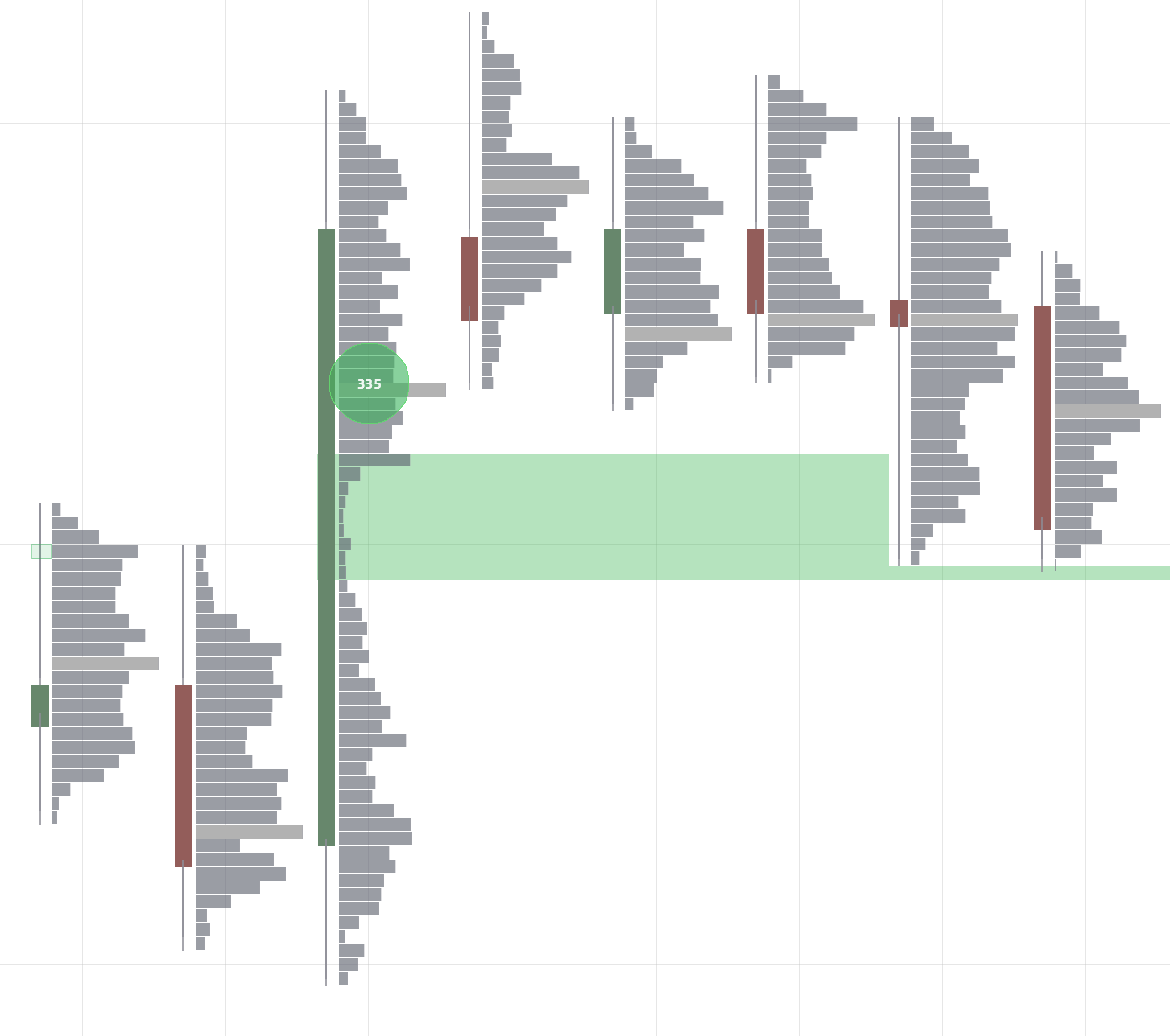
Volume Profile
A clean volume-at-price histogram inside each candle with bubble markers highlighting big trades. The widest bar is the Point of Control (POC) — the single price level where the most volume traded within that bar. Bubbles make it easy to spot where large orders hit the market at a glance.
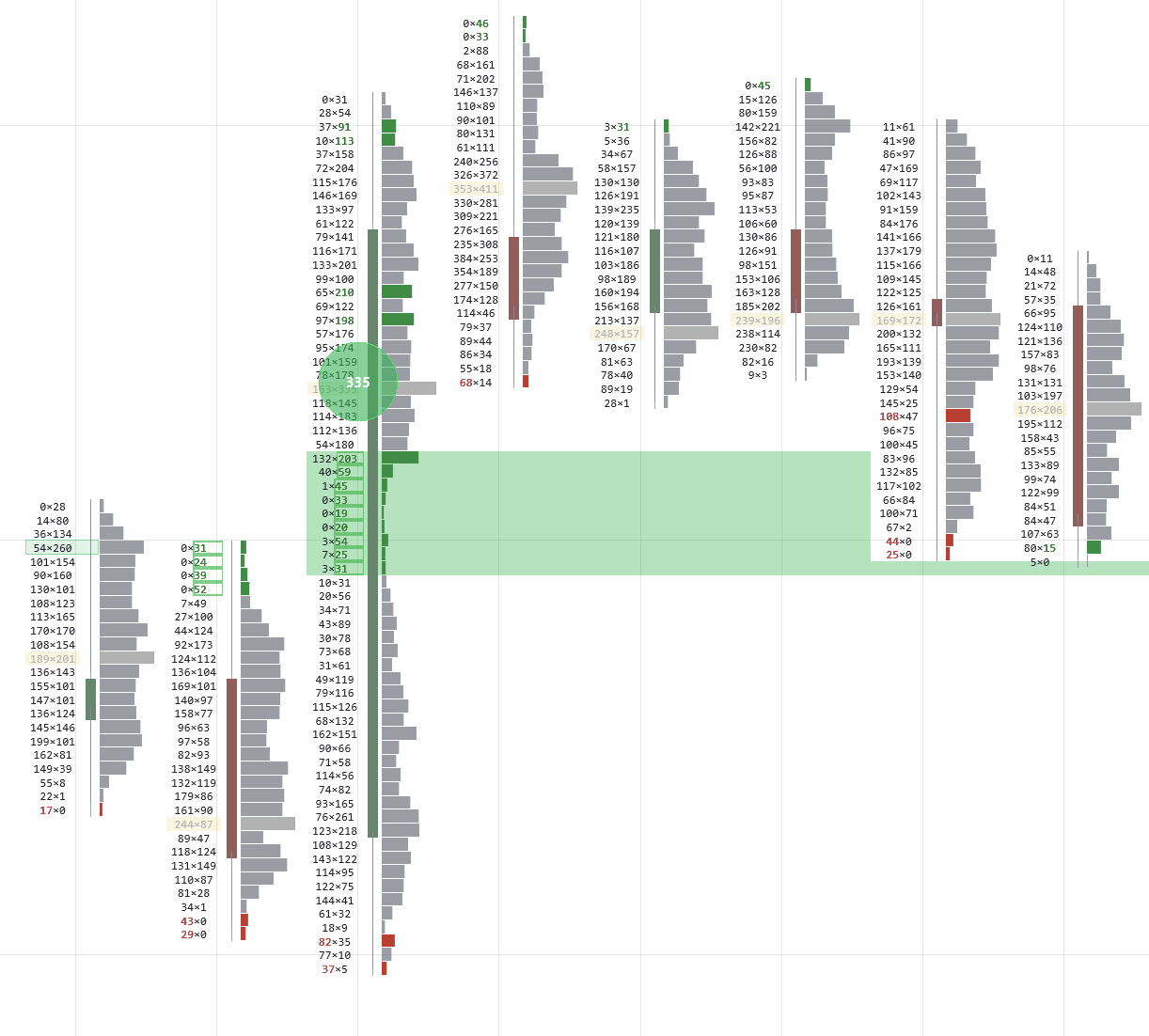
VP + Imbalances
Combines the volume profile with imbalance markers. Red and green indicators along the profile highlight levels where buying or selling was disproportionately aggressive — the exact price levels where the market showed its hand.
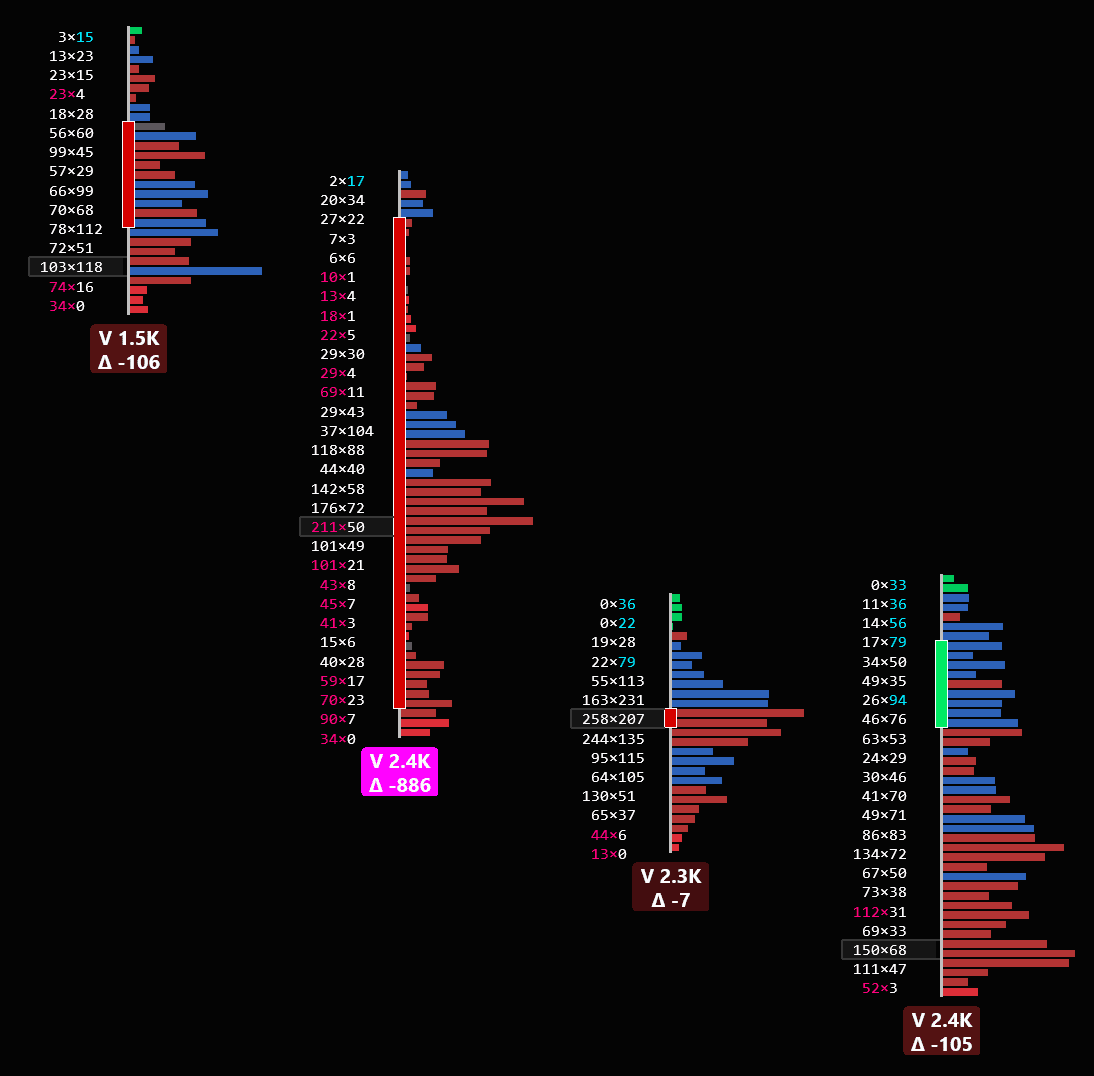
The Delta Profile
Every price level has a deltaDefinitionThe difference between ask volume and bid volume at a price level or for a whole bar. Positive means more aggressive buying; negative, more aggressive selling.: contracts bought at the askDefinitionThe lowest price someone is currently willing to accept to SELL. If you want to BUY at the market, this is the price you pay. minus contracts sold at the bidDefinitionThe highest price someone is currently willing to pay to BUY. If you want to SELL at the market, this is the price you get.. Positive means aggressive buyers lifted offers there; negative means aggressive sellers hit bids. It is the most direct read of who was in a hurry, and at what price.
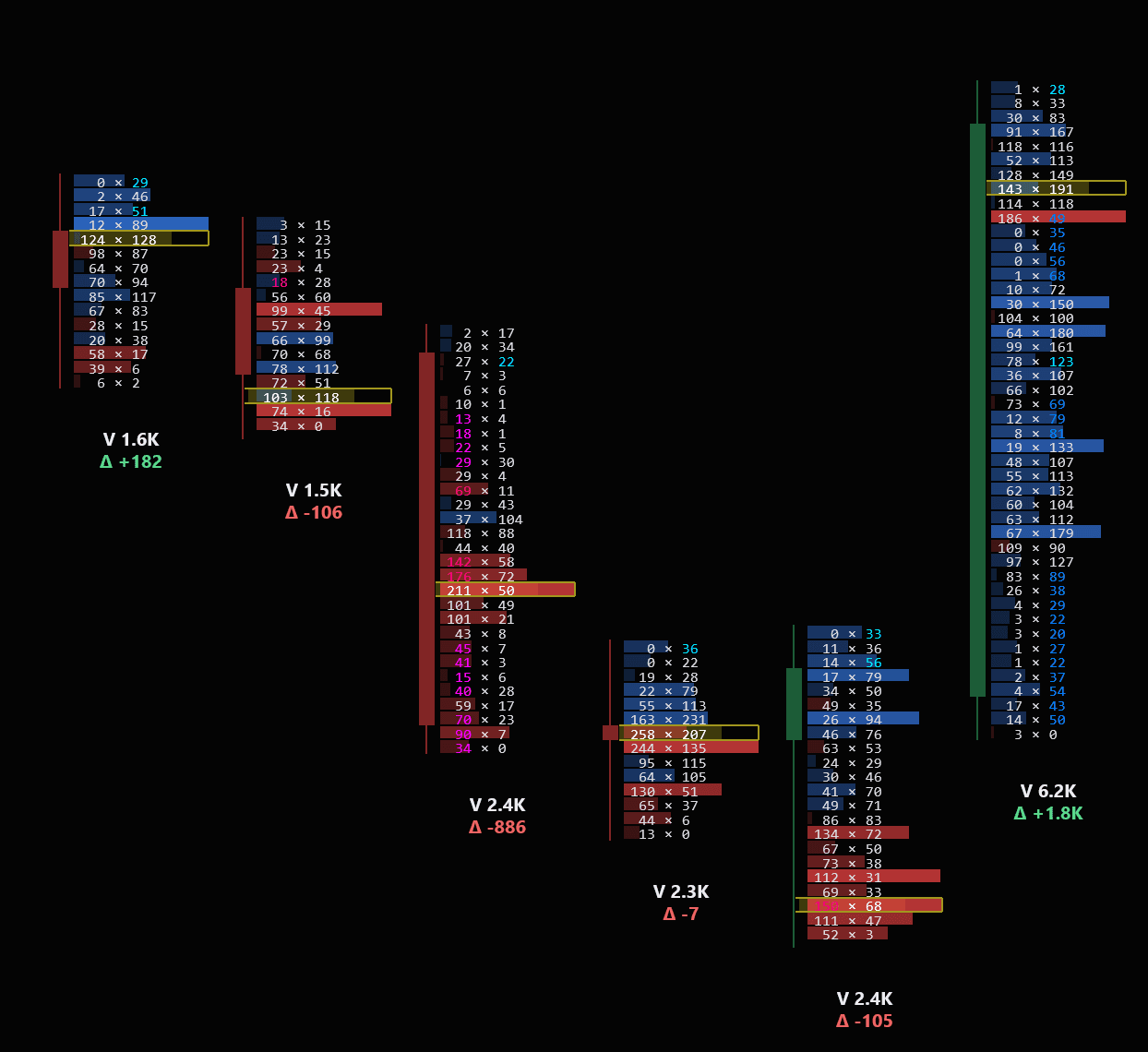
Here the row itself carries it — the deeper the shading, the heavier the imbalance at that price — so the levels that did the work stand out without reading a digit. The outlined row is where the most traded inside the candle, and each bar prints its own volume and delta underneath.
- 1
Sellers commit
2.4K traded · Δ −886
And it is not spread evenly: 142×58, 176×72, then 211×50 at the outlined row — the POCDefinitionPoint of Control: the price level with the highest total volume in the period. Where the market attracted the most interest from both sides.. Three consecutive sell imbalancesDefinitionA price level where one side overwhelms the other by 3:1 or more. Three in a row the same way is a stacked imbalance — where size was committed. driven straight into the price where the most traded. On its own, this looks like a move that is going.
- 2
The same effort stops working
2.3K traded · Δ −7
Within five percent of the volume of the bar before it, and the delta collapses to nothing. The shape says why: 163×231 above the outlined row, 258×207 at it. Sellers are still hitting bids — the bids are taking all of it. Aggression that stops producing movement is aggression being absorbedDefinitionAbsorption: aggressive orders hit a level but fail to move price, because large passive orders are taking the other side..
- 3
Price goes up anyway
2.4K traded · Δ −105 · closed green
Sellers are still leaning on it — and the candle closes green. Every one of those market sells was filled by a resting limit order, and price finished higher regardless. This is the bar that turns the read from a guess into a reading: aggression on one side, the close on the other.
- 4
The other side arrives
6.2K traded · Δ +1.8K
Two and a half times the volume of any other bar on screen. Under the outlined row: 0×35, 0×46, 0×56 — not one contract traded at the bid. Nobody would sell at those prices; every fill went at the ask.
Read together, that is the shape of a delta trapDefinitionTrapped traders: people who commit to a break just before it fails. When price comes back through, their stops fuel the move the other way.: heavy one-sided selling, then the same effort producing nothing, then the side that sold doing the buying. The 186×49 row inside that last green bar is the last of them. What the delta cannot tell you on its own is whether price made a new low on the first bar — that is the part you confirm on the chart.
It can be drawn four other ways:
Every shot below is the same four bars, so the only thing changing is the drawing — the trades underneath are identical. Pick the one your eye reads fastest.
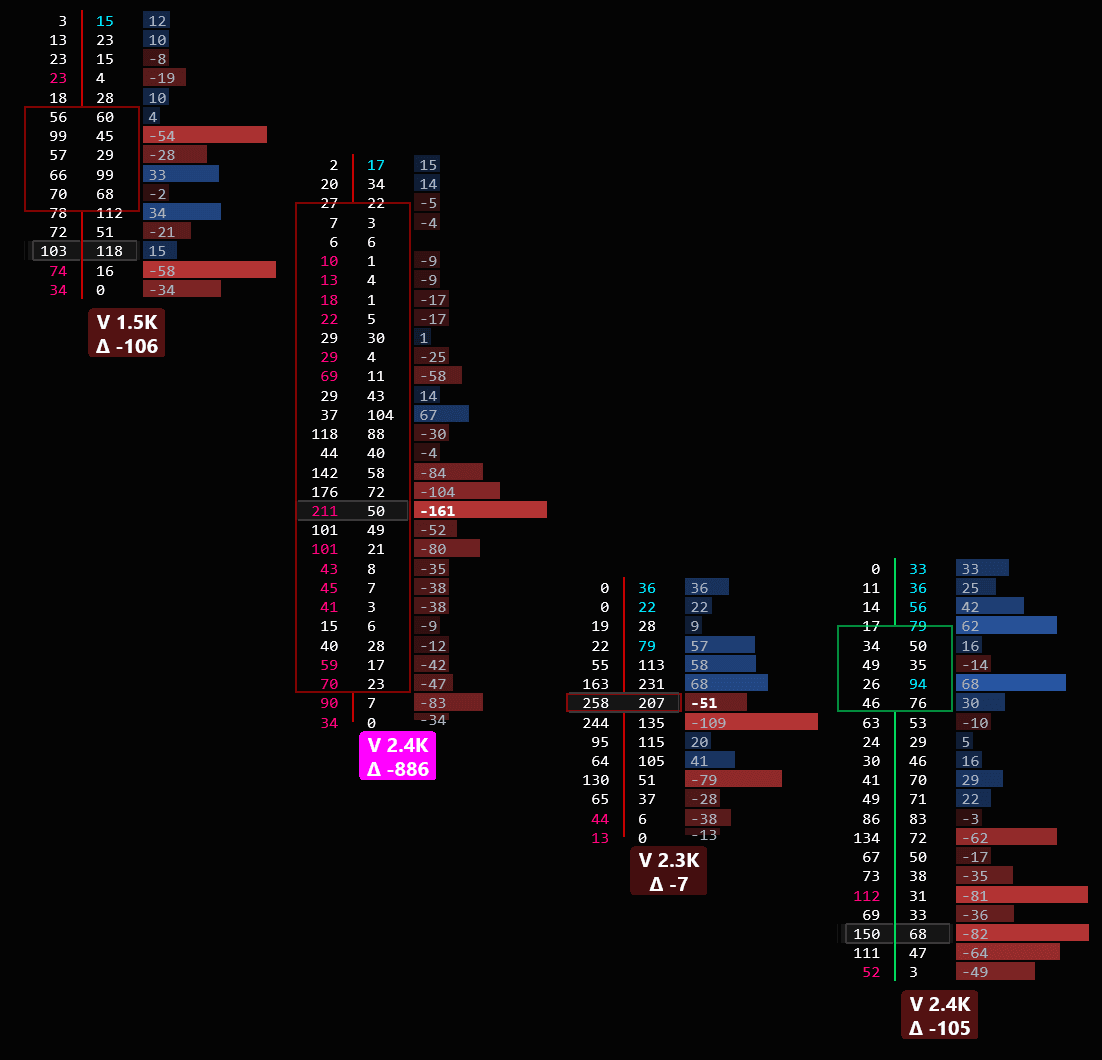
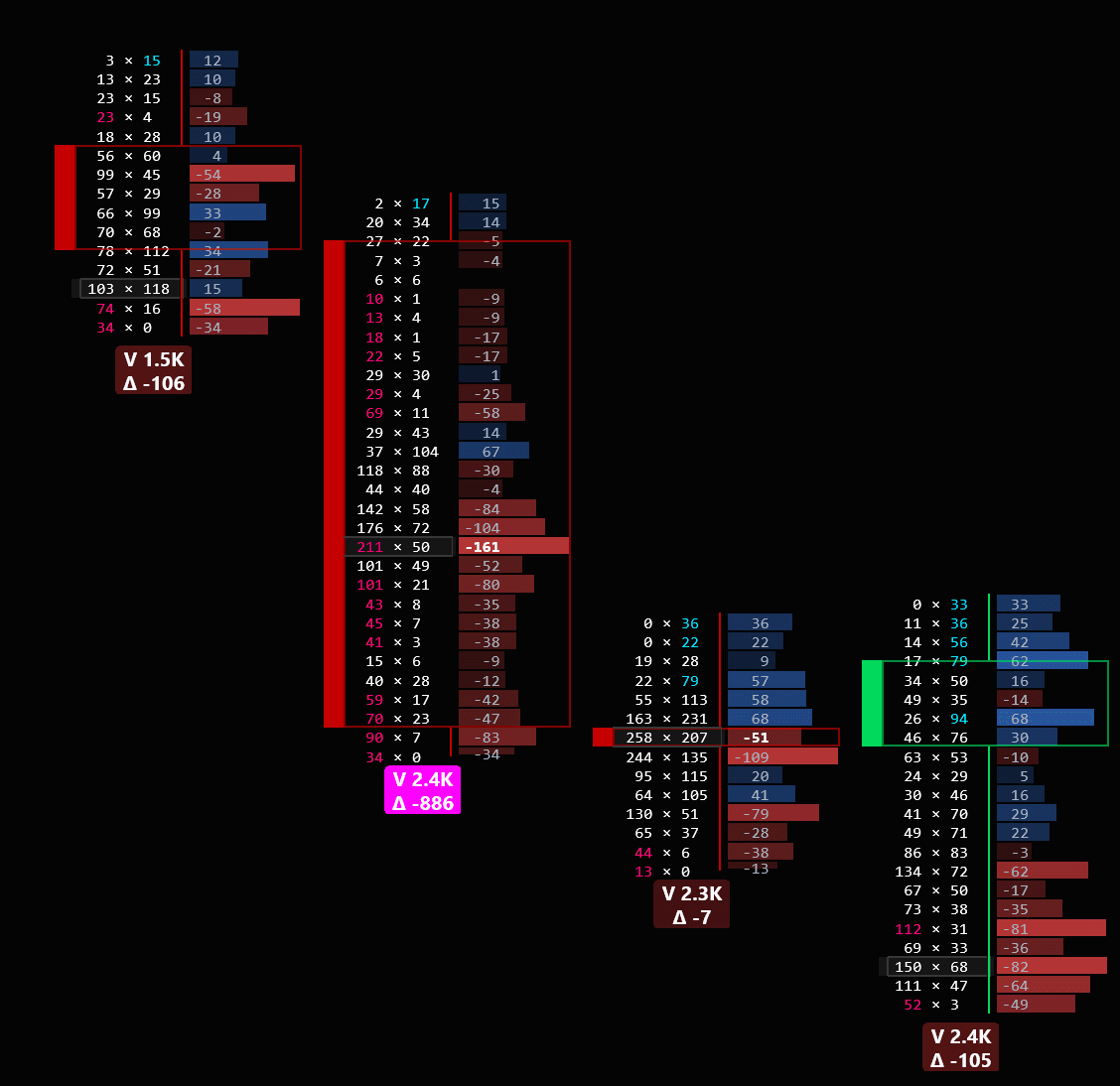
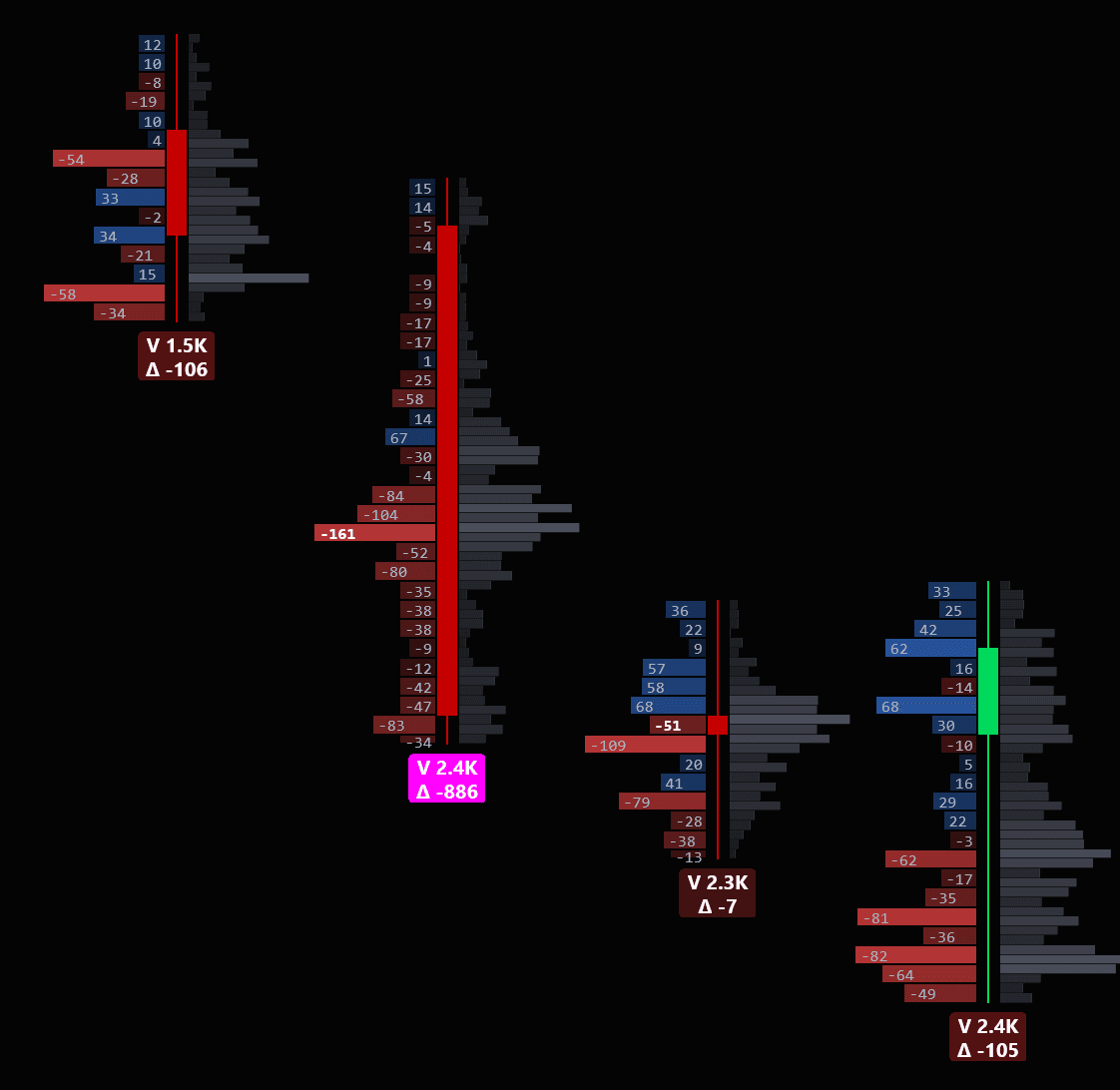
Click any of them to see it full size.
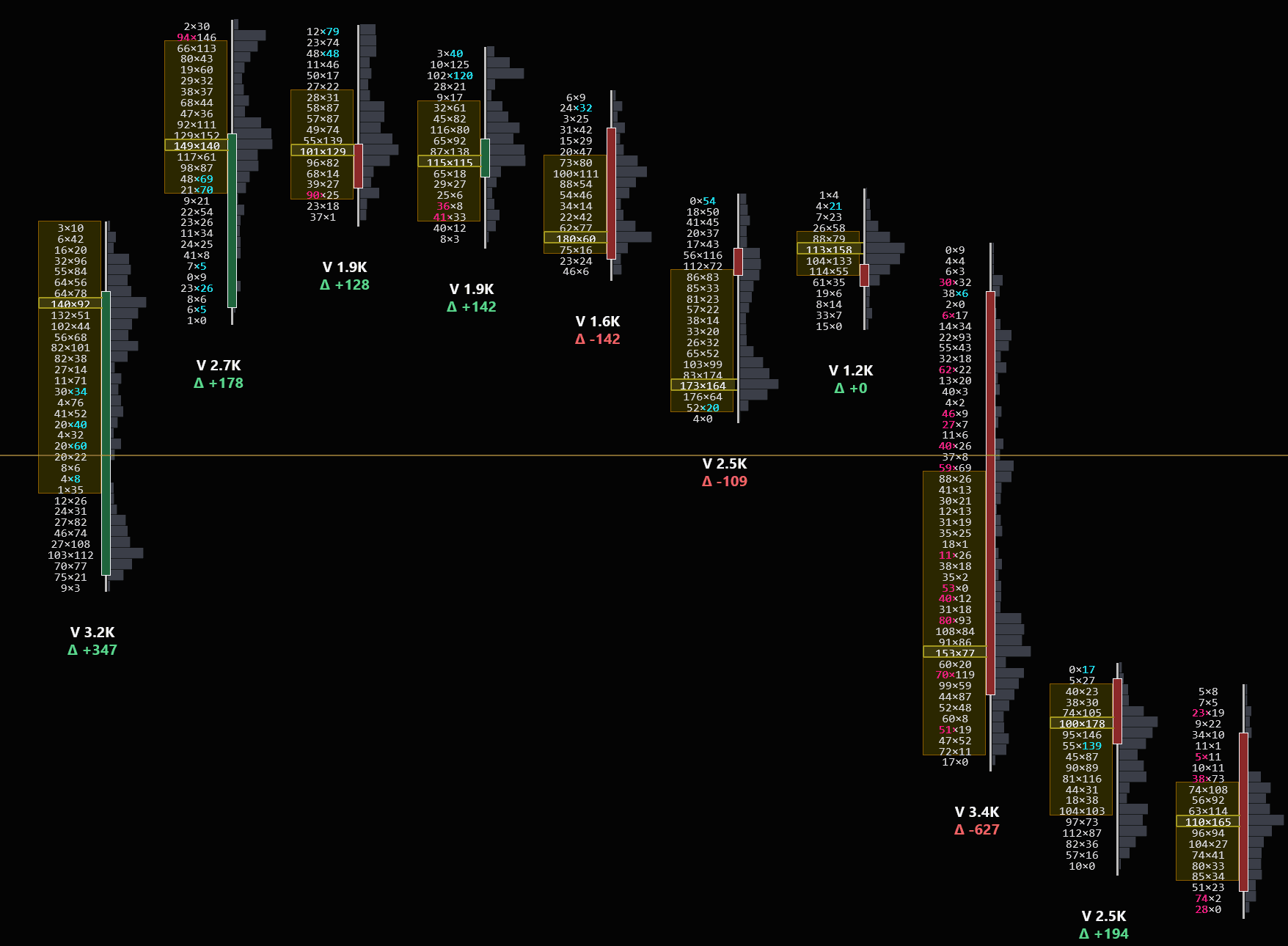
Every bar carries its own value areaDefinitionValue area: the price range holding roughly 70% of the bar's volume — where the bulk of business was done., shaded here. Read them left to right and the structure is the whole story.
- 1
Buyers commit, and value is high
Δ +347
The heaviest buying of the run, and this bar's value area sits at the top of the sequence. Delta and value agree. This is the reference everything after it gets measured against.
- 2
Value area migrating lower
Δ +128, +142, −142
The three arrowed bars each put their value area below the one before — a lower high and a lower low, three in a row. Delta is still green for the first two of them: buyers are the aggressors and the market is quietly marking them down. By the third it has flipped, and by then value has already been sliding for three bars.
Lower highs and lower lows on the value area said this was a downtrend while delta was still printing green. Delta catches up a few bars later (−142, then −109), pauses dead flat, and the heaviest bar on screen drops value to the bottom of the range. Price structure tells you where the market has been; value structure tells you where it is agreeing to do business — and here the second one moved first. When value areas overlap instead of stepping, the market is in balance. The same read works session to session, which is where most profile analysis starts.
Start with Bid x Ask mode to learn footprint reading. Once you can spot imbalances and absorption patterns, switch to VP + Imbalances for a cleaner view that still highlights the critical levels.
What this tells you
- Where large aggressive orders are entering the market
- Whether buyers or sellers are in control at each price level
- Imbalance zones where one side overwhelmed the other 3:1+
- Absorption — where large passive orders are soaking up aggression without price moving
New to Order Flow?
We built a free learning section that takes you from zero to reading footprint charts with confidence — with real chart examples from this indicator.
What Is a Footprint Chart?
Bid x Ask, how to read the numbers, what every element means
Imbalances & Stacked Imbalances
3:1 ratios, stacked zones as S/R, how institutions leave footprints
Delta & Cumulative Delta
Net aggression per bar, session totals, divergences that signal reversals
POC & Value Area
Point of Control, VAH, VAL — where 70% of volume traded
Absorption & Unfinished Business
Passive orders soaking aggression, incomplete auctions at price extremes
Footprint Trading Workflow
Putting it all together — a step-by-step process for reading the tape
See What's About to Happen
A live Depth of Market (DOM) window opens in one click straight from the indicator. Where a footprint shows you what already traded, the DOM shows you what traders are about to do — every bid below the market and every ask above it, refreshing tick by tick.
It's the only tool in your stack that shows where the big resting orders are stacked, where the gaps are that price will run through, and how those orders behave the moment price gets there.
Inline DOM — footprint + order book on the same chart
No more juggling windows. The full DOM now docks right next to your footprint, price-aligned row-by-row. Wall depth, delta, volume, bid-stacking, pulled liquidity, ask-aggression — all of it sitting on the same Y-axis as your traded volume, so cause and effect are obvious at a glance.
Each DOM row lines up exactly with a footprint price level — what traded vs. what's resting, side by side. The big bid walls on the right column show you where buyers stacked support; the pulled-liquidity column shows the gaps that opened when those bids vanished. Read the move before it happens, then watch it confirm in the footprint cells right next to it.
Need more? Pop the DOM out.
The inline DOM keeps the essentials right on your chart. For the full feature set — every column, deeper price levels, bookmap heatmap, larger cells for active scalping — pop it out into a dedicated window with one click. Resize, dock anywhere, run multiple instances on different instruments.
Every column the inline view shows, plus extras designed for the full screen: a bookmap-style time × price heatmap for tracking the last 30 seconds of book changes at a glance, configurable column layouts, custom themes, and per-price iceberg / spoof / absorption detectors. All the data, none of the chart real-estate pressure.
What this tells you
- Full column set — Wall, Δ, Vol, Bid/Ask aggression, Pulled liquidity, Iceberg, Spoofs, and more
- Bookmap-style heatmap — read 30 seconds of book activity at a glance instead of row-by-row
- Larger, scalp-friendly cells — readable from across the room, fast click targets for active trading
- Open as many as you want — dock one per instrument, sync to your existing charts
- Saves with your workspace — layout, columns, and theme persist across NinjaTrader restarts
GPU footprint rendering — built for live order flow
Live DOM updates fire 30 to 60 times per second. Every wall change, every cell repaint, every depth tick has to render before the next one arrives. Standard NinjaTrader indicators paint with the CPU and choke at these rates — the chart turns to molasses, prints lag, cells flicker mid-frame.
We built a dedicated GPU rendering pipeline for footprint and DOM cells — Direct2D-accelerated, composited off the main paint thread, frame-rate locked to your monitor. It's the reason the inline DOM and footprint can co-exist on the same chart without compromise.
Direct2D-accelerated pipeline
footprint + DOM cells composited on the GPU, not the CPU paint thread
Sub-millisecond cell repaint
every depth tick lands on the next frame, not the next bar
Zero main-thread block
scrolling, zooming, and ChartTrader stay smooth during burst flow
Tracks the depth feed natively
the chart paints as fast as the broker pushes — no throttle, no smoothing
GPU acceleration required for inline DOM
The inline DOM feature needs hardware-accelerated rendering to keep up with live order-book updates. On systems without a working GPU pipeline (very old hardware, virtual machines without GPU passthrough, remote desktop sessions), the inline DOM panel will be unusably slow. The rest of the indicator — footprint, volume profile, market profile, delta — works on any NinjaTrader 8 setup.
Read 30 seconds at a glance
Toggle the heatmap and the Bid/Ask Depth columns become a 30-second time × price grid. Walls, pulls, and absorption you'd normally track row-by-row collapse into one visual story.
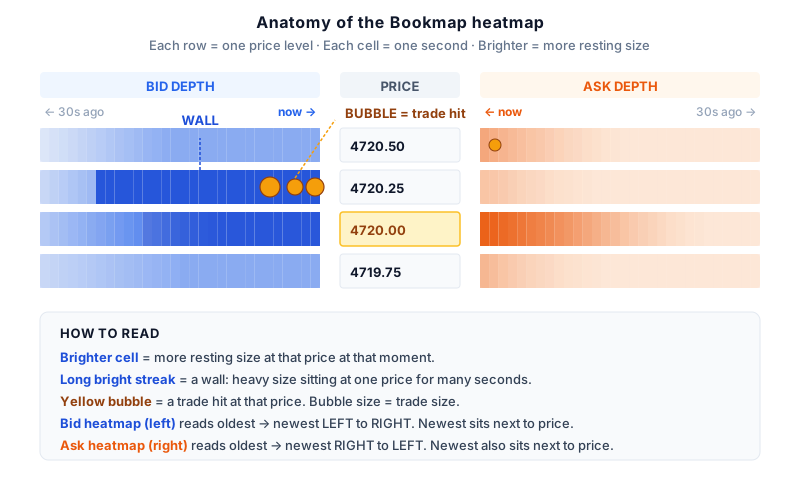
Bright streakswalls of resting size held for many seconds
Sudden dimmingliquidity just got pulled — leading signal
Yellow bubblestrades that actually hit at that price
Newest dataalways sits closest to the price column
Six reads that matter
The whole heatmap collapses into a handful of canonical patterns. Once you can name them, you can't unsee them.
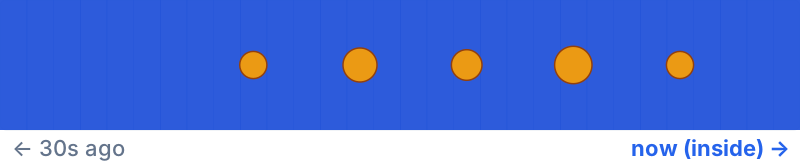
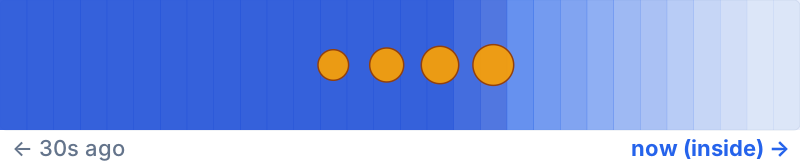
Absorption
wall holding under fire
Bubbles slam into the band, but the band stays bright. The wall isn't thinning — real defender absorbing flow.
Trade WITH this side.
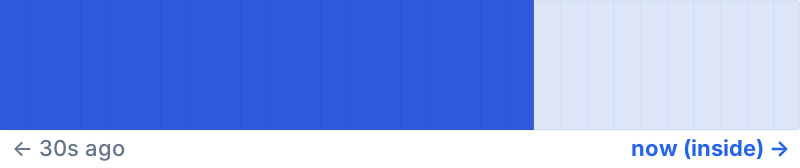
Wall got eaten
defender ran out of size
Band starts bright, several bubbles hit, then it fades. The level was real but it got chewed through.
Expect price to push past.
Pulled liquidity
the vacuum
Band is solid bright, then suddenly turns dark. NO bubbles around the dimming — defenders yanked.
Often precedes a fast move.
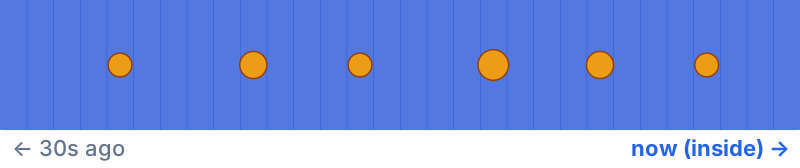
Iceberg refilling
hidden size at work
Repeated bubbles all over the strip but the band stays uniformly bright. Hidden size keeps replenishing.
Trade WITH the iceberg side.
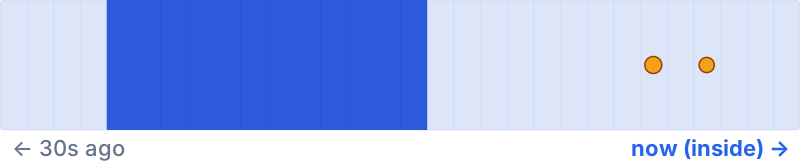
Spoof
pulled fake
A bright band appears, then vanishes BEFORE any meaningful trades arrive. Whoever placed it never intended to fill.
Don't chase based on size alone.
Wall (untested)
size sitting, no action yet
A long bright band with no bubbles. Heavy size has been resting at one price — but it hasn't been tested yet.
Wait for the test before trusting it.
A quick glossary for reading the DOM:
Bid
An order waiting to buy at a set price.
Ask
An order waiting to sell at a set price.
Absorption
A big resting order soaking up incoming trades without price moving — someone is defending that level.
Iceberg
A hidden order that only shows a small piece at a time. When that piece gets filled, another appears in its place.
Pulled liquidity
Orders that disappear right before price gets to them. Often a fake-out.
Stacked liquidity
Large orders piled at adjacent prices, building a wall the market has to push through.
Pair the DOM with a footprint chart for the full picture: the footprint shows the aggressive trades that already crossed the spread, the DOM shows the resting orders waiting to be hit. Together they tell you who's in control before price decides.
See the book. Manage the trade.
Two of the newest additions to the package, both live in v1.0.36. The Liquidity Visualizer is a Bookmap-style heatmap of resting orders over a configurable timeframe — a rolling map of where liquidity is sitting, and how price reacts when it hits it.
It breaks the book into COB, SVP, Delta and CVP columns, surfaces hidden bid/ask orders and trade bubbles, and tracks CVD straight off the tape — all in one docked window. It keeps a rolling, size-capped store of recent liquidity, tuned for day trading rather than as a full Bookmap replacement.
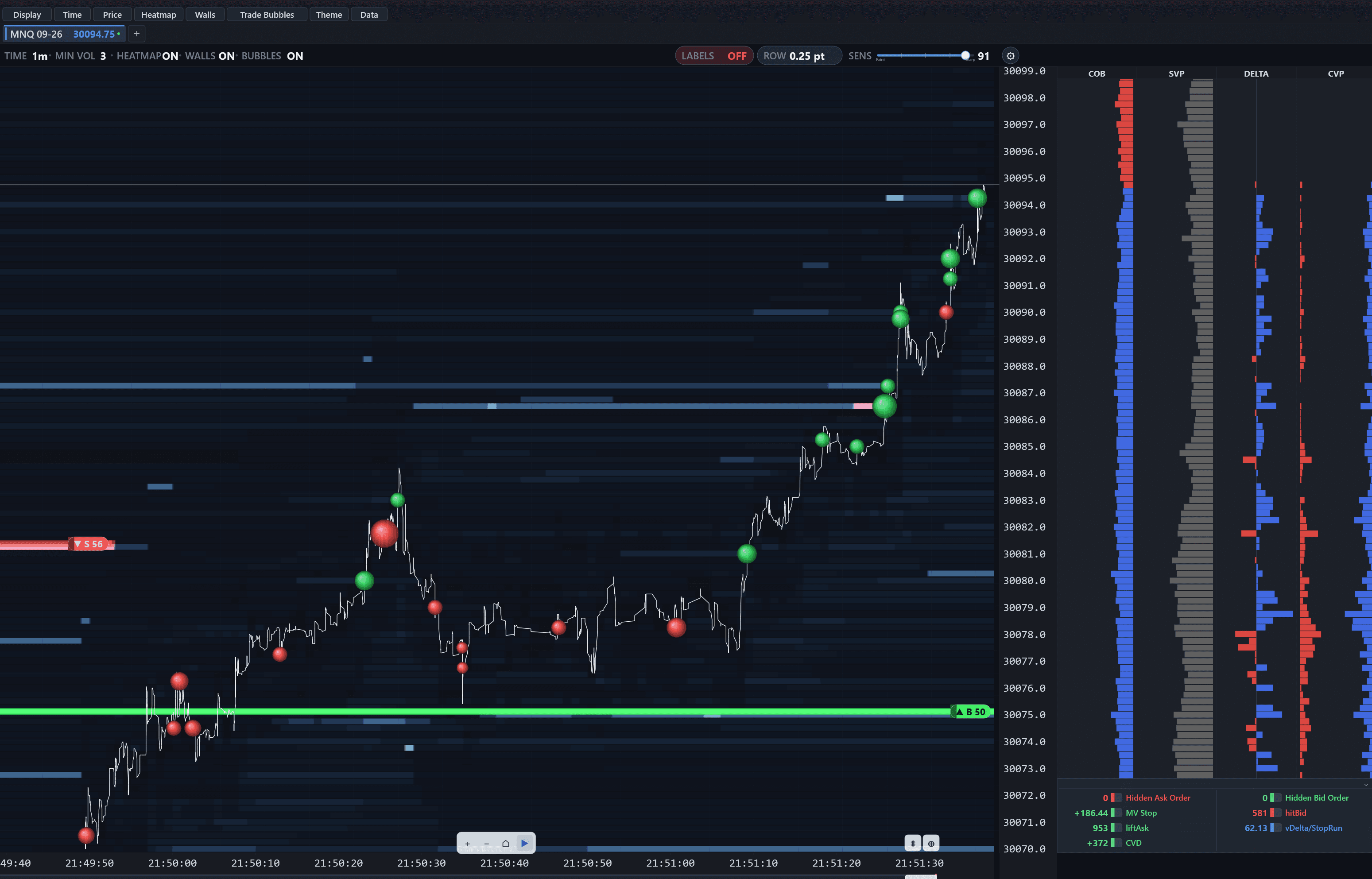
- 1
Feature toolbar
Toggle the heatmap, walls, trade bubbles, theme and data source from the top.
- 2
Live toggles & sensitivity
Heatmap / walls / bubbles on-off, row size, and a sensitivity slider to tune what shows.
- 3
Liquidity heatmap
Brighter cells = more resting liquidity sat at that price over the window.
- 4
Trade bubbles
Executed trades plotted at price and sized by volume — aggressive prints as they land.
- 5
Bid & ask walls
Large resting orders drawn as labeled bands (▲ B 50 = a 50-lot bid wall).
- 6
COB / SVP / Delta / CVP columns
Current order book, session & composite volume profiles, and per-price delta, side by side.
- 7
Live signal panel
Hidden orders, delta velocity (MV Stop), liftAsk / hitBid, CVD and stop-run pressure at a glance.
What the columns & signals mean
- COB
- — Current Order Book: a live snapshot of resting bid/ask size at each price.
- SVP
- — Session Volume Profile: total volume traded at each price this session.
- CVP
- — Composite Volume Profile: volume distribution aggregated across the captured window.
- Delta
- — net aggressive buying vs selling at each price (blue = buy-aggressed, red = sell-aggressed).
- CVD
- — Cumulative Volume Delta: the running sum of net delta across the session.
- liftAsk / hitBid
- — aggressive buying (lifting the ask) and aggressive selling (hitting the bid).
- Hidden Ask / Bid Order
- — iceberg-detected hidden size: hidden ask supply lifted by buyers, or hidden bid support hit by sellers.
- MV Stop
- — delta velocity: net delta per minute over the window.
- vDelta / StopRun
- — stop-run pressure: the heavier side as a share of total flow (one-side dominance).
What this tells you
- Where resting liquidity is stacked — and where the gaps are
- How price reacts when it hits a liquidity pocket
- Hidden bid/ask orders and CVD, read straight off the tape
Find Where the Big Money Traded
Standard volume bars show you how much traded per candle. Volume Profile shows you at which price. This distinction is everything. A bar with 50,000 contracts might have 40,000 of them concentrated at a single price level — that's your POC, and it acts as a magnet for future price action.
The indicator automatically calculates and plots the Point of Control (POC), Value Area High (VAH), and Value Area Low (VAL) — the range where 70% of volume traded. When price trades outside the value area and fails to find acceptance, it tends to rotate back. When it breaks through with volume, it's a sign of genuine directional conviction.
It helps to know what a profile is actually counting. Every contract that trades is two orders meeting: a market orderDefinitionAn order to buy or sell immediately at the best price available. It crosses the spread and takes liquidity out of the book. crossing the spread to get filled now, and a limit orderDefinitionAn order to buy or sell only at a stated price or better. It rests in the book providing liquidity until a market order crosses the spread to meet it. resting at that price to take the other side. A volume profile counts those matches. A fat row is not “buying” or “selling” — it is a price where a lot of resting size was willing to transact and a lot of market orders were willing to pay. Which side was the aggressor is a separate question, and the delta profile below is the one that answers it.
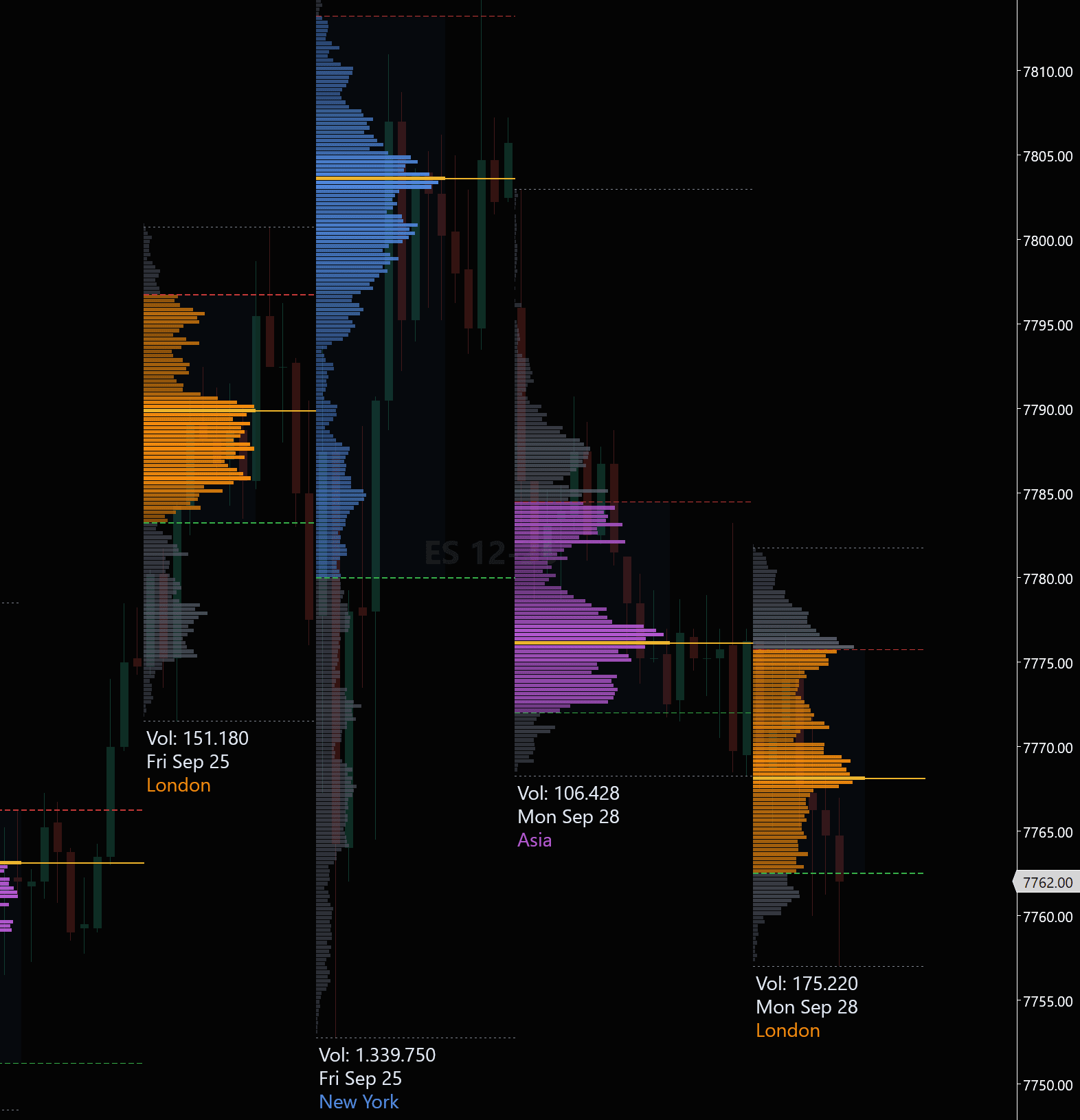
Session Profiles, Split by Desk
Every session gets its own profile, colored by the desk that traded it — Asia in purple, London in orange, New York in blue — each labeled with its own volume and date. The yellow line is that session's POCDefinitionPoint of Control: the price level with the highest total volume in the period. Where the market attracted the most interest from both sides.; the dashed lines are its value areaDefinitionValue area: the price range holding roughly 70% of the period's volume — where the bulk of business was done. high and low. A single daily profile averages the three desks together, so a level built overnight on thin Asian volume looks identical to one built on a New York session twenty times its size. Depth matters as much as the total: overnight there are far fewer limit orders resting at each price, so the same market order travels further than it would against New York's book.
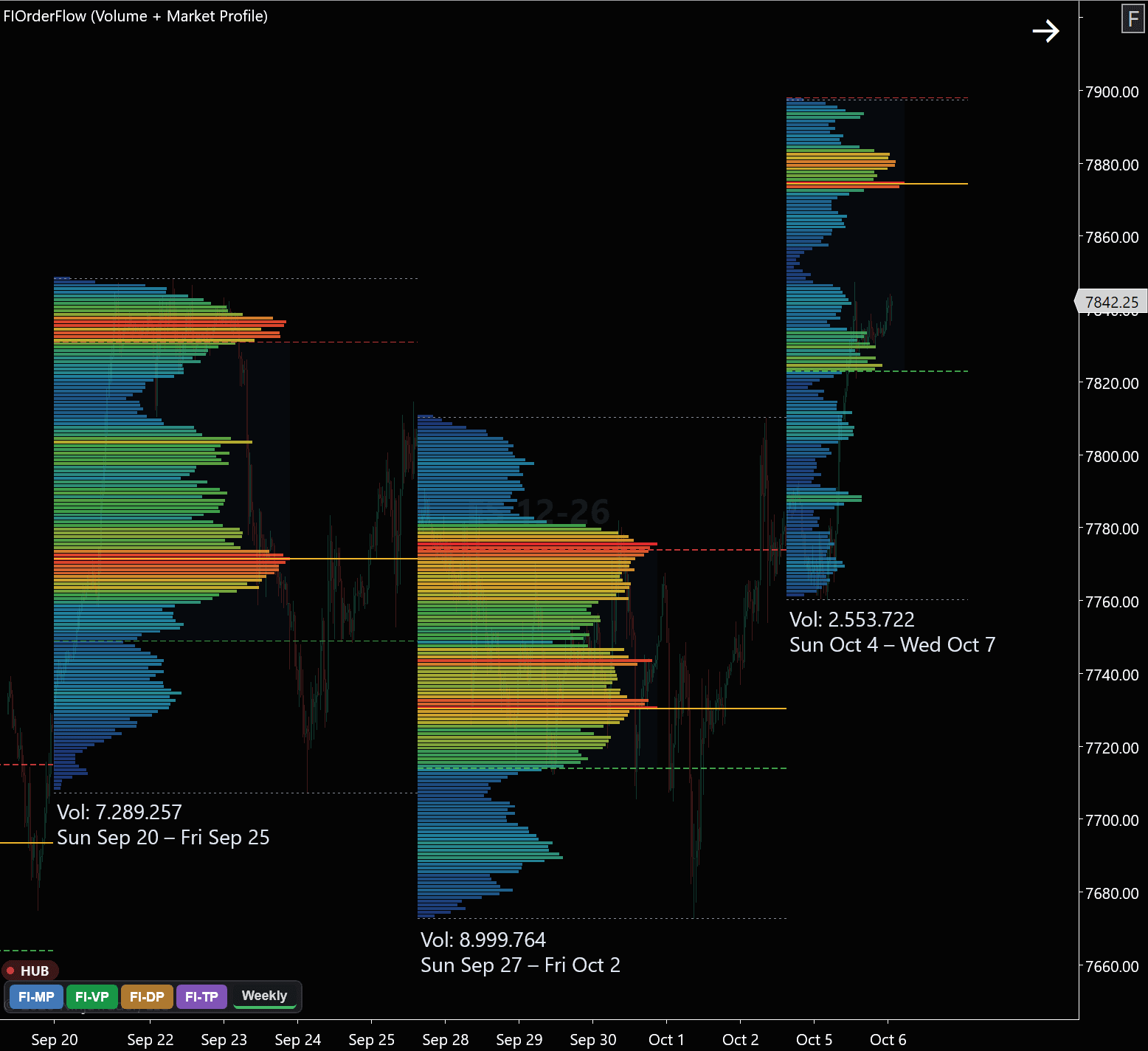
Weekly Composites, Heat-Colored
A whole week merges into one distribution, labeled with its total volume and date range. Every row is also colored by how much traded there — blue through green and yellow to red at the busiest prices — so length and color say the same thing twice, and the week's POCDefinitionPoint of Control: the price level with the highest total volume in the period. Where the market attracted the most interest from both sides. reads without measuring any bar against its neighbors. A row that runs hot is a price where market orders kept arriving and resting limit orders kept meeting them, session after session, without the level being cleared out. The week in progress builds alongside the completed ones rather than appearing on Friday.
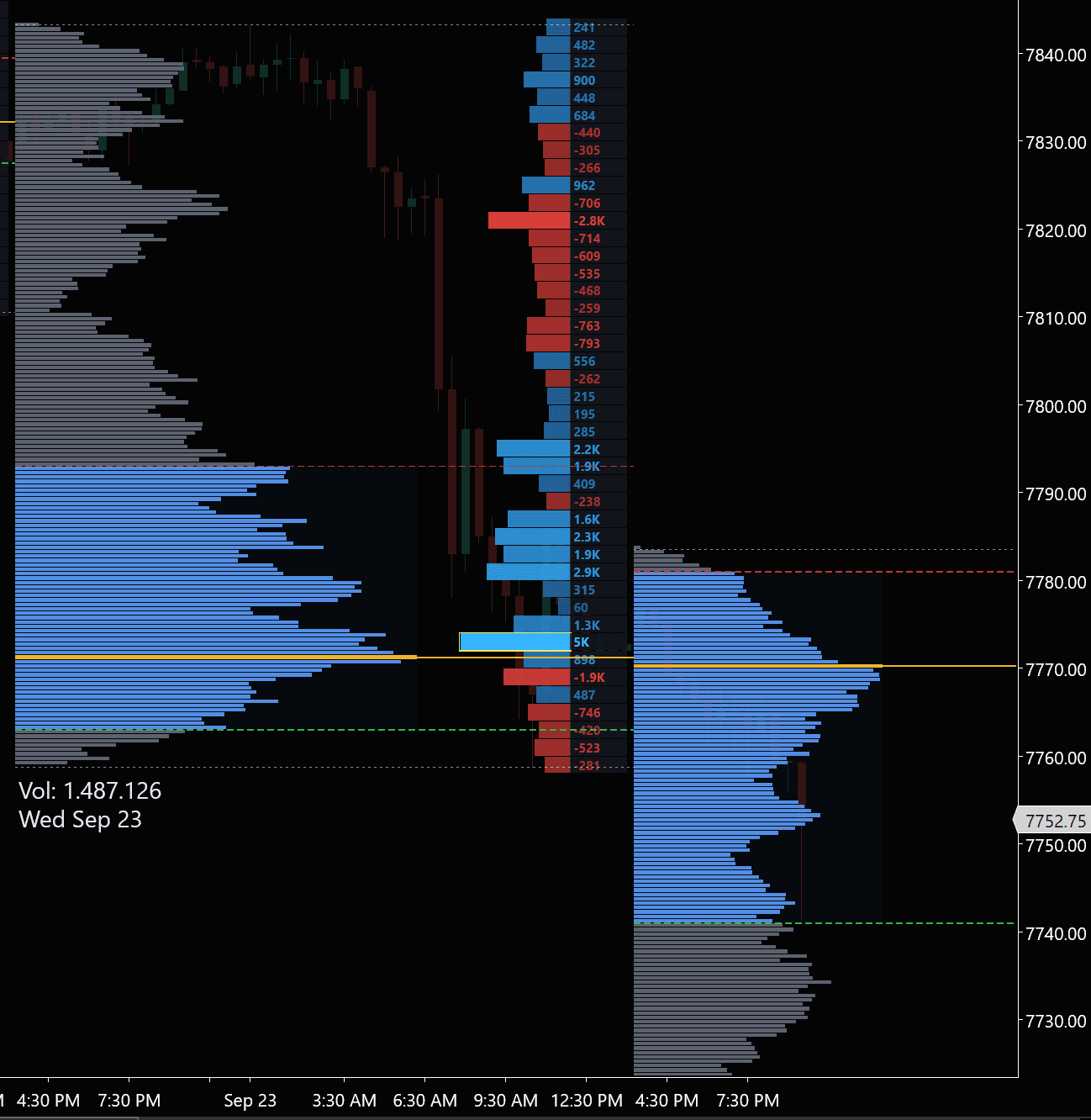
Delta Profile, Printed by Price
Beside the volume profile sits a second histogram: net deltaDefinitionThe difference between ask volume and bid volume at a price level or for a whole bar. Positive means more aggressive buying; negative, more aggressive selling. at every price, with the figure printed on each row instead of left to the eye. Delta counts only the aggressor — a market buy lifting the offer scores positive, a market sell hitting the bid scores negative. The limit orders on the other side, which made every one of those trades possible, never appear in the number, and that is precisely what makes it readable: it isolates the half of each transaction that chose to pay the spread. A row with heavy volume and a delta near zero was two-sided business; a large negative delta at a price that did not break lower is aggressive selling met by someone's resting bids — absorptionDefinitionAbsorption: aggressive orders hit a level but fail to move price, because large passive orders are taking the other side..
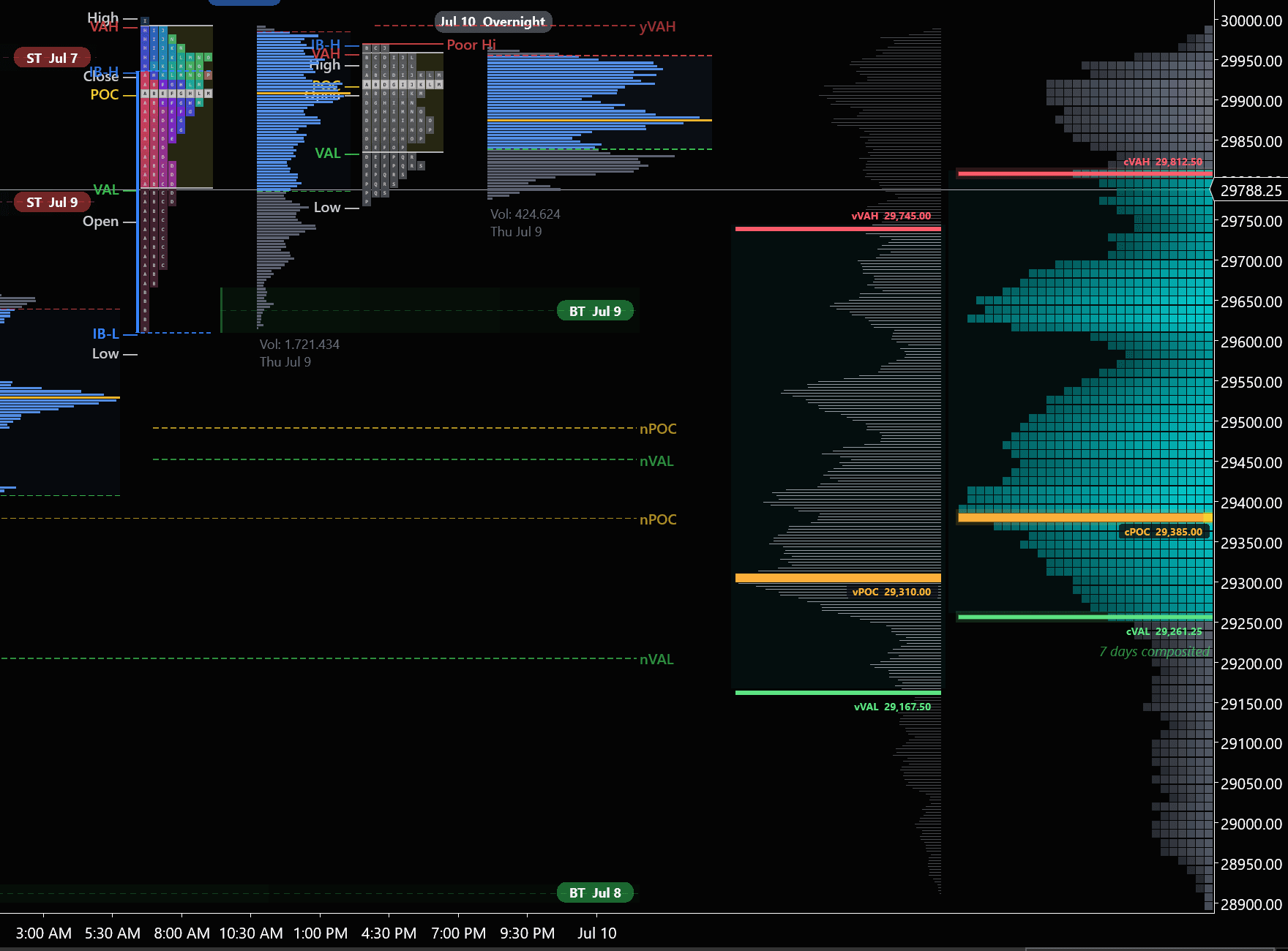
7-Day Composite, Beside the TPO
The composite (far right) merges a full week into one distribution — cVAH, cPOC and cVAL mark where the week's volume concentrated — shown beside the naked TPODefinitionTime Price Opportunity: one mark for each time bracket, usually 30 minutes, in which price traded at a level. It counts time, not contracts. profiles and their prior-day levels. The two count different things, which is the whole reason to run both. A volume profile counts contracts: how much changed hands at each price. A TPO profile — the Market Profile construct J. Peter Steidlmayer developed at the Chicago Board of Trade in the 1980s — counts time: one letter for each half-hour bracket in which price traded there at all. A level can collect letters for hours on thin trade, or take enormous size inside a single bracket and collect one. Where the volume POC and the TPO POC sit apart, the market spent its time in one place and its money in another.
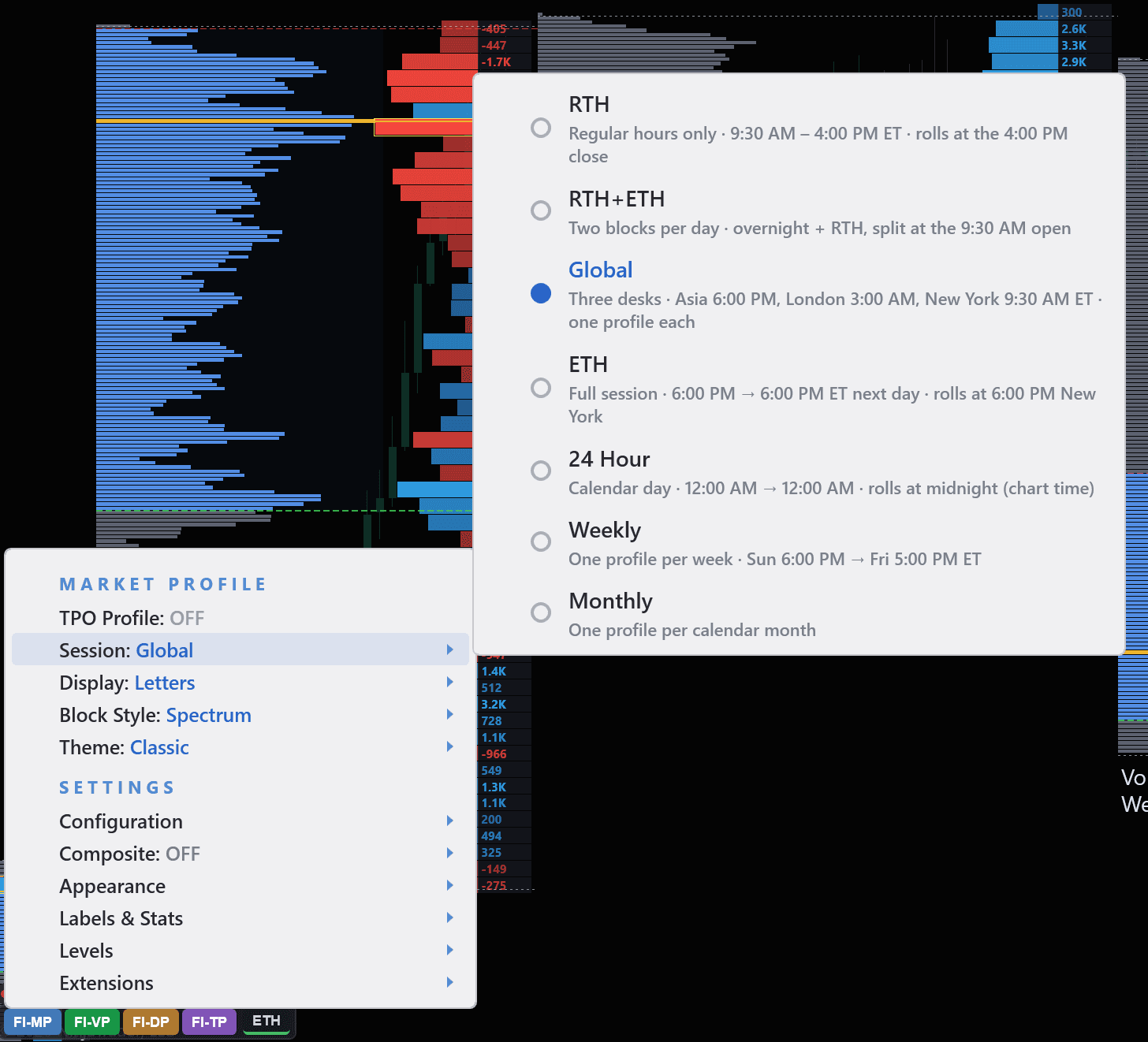
One Menu, Every Profile Above
Every view in this section is one click away, and the menu says what each option means rather than assuming you know. The session row sets what a profile covers — RTH for regular hours, ETH for the full 6:00 PM to 6:00 PM session, Global for the three-desk split at the top of this section, Weekly for the composites above — and each one states when it starts and when it rolls, so “ETH” on your chart means the same thing it means on anyone else's. Display, block style, theme, composite, levels and extensions sit in the same place. No config files, no reloading the chart.
Use weekly composite profiles to set your bias for the day. If price opens inside the prior week's value area, expect rotation. If it opens outside, look for a trend day back toward the POC or continuation away from value.
What this tells you
- The fair value price where 70% of volume traded (Value Area)
- Key levels that act as magnets for price (POC)
- Whether price is trading above/below value — critical for daily bias
- Where institutions built positions over the session or week
Read the Market's Auction in Real Time
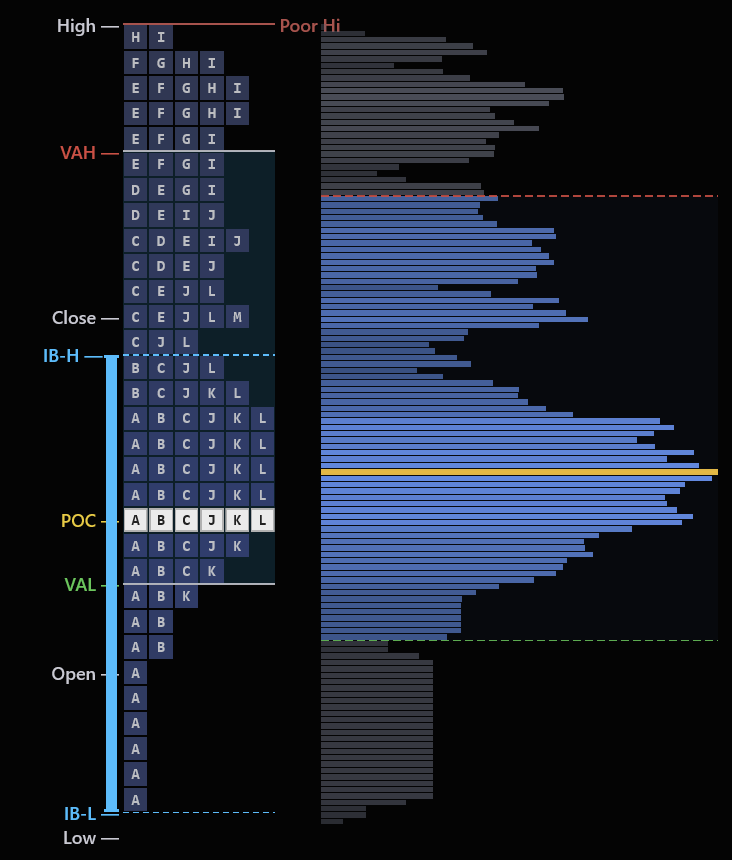
Standard charts show you where price went. Market Profile shows you where price stayed. By organizing each 30-minute period into TPO letters that stack at every price level, you can see the session's story at a glance — where value was accepted, where the market moved through quickly, and where the auction is still incomplete.
The indicator automatically plots the full TPO profile with POC, Value Area, Initial Balance, poor highs and lows, and single prints — all labeled on every session. Profile shapes, open type, and day type classification become immediately visible.
Profile Shapes
D, P, b, double distribution
Poor Hi / Lo
Incomplete auctions labeled
Initial Balance
IB-H and IB-L every session
Open Type
Inside, above, or below value
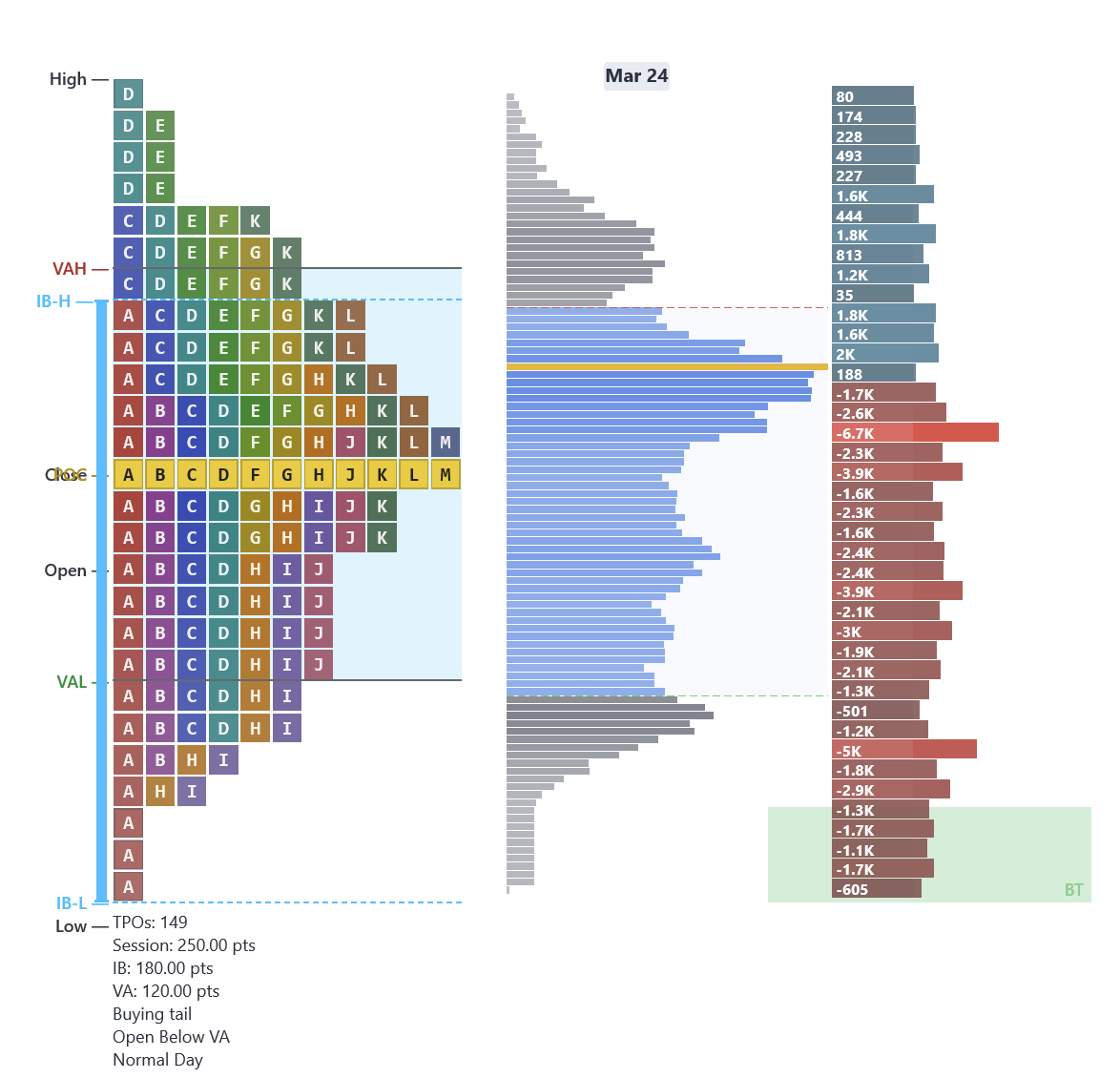
Real chart examples from our indicator:
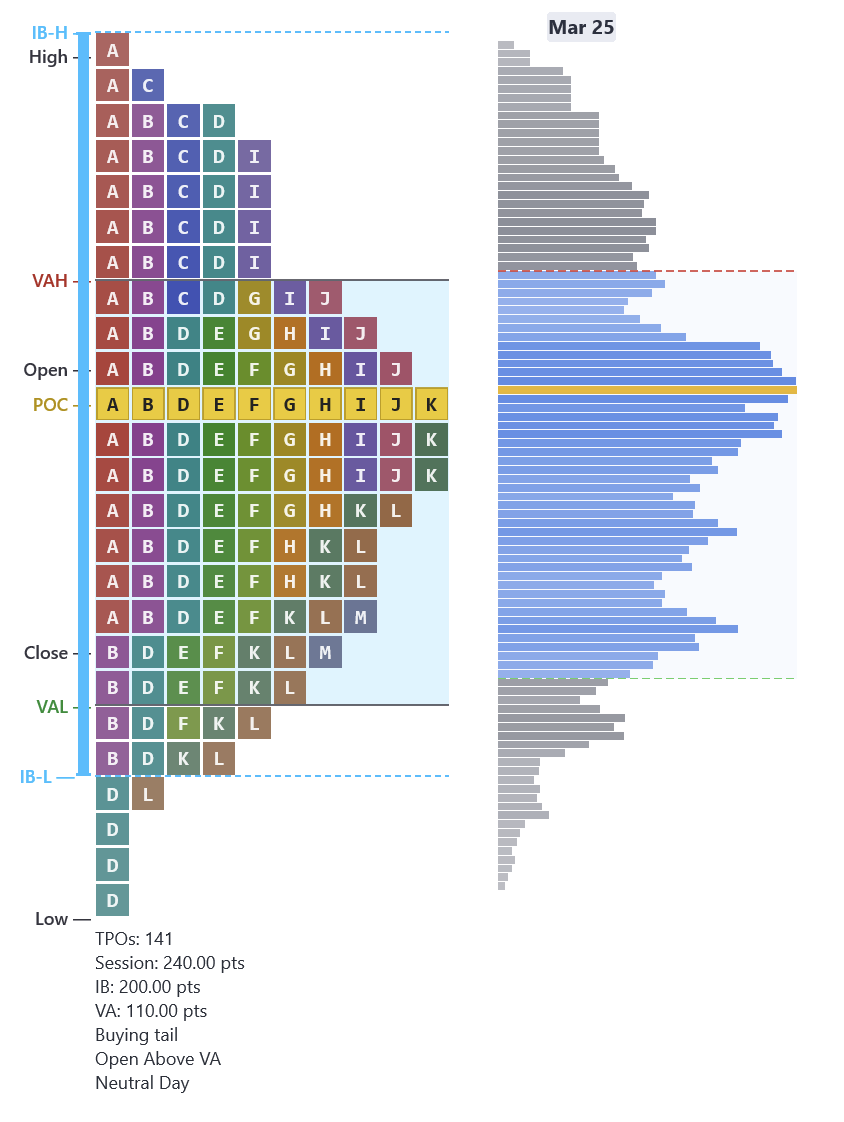
D-Shape (Balanced)
Bell curve profile — POC in the center, thin tails. Fade the extremes, target the POC.
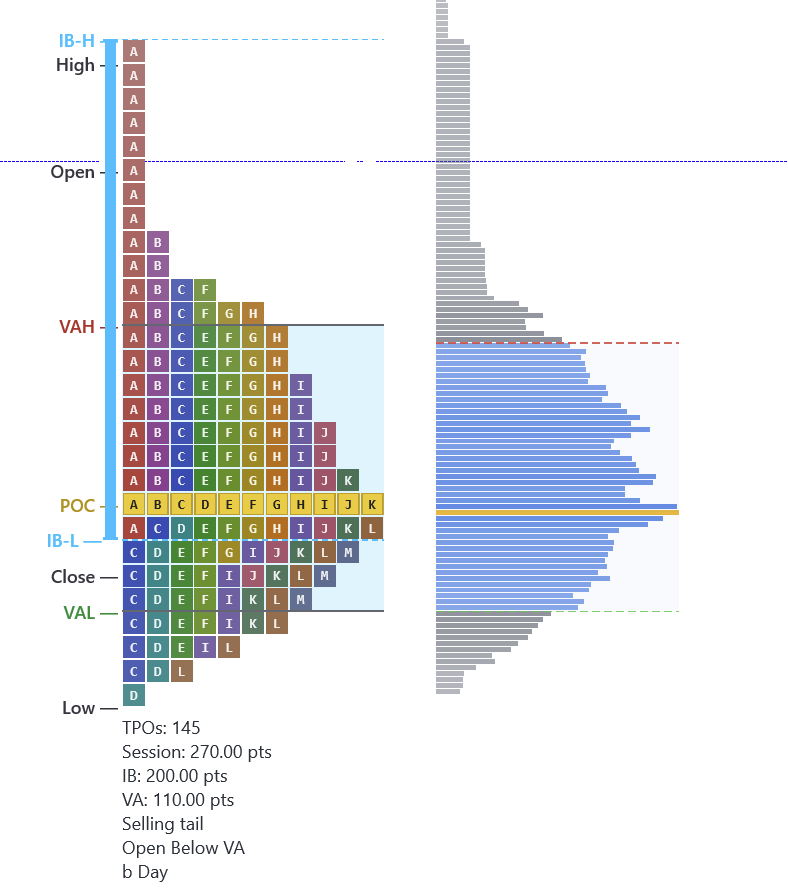
b-Shape (Sell-Off)
Fat at the bottom, thin tail at the top. Initiative selling drove price down all session.
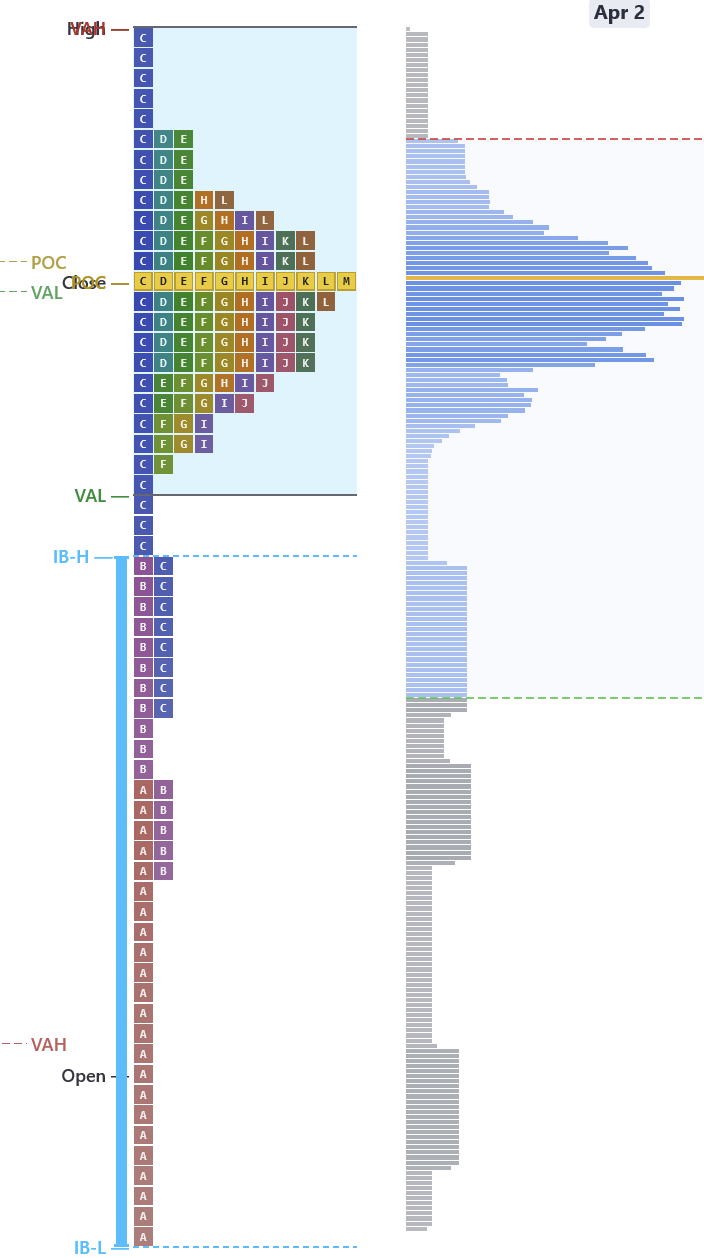
P-Shape (Rally)
Fat at the top, thin tail at the bottom. Price rallied and value concentrated at the highs.
Incomplete Auctions Are Magnets
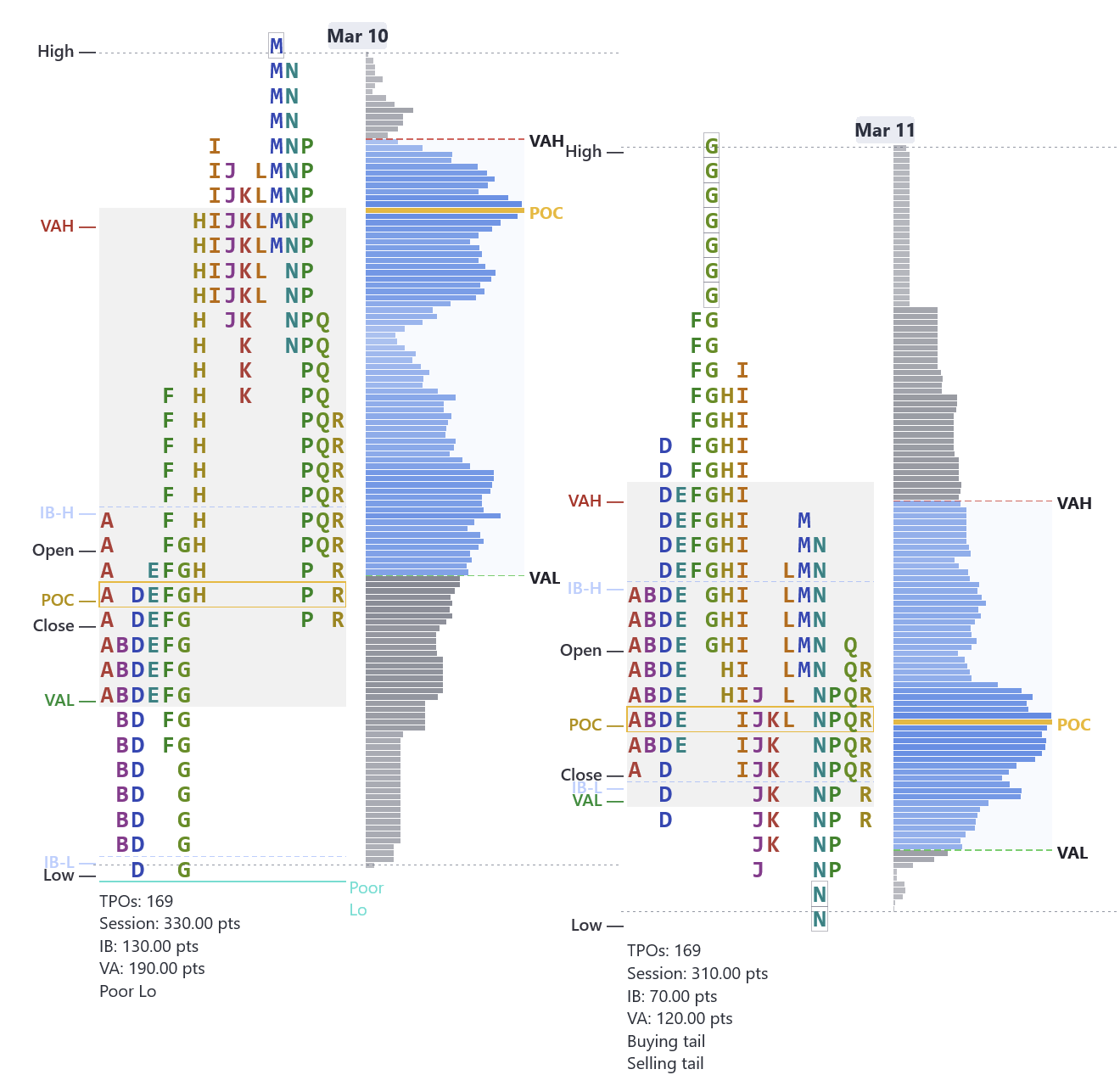
A poor low is when the bottom of the profile has multiple TPO letters stacked with no clean single-print rejection — the auction never finished. The market will come back to complete the job. A poor high is the same concept at the top.
Poor high or low = no single-print tail at the extreme — buyers/sellers were never decisively rejected
These levels act as magnets — price tends to revisit them to finish the unfinished auction
The indicator labels poor highs and poor lows automatically on every session
Real example: March 10 MNQ closes with a poor low. Next session opens near the prior VAL, rallies to test it, gets rejected — then drops back to revisit the incomplete auction. The poor low pulled price back like a magnet.
One of Market Profile's Most Powerful Setups
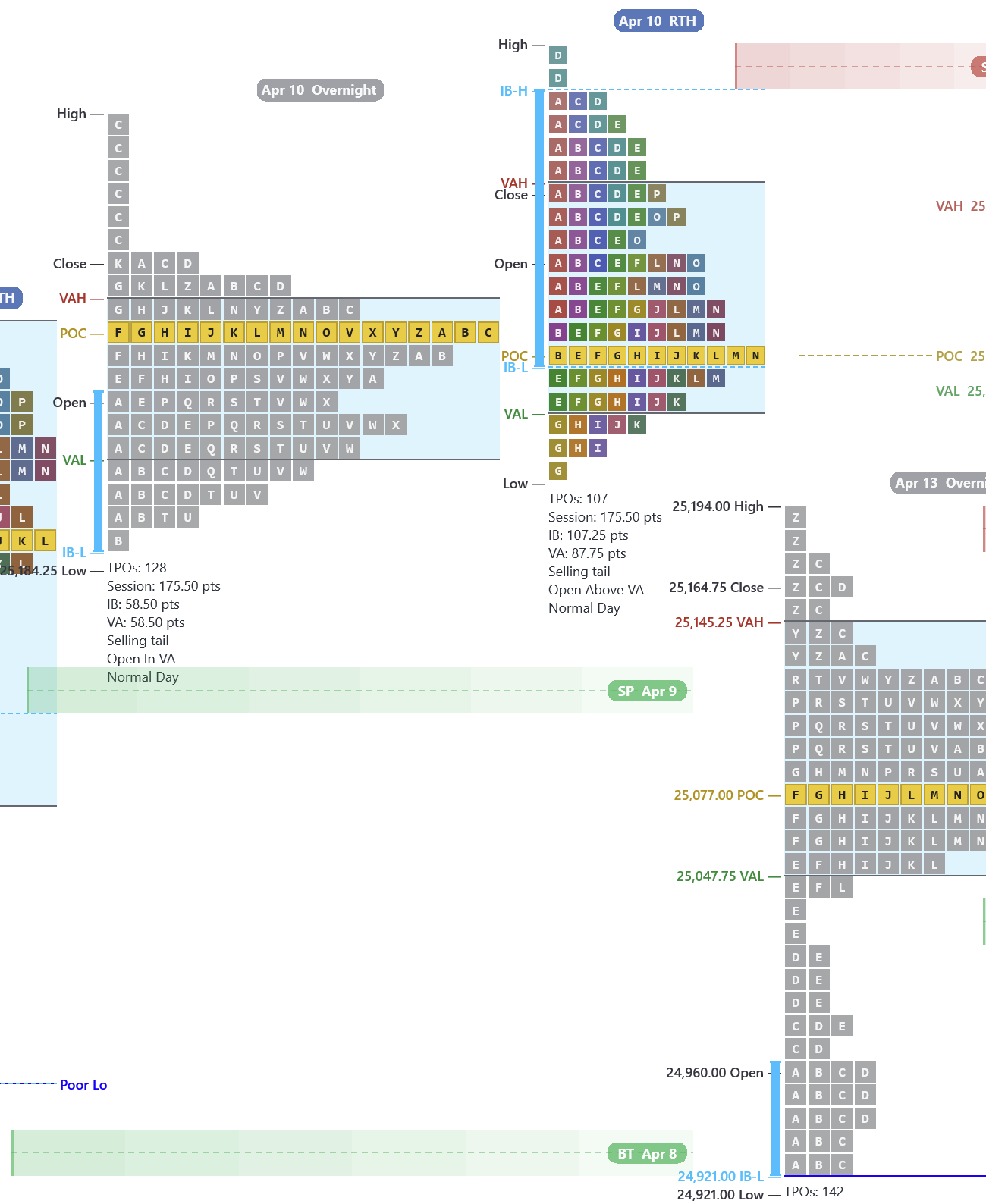
If price opens outside the prior session's Value Area and then re-enters it (crosses back through the VAH or VAL), there is roughly an 80% probability that price will travel all the way to the other side of the Value Area.
Price opens above VAH → sells off → drops back inside VA → likely travels to VAL
Price opens below VAL → rallies → pushes back inside VA → likely travels to VAH
Based on auction market theory — if the market rejected the extreme and returned to value, it has momentum to travel through
Real example: April 10 RTH opens outside value above the prior session's VAH, fails to hold, and re-enters the value area. From there it gaps down and takes out the prior day's (April 9) Value Area Low, continuing lower — textbook 80% Rule. Price then rallies off the April 8 buying tail, confirming that tail as support.
Where the Market Moved Fast and Never Came Back
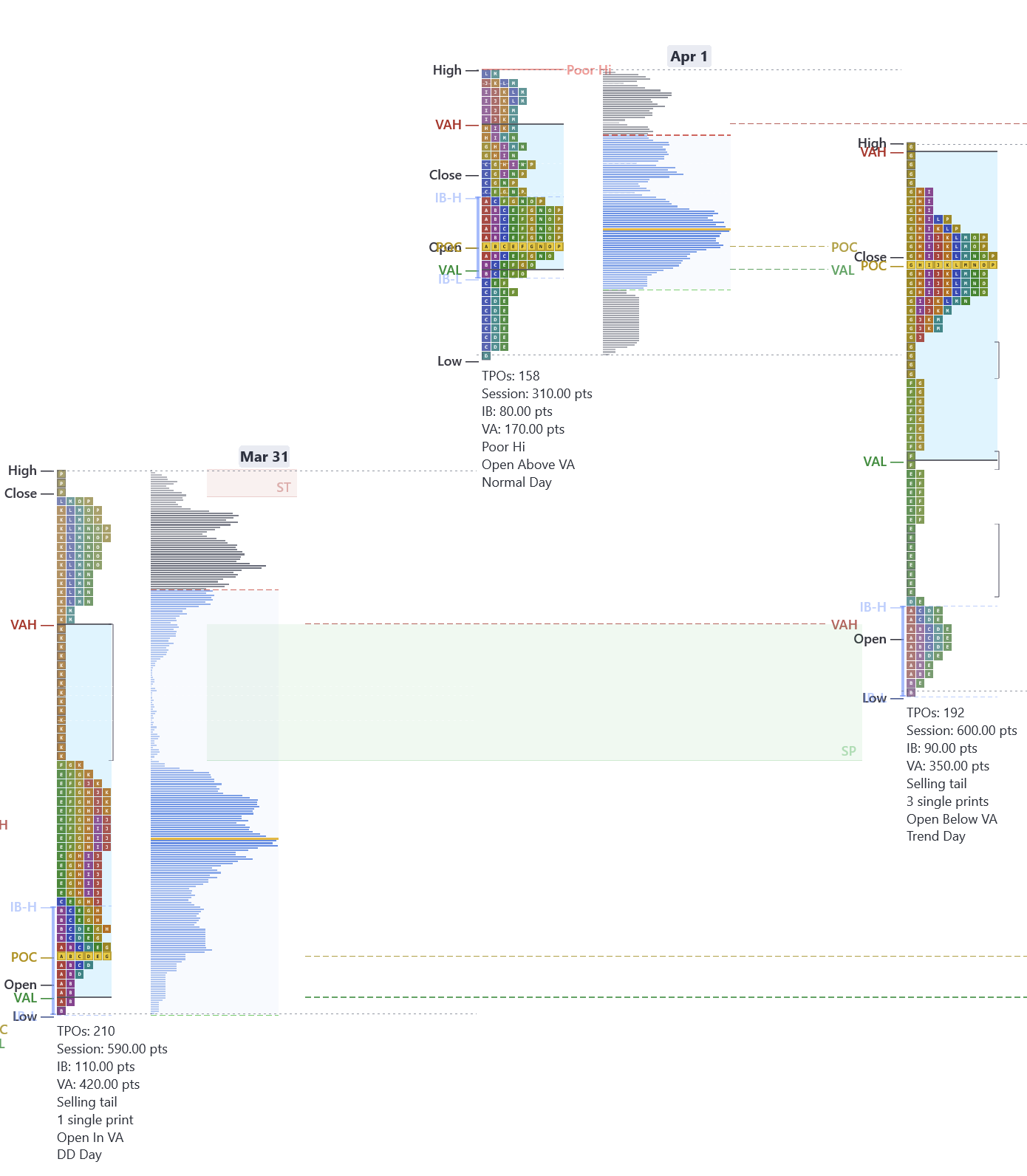
A single print is a price level where only one TPO letter appears — the market visited that price during one 30-minute period and never returned. These zones represent initiative activity where one side drove price through aggressively.
Single prints separate two value areas in a double distribution — they mark the repricing zone
When price revisits single prints, expect a reaction — either a bounce (initiative confirmed) or a fill (initiative unwound)
The indicator highlights single print zones automatically with shading so you never miss them
Real example: March 31 MNQ double distribution day — the green shaded zone between the two value clusters is a single print area. The next session moves through it as price retests the prior initiative zone.
One-Click Configuration
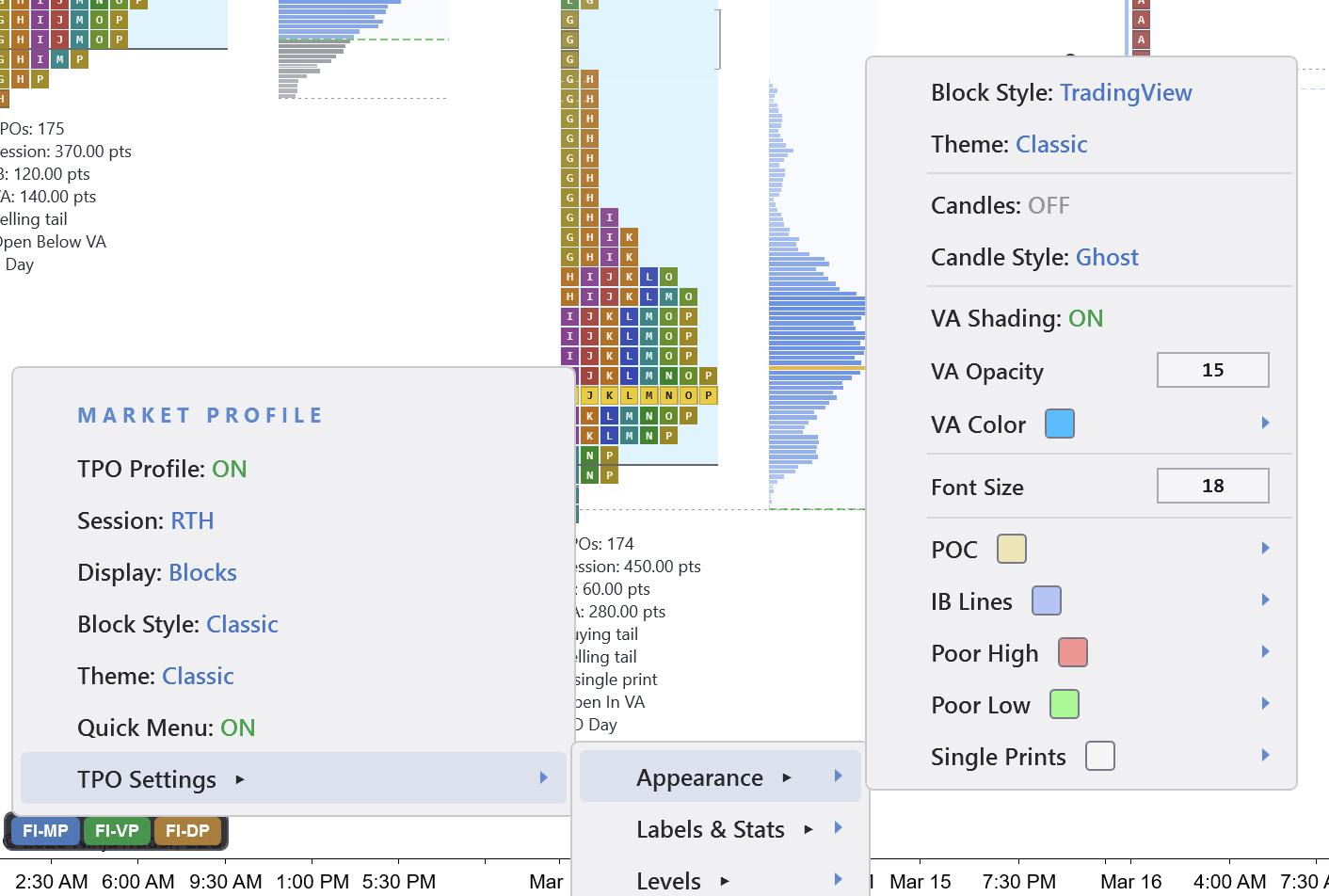
Every Market Profile setting is right in the menu — TPO Profile, IB Lines, Poor Hi/Lo labels, Single Prints, Value Area shading, POC colors, and more. Switch between Market Profile and Delta Profile with a single toggle. No separate indicators to manage, no conflicting settings.
Right-click any session to see the full auction:
Overnight Session Analysis
Futures trade nearly 24 hours a day. If you only analyze the regular session, you are missing half the auction. The overnight session is where institutions process earnings, economic data, and global macro flows. By the time RTH opens, overnight participants have already established value, tested key levels, and left behind single prints that become support and resistance during the day.
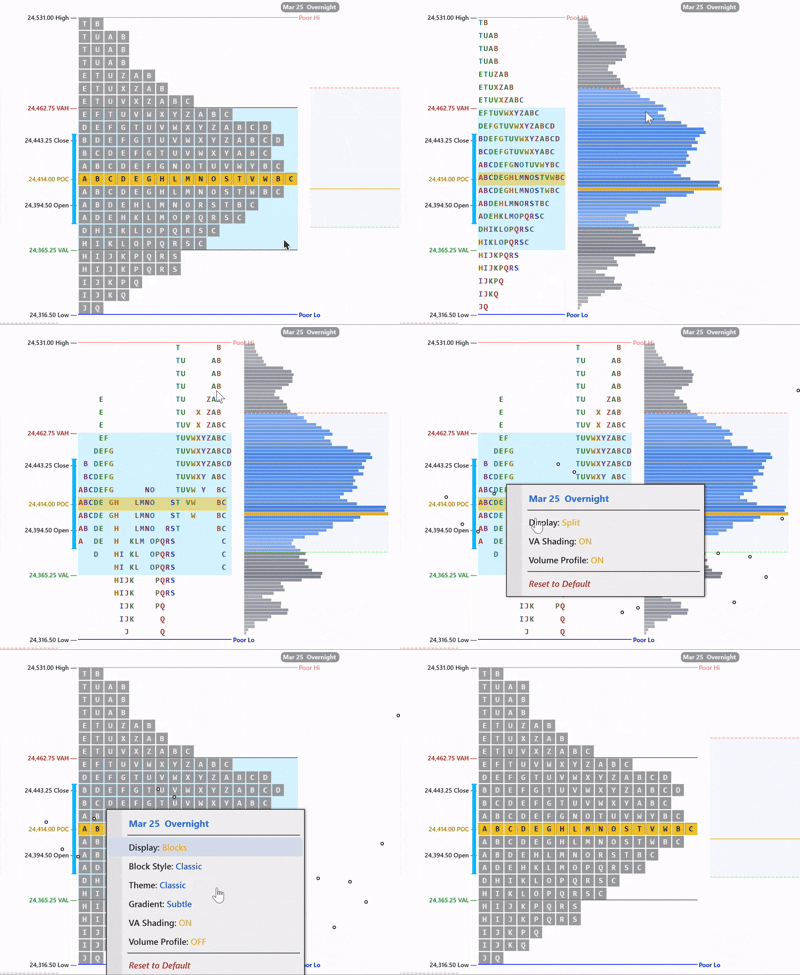
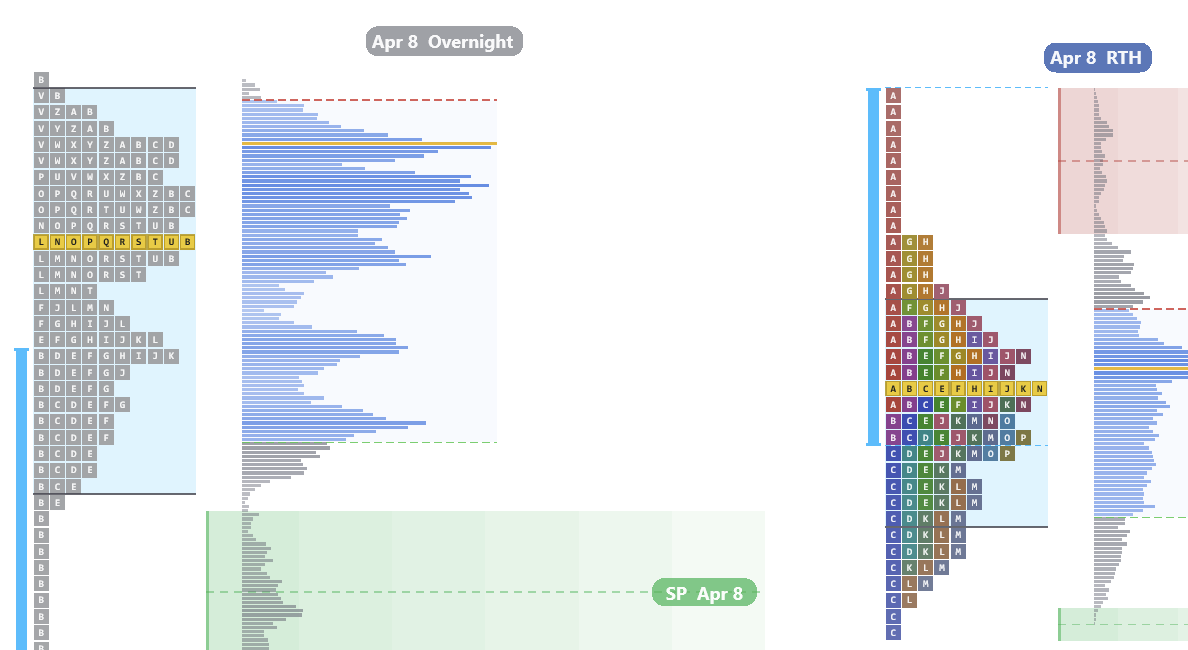
Split the overnight (Globex) session from RTH to see each auction independently. In this example, single prints from the overnight auction act as a floor — the C period tests the overnight singles and bounces cleanly, confirmed by the volume profile. Reviewing the overnight profile before RTH is not optional.
Split overnight and RTH into separate profiles
Overnight single prints become RTH support and resistance
Overnight POC, VA, and session levels as pre-market reference
Volume profile confirms participation at key overnight levels
Built-In Themes
Switch between Market Profile themes with one click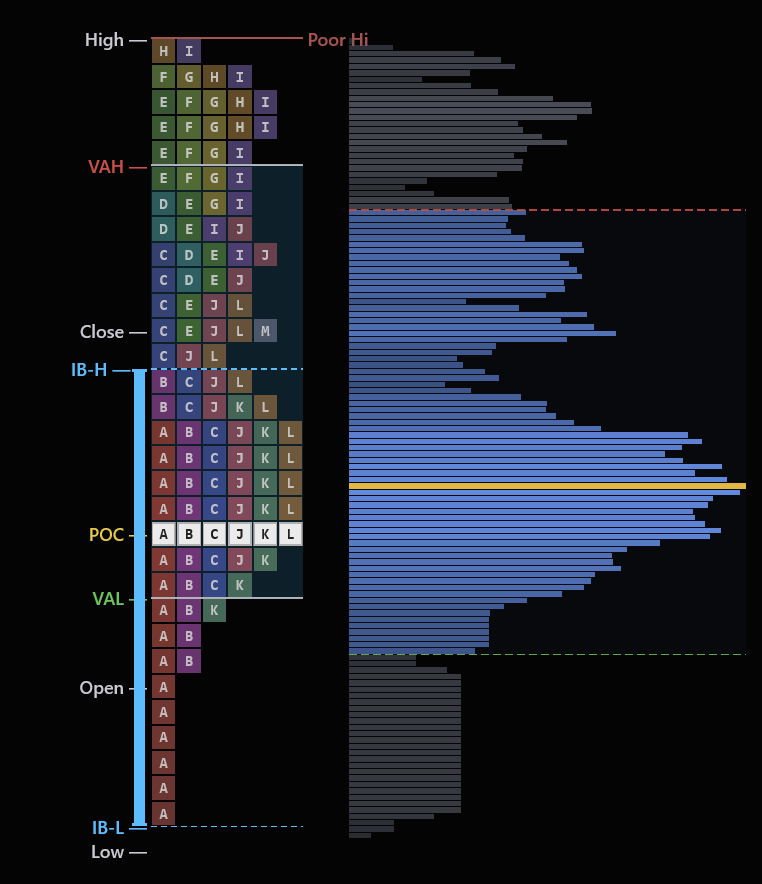
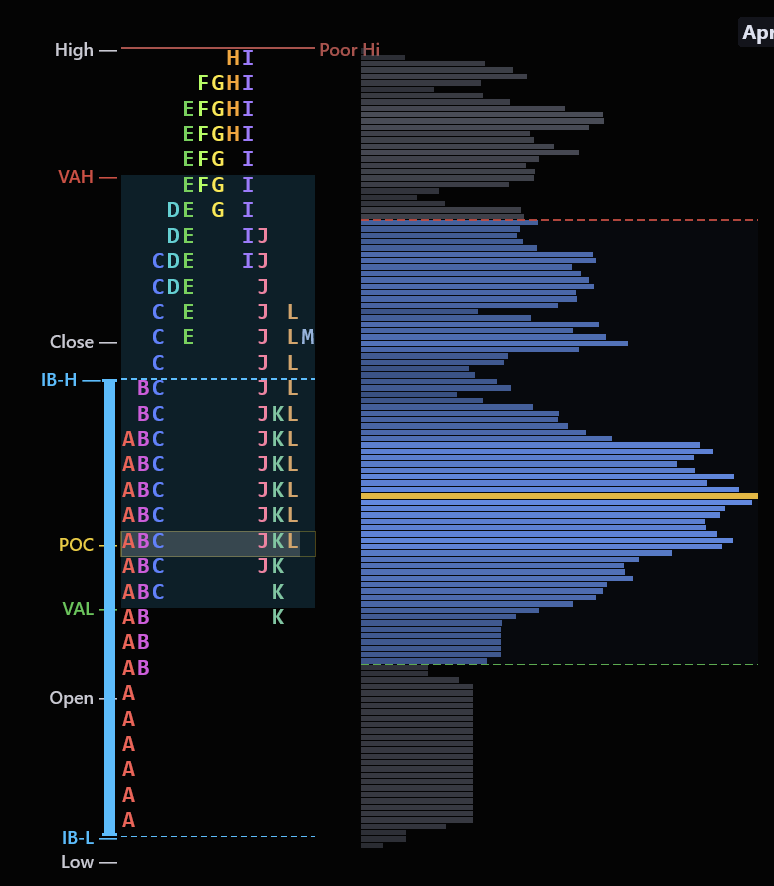
Classic
Color-coded TPO letters with rainbow periods
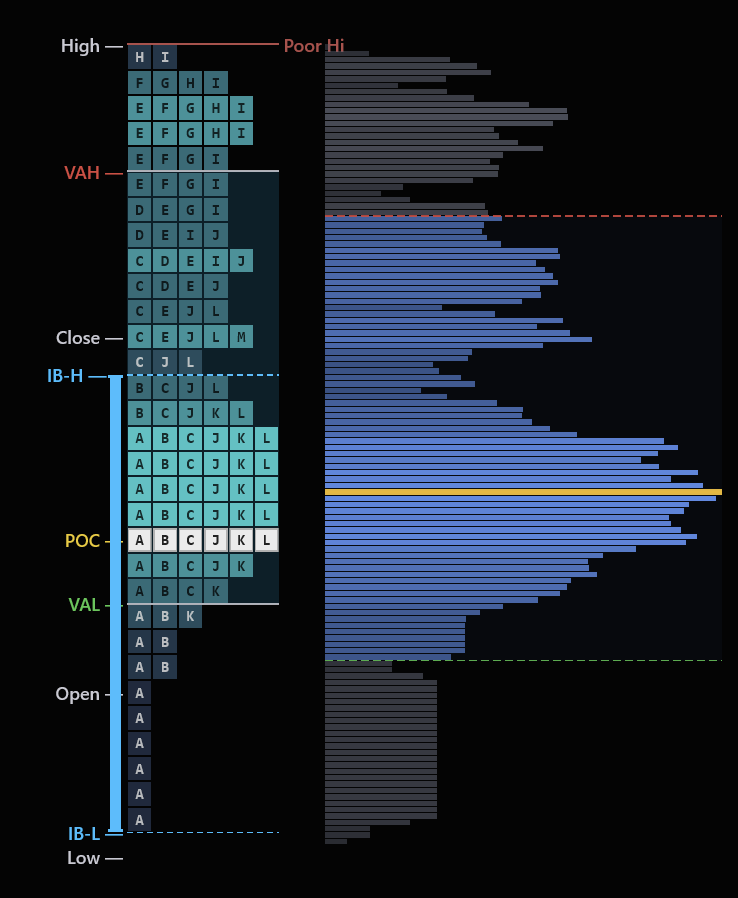
Heatmap
Heat intensity shows time density at each level
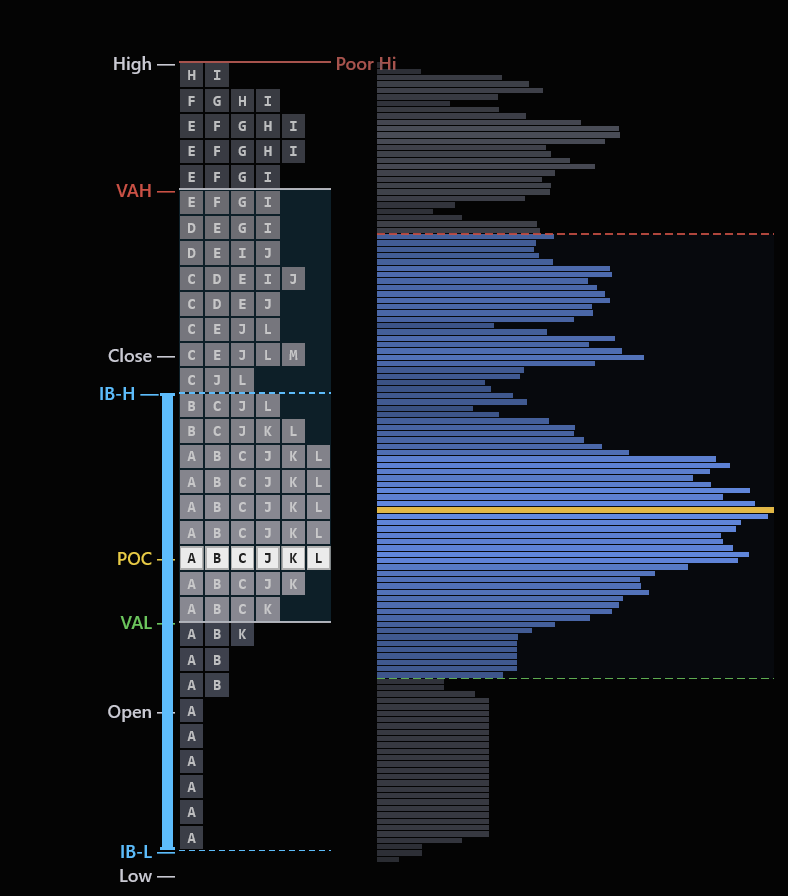
Mono
Clean single-color for distraction-free analysis
Session
Session-colored periods for time-based reading
Split
Split profile with separate buy/sell sides
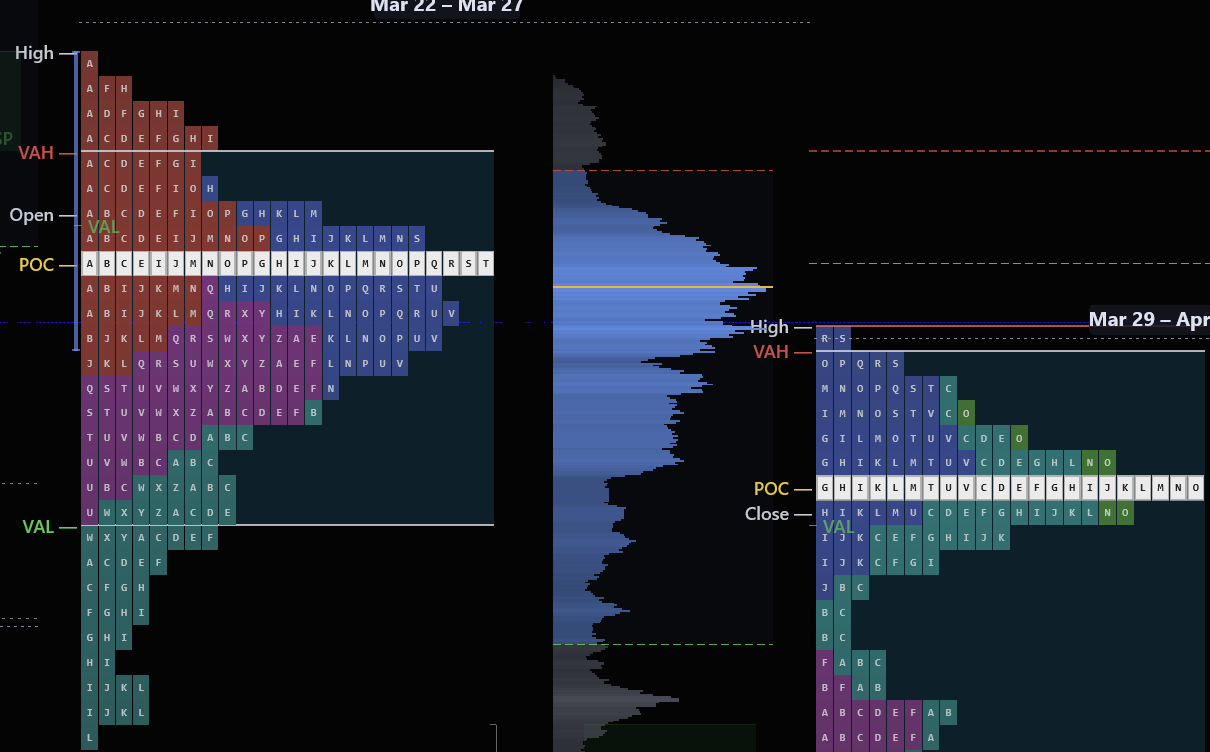
Weekly
Multi-day composite view for swing traders
Combine profile shapes with footprint confirmation. A P-shape profile looks bullish, but if cumulative delta is flat, the rally was short covering — not real buying. The profile tells you what happened. The footprint tells you whether to trust it.
What this tells you
- Profile shape at a glance — D (balanced), P (rally), b (sell-off), or double distribution
- Poor highs and poor lows — incomplete auctions that act as magnets for future price
- Initial Balance levels — the first hour's range that frames the entire session
- Open type — whether price opened inside, above, or below the prior Value Area
- 20+ themes — dark, light, heatmap, mono, and custom presets
- Split overnight and RTH profiles for full-session context
New to Market Profile?
We built a free, in-depth learning section that teaches you everything from scratch — with real chart examples from this indicator.
What Is Market Profile?
TPO charts, single prints, poor highs & lows, excess tails
Initial Balance Framework
IB width, day type prediction, range extensions
Profile Shapes
D-shape, P-shape, b-shape, double distribution, trend days
Volume Profile vs Market Profile
Time at price vs contracts at price — when they agree and diverge
Composite Profiles
Value area migration, naked POCs, developing vs settled profiles
Trading Setups
Open type, 80% rule, IB extensions, poor high/low retests
Built-In Auto Trader. Place It. It Manages It.
A full Chart Trader and trade-management engine right on your chart — draggable entries, four auto-trail modes, custom ATM strategies and account risk guards, from the entry through the exit.
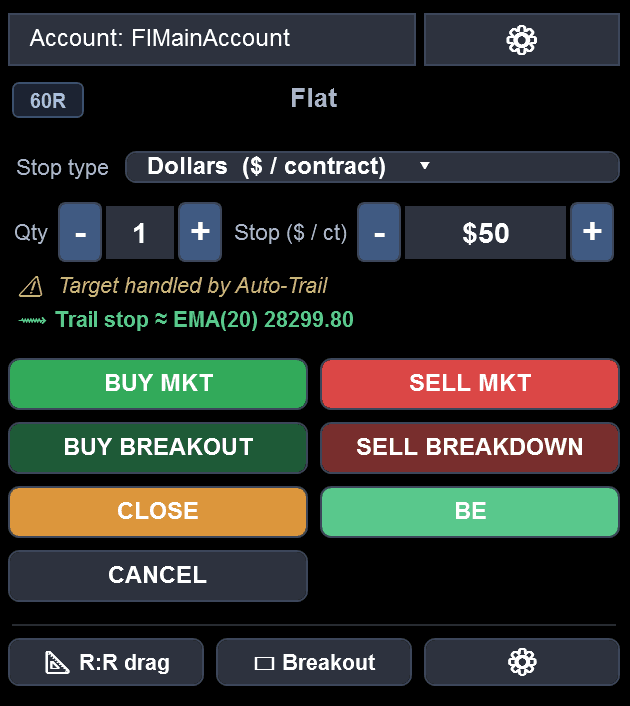
Draggable Entries
Pull your stop where you want it — entry, stop and target with live risk
Four Auto-Trail Modes
SSL line, 3-Step, Bar and EMA — the engine moves your stop tick by tick
Custom ATM Strategies
Run a saved NinjaTrader ATM template end-to-end from the panel
Account Risk Guards
Daily limits, trailing drawdown, and flatten-and-lock on breach
Auto-Trail
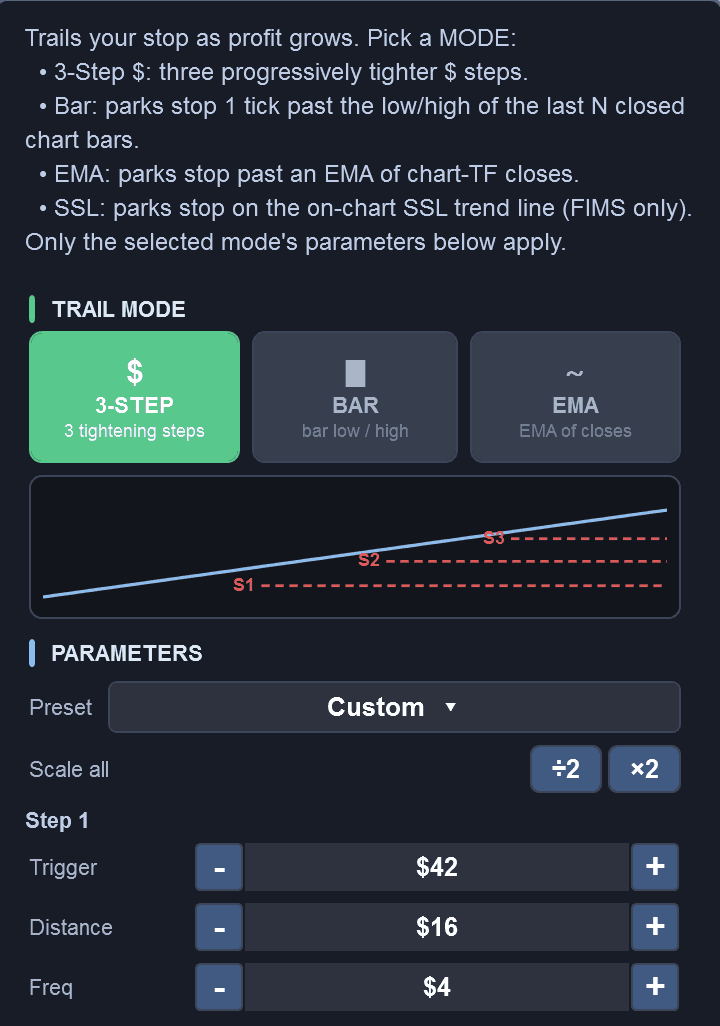
Four Ways to Trail. Pick One and It Runs.
Choose how your stop follows price and the engine trails it for you, tick by tick — with a live readout of exactly where the trailing stop sits. The manual stop field locks while a dynamic trail is driving it, and a position without a stop gets one automatically.
SSL Trend LineNew
Rides the on-chart SSL trend line
3-Step
Progressive tightening, presets for NQ, ES, MNQ, MES, CL, GC
Bar Trail
A tick past the low/high of the last N closed bars
EMA Trail
Past an EMA of chart-timeframe closes
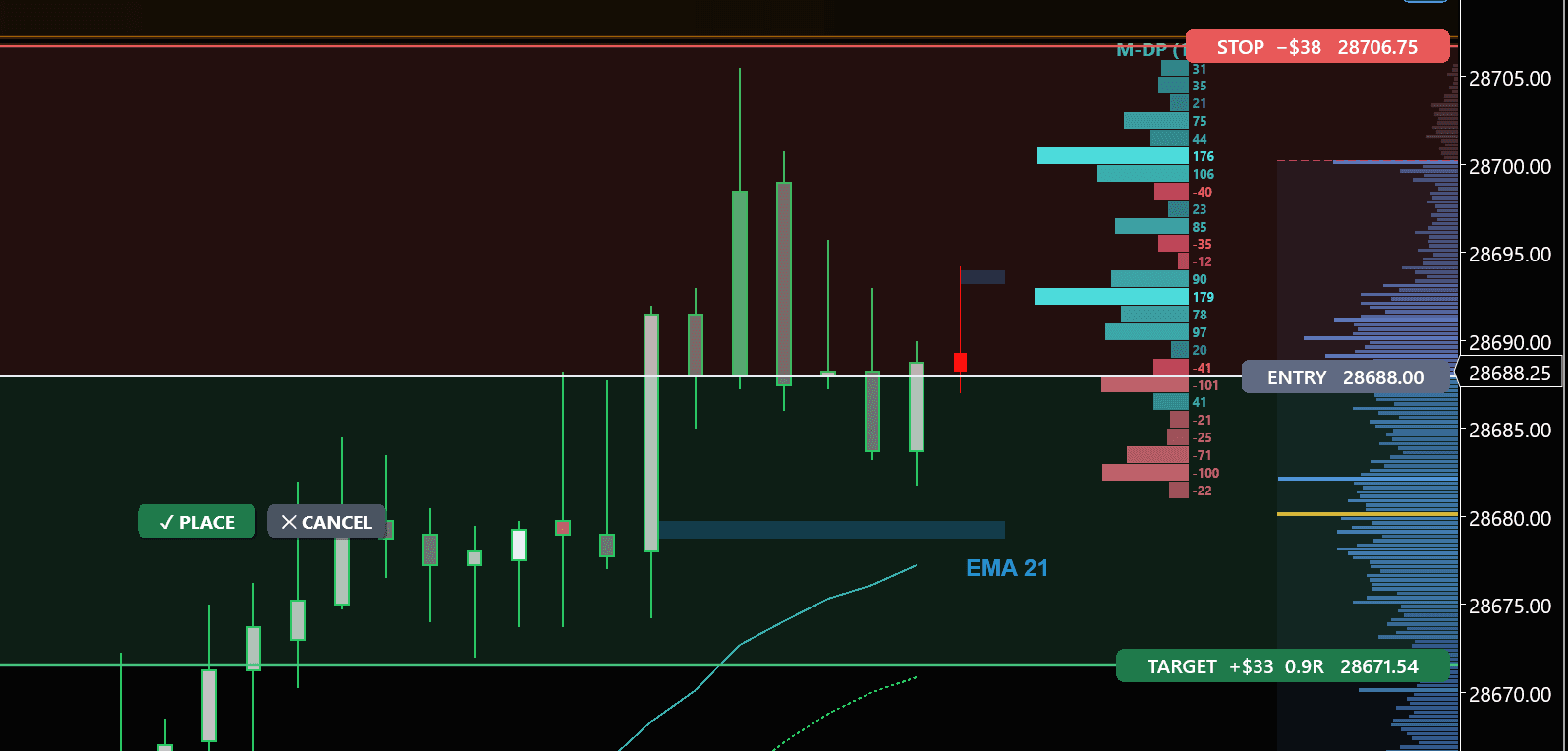
Draggable R:R Entries
Pull your stop to where you want it — the Auto Trader lays out entry, stop and target with live risk, then places the whole bracket in one click.
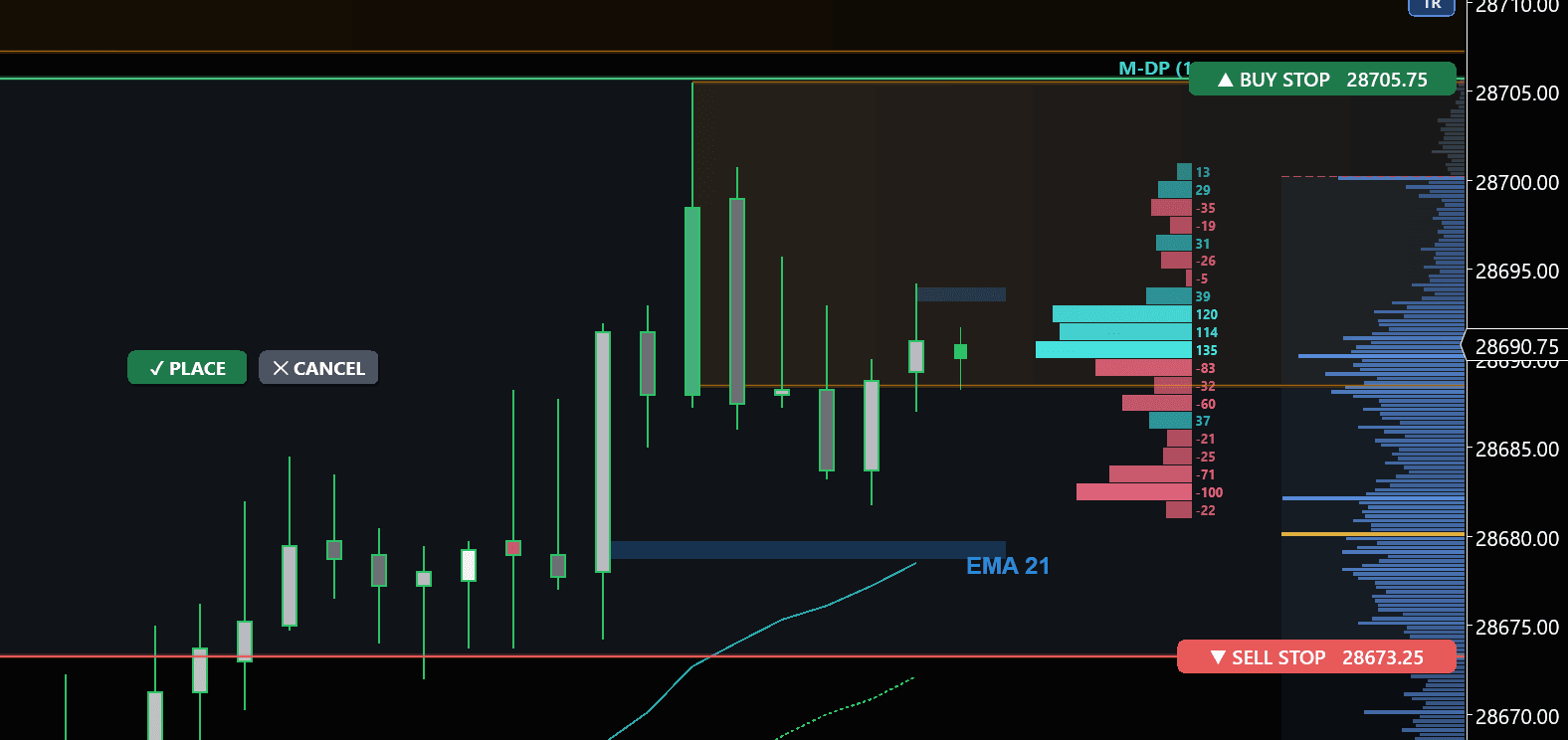
Draggable Range Breakouts
Drag across a range and the Breakout tool arms a buy-stop above it and a sell-stop below it — set to trade the break either way in one click.
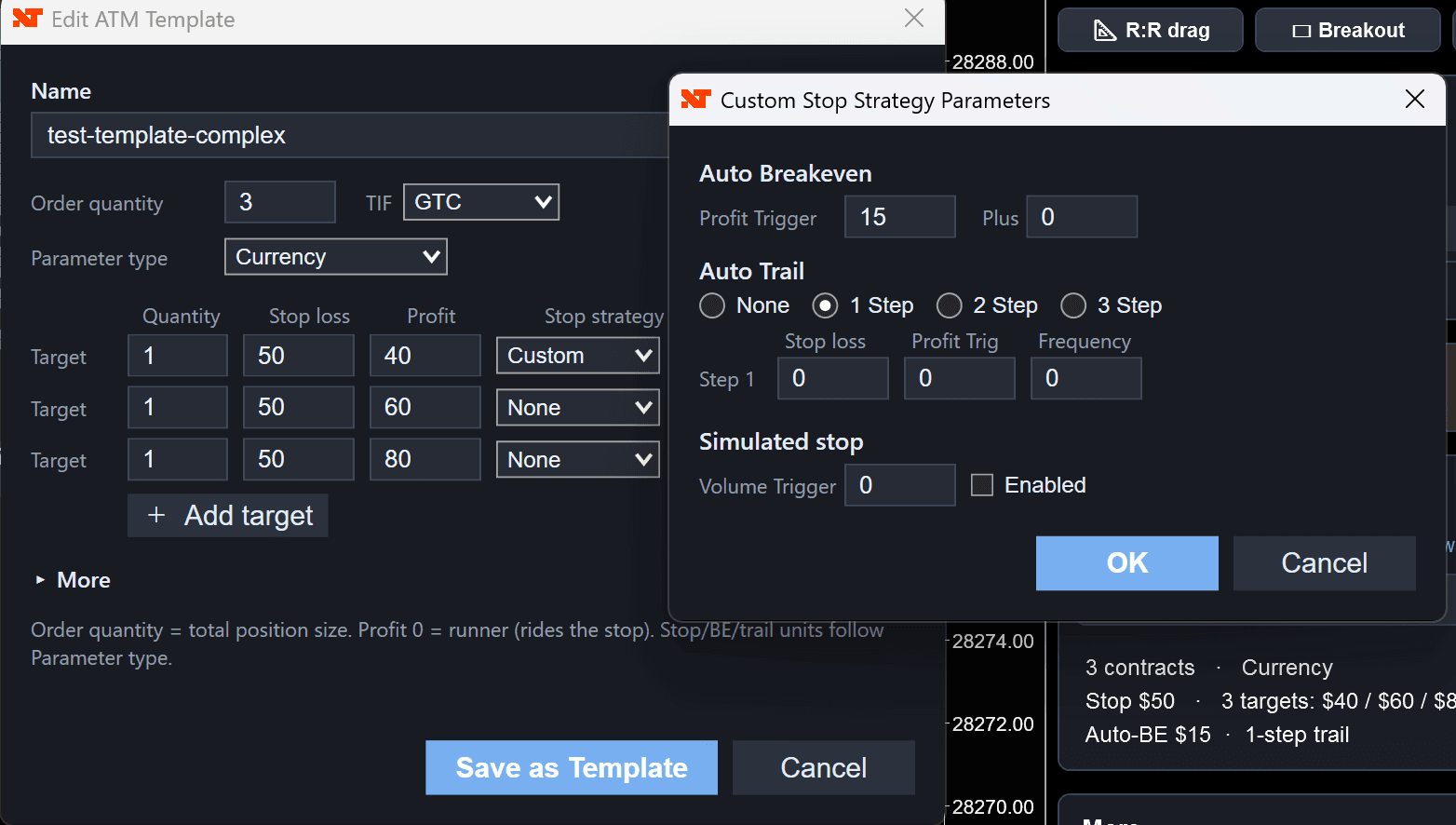
Custom ATM Strategies.
Build a full ATM strategy — multiple targets, per-target stop strategies, auto-breakeven and multi-step trailing — then hand it to the Auto Trader. Pick a saved template and the panel runs it end to end.
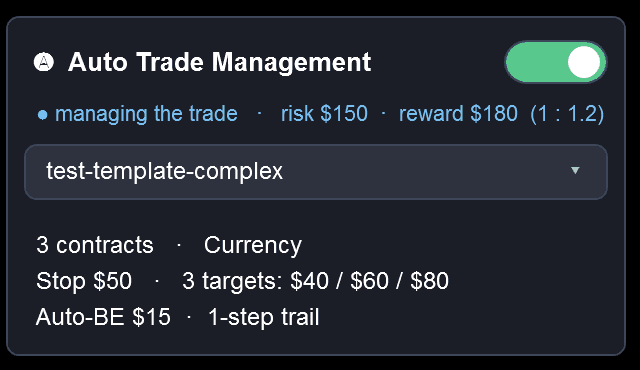
Everything Else It Handles for You
Toggle on only what you want — each one runs on its own once you're filled.
Auto Break-Even
Stop to break-even, with optional offset and per-instrument presets
Runner / Scale-Out
Take part off at the first target and let the rest ride the trail
Trail Behind Structure
Trail the last swing instead of a fixed distance
Time Flatten
Flatten the position at a time you set
Stagnation Exit
Optionally close out a trade that stalls
Risk Sizing
Size the position from the risk you're willing to take
Configurable Buttons
Reorder, offset, add or remove every entry and exit button
Risk Guards
Daily limits and drawdown — flatten-and-lock, block, or warn
Multi-Account P&L
Trade multiple accounts with live per-account and total P&L
Configurable Hotkeys
Buy, sell, close, reverse, close half, cancel all, stop to B/E
Click-To-Trade
Limit, stop and market orders straight from the chart
Light Mode, Too
The whole panel runs in a clean light theme
Test on a SIM account first. Before you place a single live trade, run the Auto Trader on a SIM account and get familiar with exactly how it manages a position — how it enters, trails and exits. It's included for every customer. Trading involves risk, including the loss of principal.
Two Views of Market Aggression
Other platforms sell cumulative delta and delta bars as separate paid indicators. We've built both directly into the same indicator as the footprint — a first for NinjaTrader. Toggle between them instantly from the menu. Cumulative Delta tracks the running session total of aggressive buying minus selling, answering the big-picture question: who has been in control all day? Delta Bars show the net aggression on each individual bar, so you can see exactly how much conviction is behind every candle.
Both modes render with Bollinger Bands, EMAs, and a built-in delta squeeze detector — when the bands compress, delta is coiling and a large directional move is about to fire. Bars are colored by imbalance direction and intensity, and you can choose from 10+ themes that match your chart style.
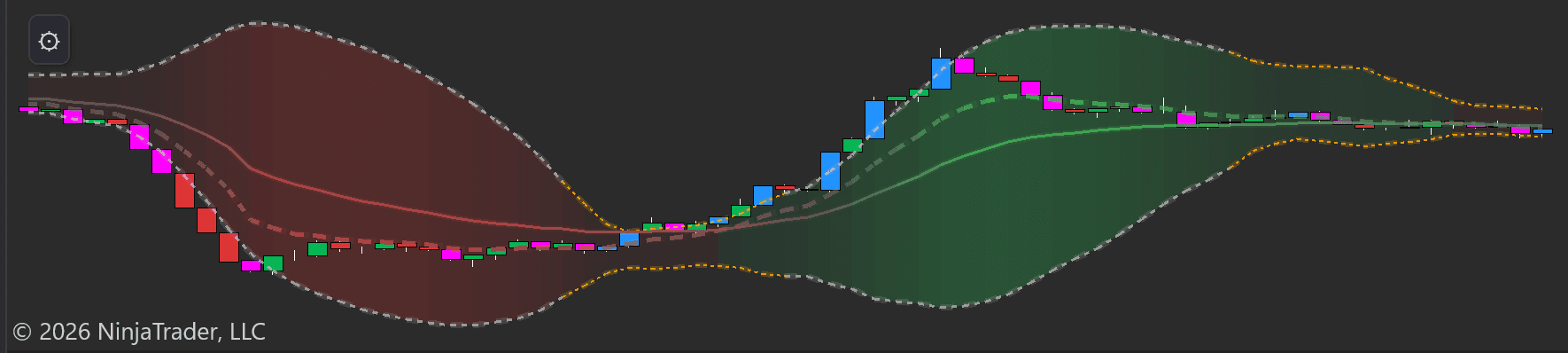
Cumulative Delta
The cumulative delta flows as a multi-colored ribbon beneath your chart with Bollinger Bands and EMAs. Rising ribbon = net aggressive buying is increasing. Falling ribbon = net aggressive selling. The colored bands make divergences between price and delta immediately visible — essential for spotting distribution at tops and accumulation at bottoms.
When the Bollinger Bands squeeze tight, delta is consolidating — just like a price squeeze, a delta squeeze signals that aggressive volume is about to expand in one direction.
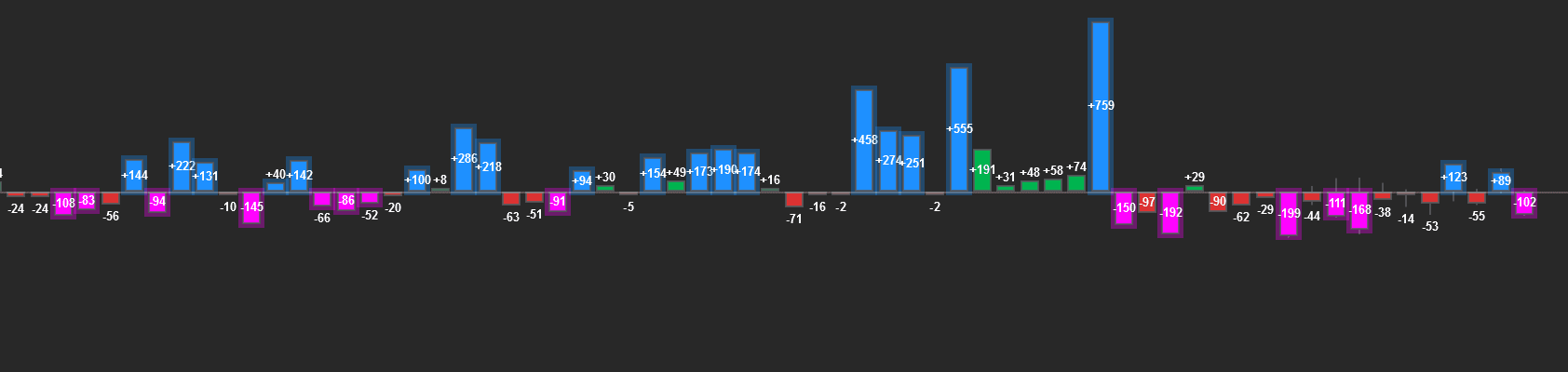
Delta Bars
Each candle gets a corresponding histogram bar: blue = positive delta (more volume at the ask), magenta = negative delta (more at the bid). The numeric label shows the exact value. A bar with +759 means 759 more contracts traded aggressively at the ask than at the bid.
Bars are colored by imbalance intensity — so extreme delta spikes stand out visually. Watch for large delta at key support/resistance levels to confirm institutional participation.
Bullish Divergence
Price makes a lower low, but CVD makes a higher low. Sellers are pushing price down, but there's less aggressive selling on each push — passive buyers are absorbing the flow. Watch for a reversal.
Bearish Divergence
Price makes a higher high, but CVD makes a lower high. Buyers are pushing price up with less conviction each time — smart money is selling into the rally. Watch for a reversal or distribution.
Pay attention to delta relative to the move. A large green candle with only +30 delta means the move was driven by passive order absorption, not aggressive buying — it's likely to reverse. A small candle with +500 delta means buyers are flooding in but being absorbed — expect the dam to break.
What this tells you
- Whether aggressive buying or selling is driving the current move
- The exact net buying vs. selling pressure on every single bar
- Divergences that signal hidden accumulation or distribution
- Delta squeeze — when Bollinger Bands compress, a directional explosion is coming
- Whether a breakout has real conviction behind it or is likely to fail
Where One Side Overwhelmed the Other
An imbalance occurs when buying or selling volume at a specific price level exceeds the other side by a significant ratio (typically 3:1 or more). A stacked imbalance is when 3 or more consecutive price levels show this same directional imbalance — signaling that large, aggressive orders swept through those prices.
These zones are significant because they represent prices where one side of the market committed heavily. When price returns to a stacked buying imbalance zone, remaining passive buy orders may still be resting there — creating support. Stacked selling imbalances mark prices where heavy selling occurred and often become resistance.
The indicator detects and plots these automatically:
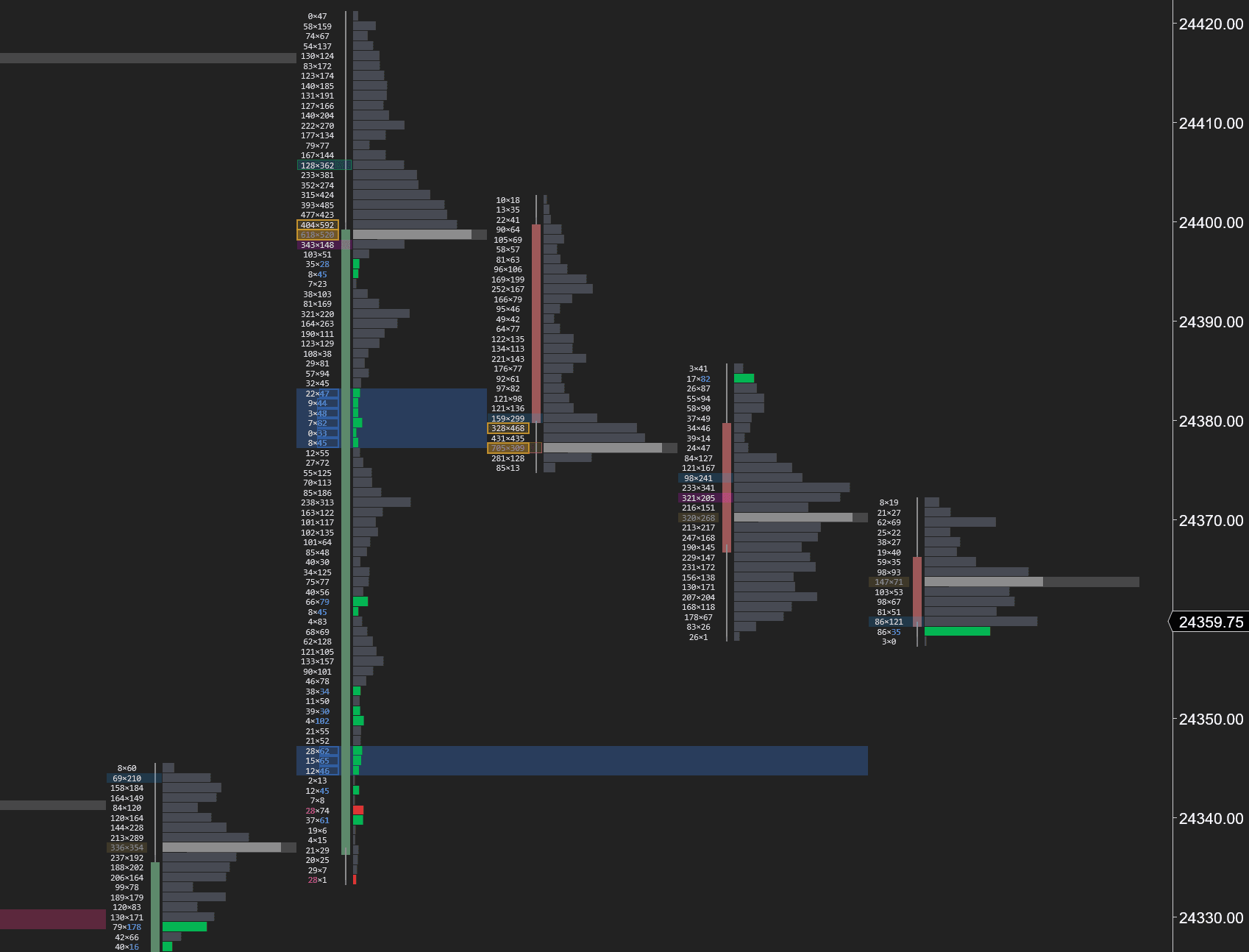
Stacked Imbalances Close-Up
Inside the footprint, stacked imbalance zones are highlighted as horizontal bands at the exact price levels where consecutive 3:1+ imbalances occurred. These bands mark the precise prices where large aggressive orders entered — the footprint of institutional activity.
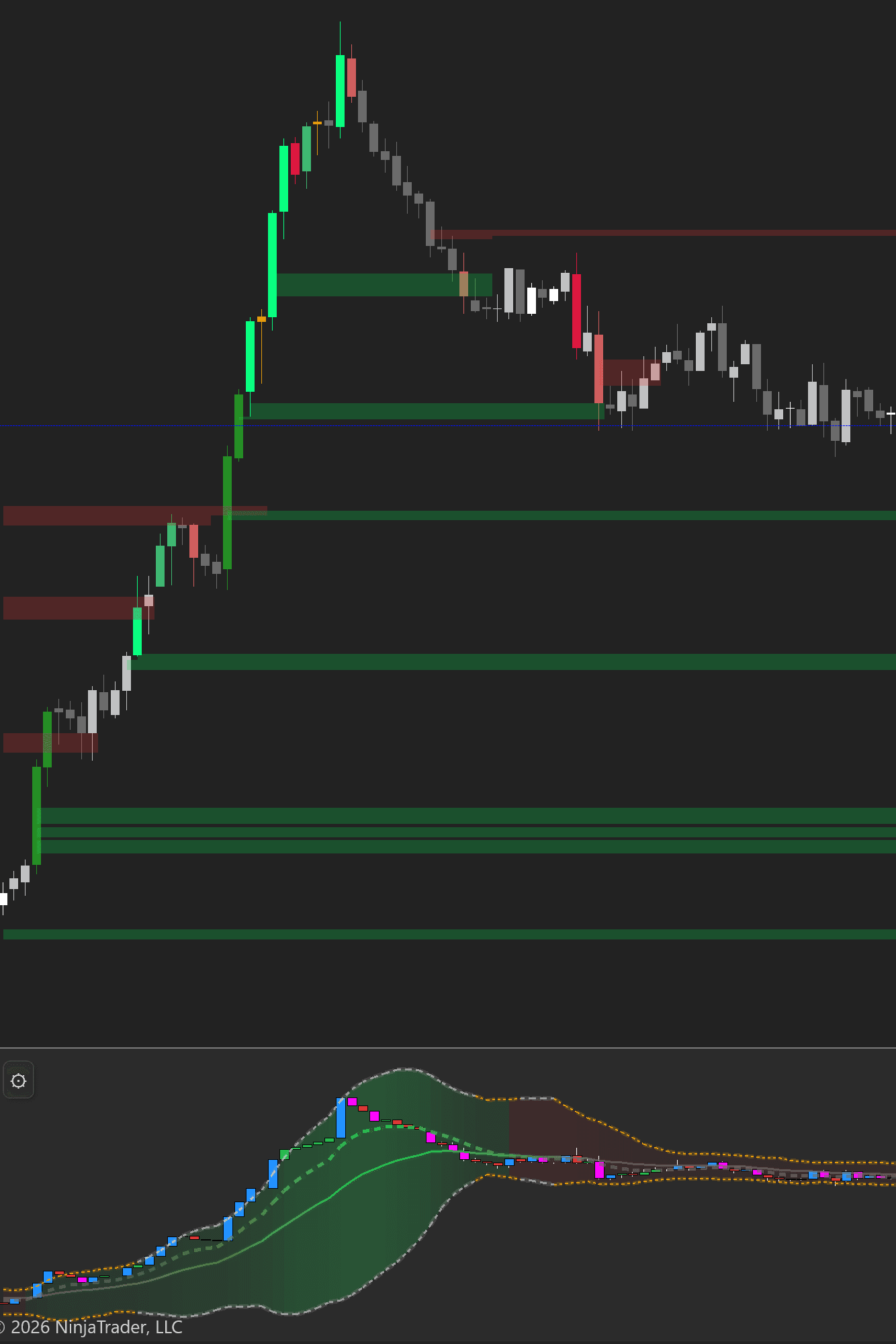
Imbalance Zones on Chart
A 1-minute NQ chart with 5-minute stacked imbalance zones projecting forward — green for buying (support), red for selling (resistance). The cumulative delta ribbon confirmed the downtrend the entire way, and the aggressive negative delta spike at the bottom marked the exhaustion point. Imbalance zones mark the levels, delta confirms the direction.
Reading the Phases of a Trade:
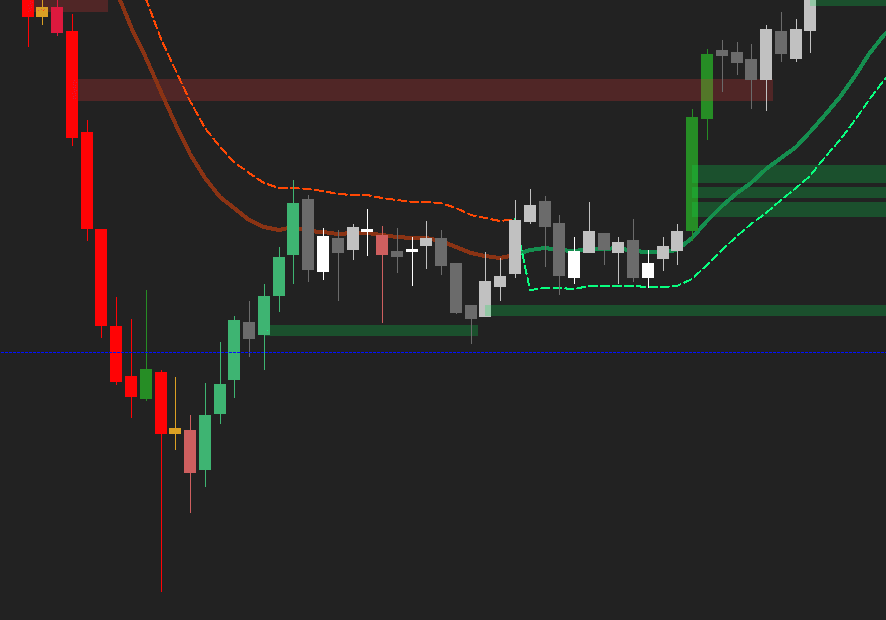
Imbalance Takeout
Bullish buying takes out a bearish stacked imbalance zone (red). Green imbalance zones form below as buyers establish a new floor. The EMA crossover is just beginning.
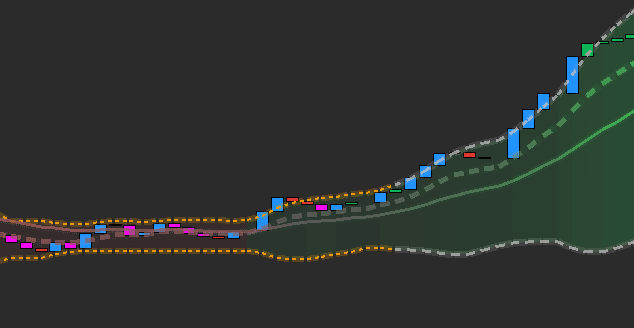
Delta Squeeze Breaks
Cumulative delta breaks out of a squeeze — Bollinger Bands expand as aggressive blue prints flood in. The delta bars flip strongly positive, confirming the trend has legs.
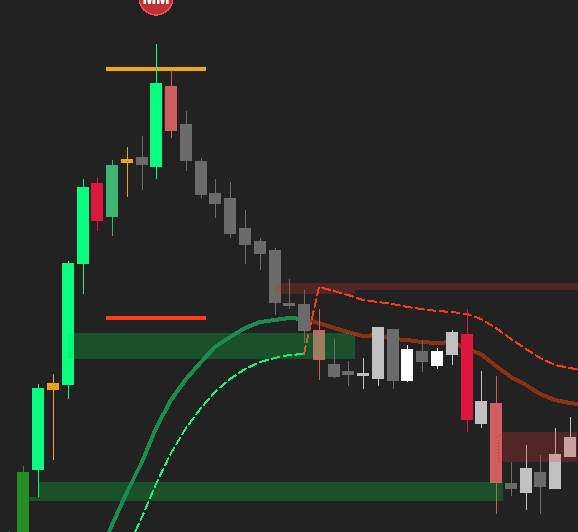
Exhaustion & Reversal
Price tops out at a bearish imbalance zone (red). Selling imbalances form at the high, EMAs cross bearish, and a new selling imbalance zone projects forward as resistance.
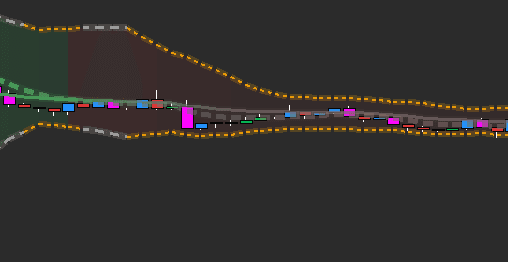
Delta Confirms the Turn
Cumulative delta transitions from green to red — the squeeze compresses and then breaks bearish. Aggressive magenta prints confirm sellers have taken control.
Beyond Stacked Imbalances — 10+ Signal Types:
Big Imbalance
Single-level imbalances exceeding your min volume threshold
Oversized Imbalance
Extreme volume imbalances — often institutional block orders
Inverse Imbalance
Diagonal imbalances comparing bid at one price to ask at the next — early reversal signal
Reversal Imbalance
Imbalances that form against the prevailing trend direction
Absorption
Heavy aggressive volume hitting a level but price refuses to move — a large passive order is absorbing the flow
Exhaustion
Extreme volume at the end of a move with diminishing follow-through — the trend is running out of fuel
Stopping Volume
A spike in volume that halts a move — often marks the exact turning point
Fading Momentum
Delta decreasing bar-over-bar while price continues — weakening conviction signals reversal
Max Delta
The single bar with the highest delta in the visible range — marks peak aggression
The highest-probability setup in order flow trading: footprint absorption + CVD divergence at a stacked imbalance zone. When price retests a buying imbalance zone, the footprint shows absorption (heavy selling but price holds), and CVD diverges bullish — that's your entry.
Who Controls Each Price Level
The visible range delta profile combines a standard volume profile with delta coloring across your entire visible chart. Each row shows total volume and whether that volume was predominantly buying or selling. Blue bars = net buying dominated at that price. Red bars = net selling.
This gives you a complete picture of the battleground. Prices with heavy volume and net buying are levels where buyers have established a position — they'll likely defend it. Prices with heavy selling mark supply zones. When price approaches a high-volume, high-delta level, expect a strong reaction.
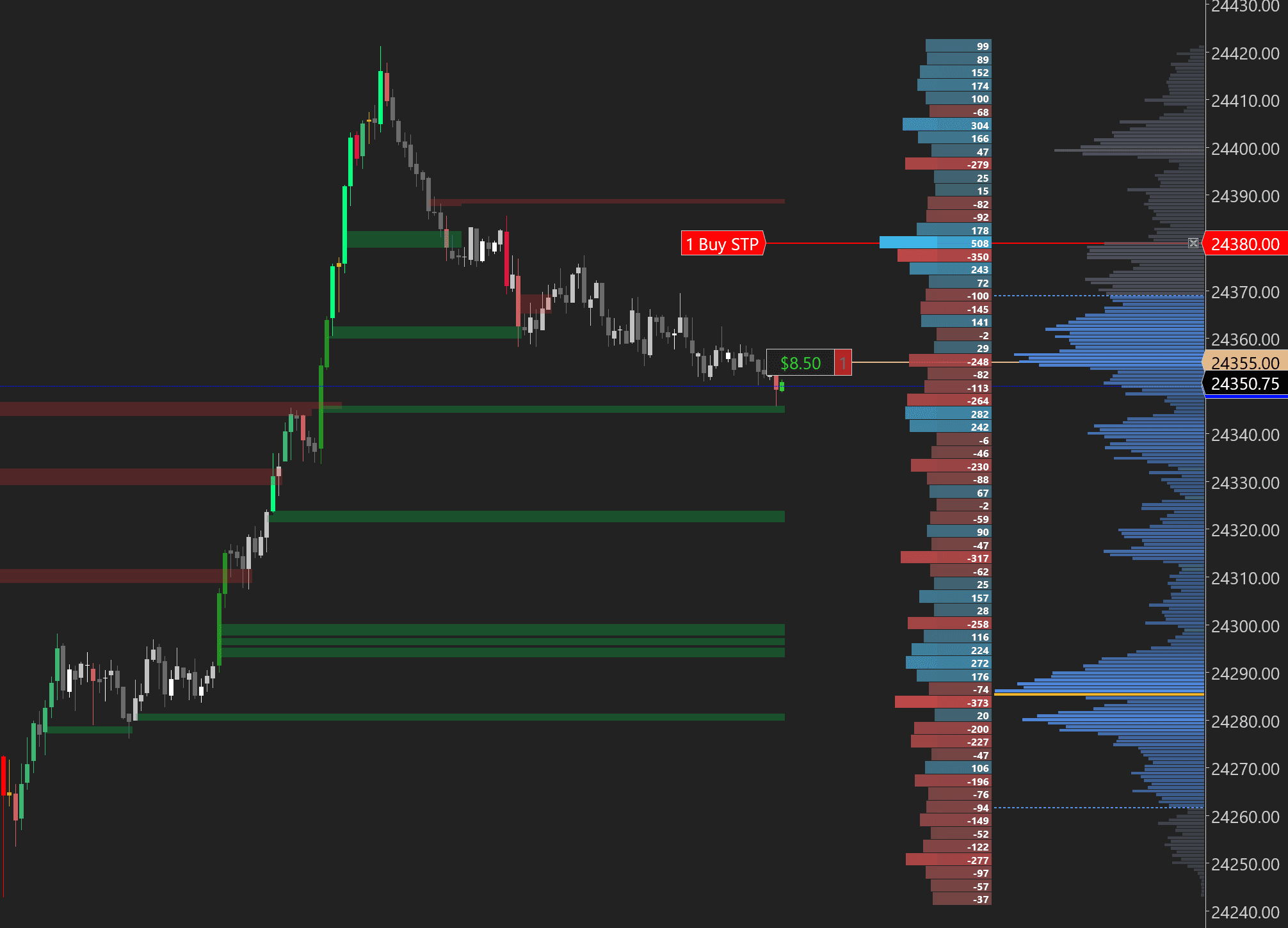
The delta-colored profile anchored to the right side of your chart. Blue rows = prices where aggressive buying exceeded selling. Red rows = selling-dominant prices. The gray volume profile appears behind it for context. The width of each bar shows total volume, the color shows who was in control. Use this to find high-conviction support and resistance based on actual order flow.
What this tells you
- Which side controls each price level across your entire visible range
- High-volume + high-delta levels where strong reactions are likely
- Supply zones (heavy red) and demand zones (heavy blue) based on real order flow
- Whether current price is above or below the delta-weighted POC
Use What You Need, Hide What You Don't
Not every session calls for a full footprint chart. Maybe you just want stacked imbalance zones on a clean candlestick chart. Maybe you want cumulative delta with a volume profile but no footprint bars. Every combination works — toggle any feature on or off from one unified menu. This is not five separate indicators duct-taped together. Every feature shares the same data pipeline, the same menu, and the same license.
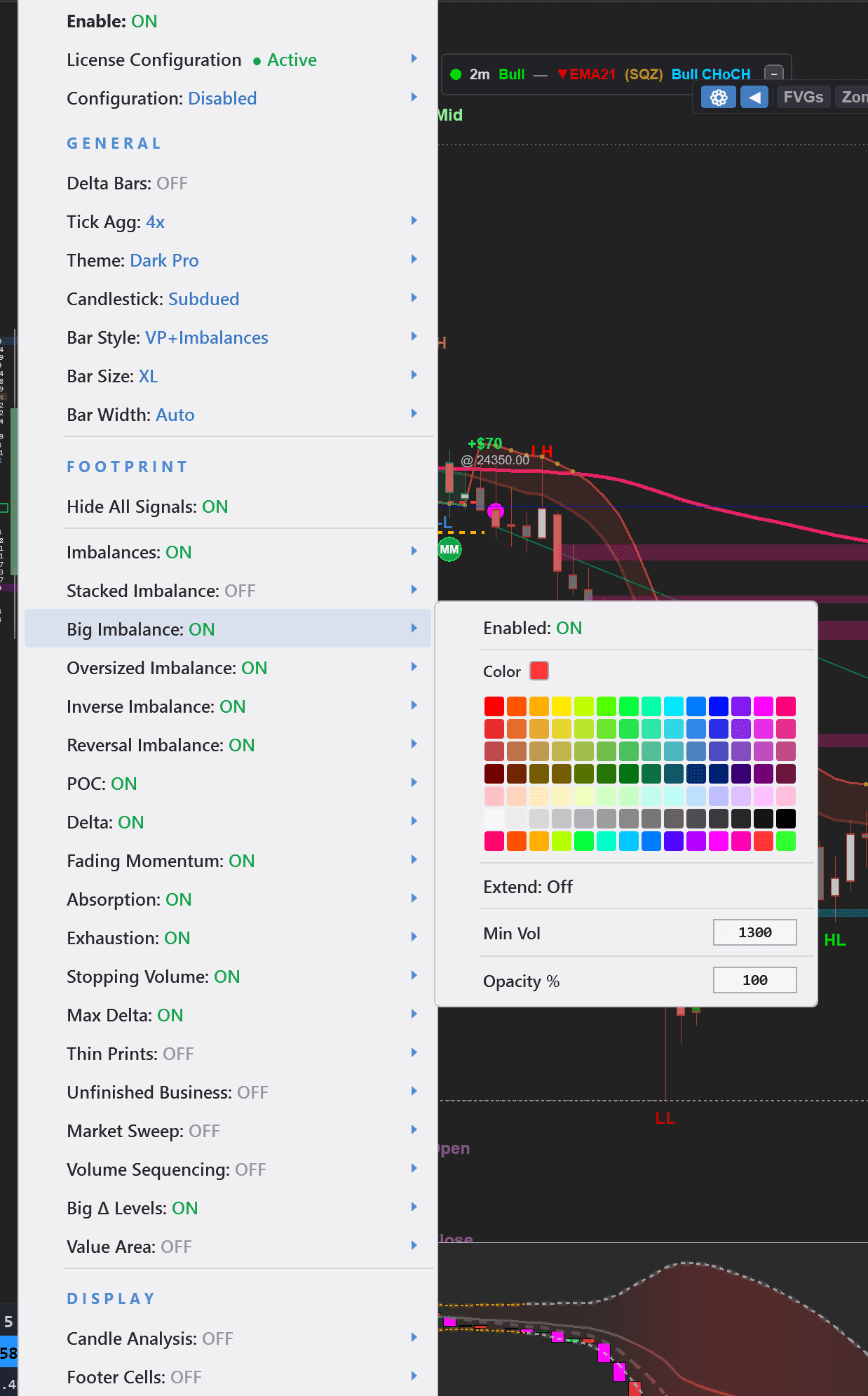
Everything In One Menu
Footprint
4 bar styles, tick aggregation, themes, candlestick style, bar size & width
Signals
Imbalances, Stacked Imbalances, Oversized, Inverse, Reversal, Absorption, Exhaustion, Stopping Volume, Fading Momentum, Max Delta, Unfinished Business
Profiles
Volume Profile (session/weekly/visible range), Market Profile (TPO), Delta Profile — all with independent colors, width, and opacity
Delta
Cumulative delta or delta bars with Bollinger Bands, EMAs, squeeze detection, and 10+ themes
New to order flow? Start with Bar Style: VP + Imbalances, Delta Bars: ON, and Stacked Imbalances: ON. This gives you volume context, delta confirmation, and key levels without overwhelming your chart.
Everything Included
Trade Journal — Built-In Performance Analytics
Track every trade automatically. View daily performance, analyze win rates, profit factors, and drawdowns. Connect your trading account and start building a complete journal of your edge.
Calendar View
See daily P&L, trade count, and win % at a glance
Dashboard
Weekly summary with charts, metrics, and trends
Trade Analysis
Detailed table of every trade with entry, exit, and P&L
Win Rate Tracking
Monitor your win % and profit factor over time
Drawdown Analysis
Track maximum drawdown and recovery patterns
Session Breakdown
Performance by session, instrument, and trading style
Daily Performance at a Glance
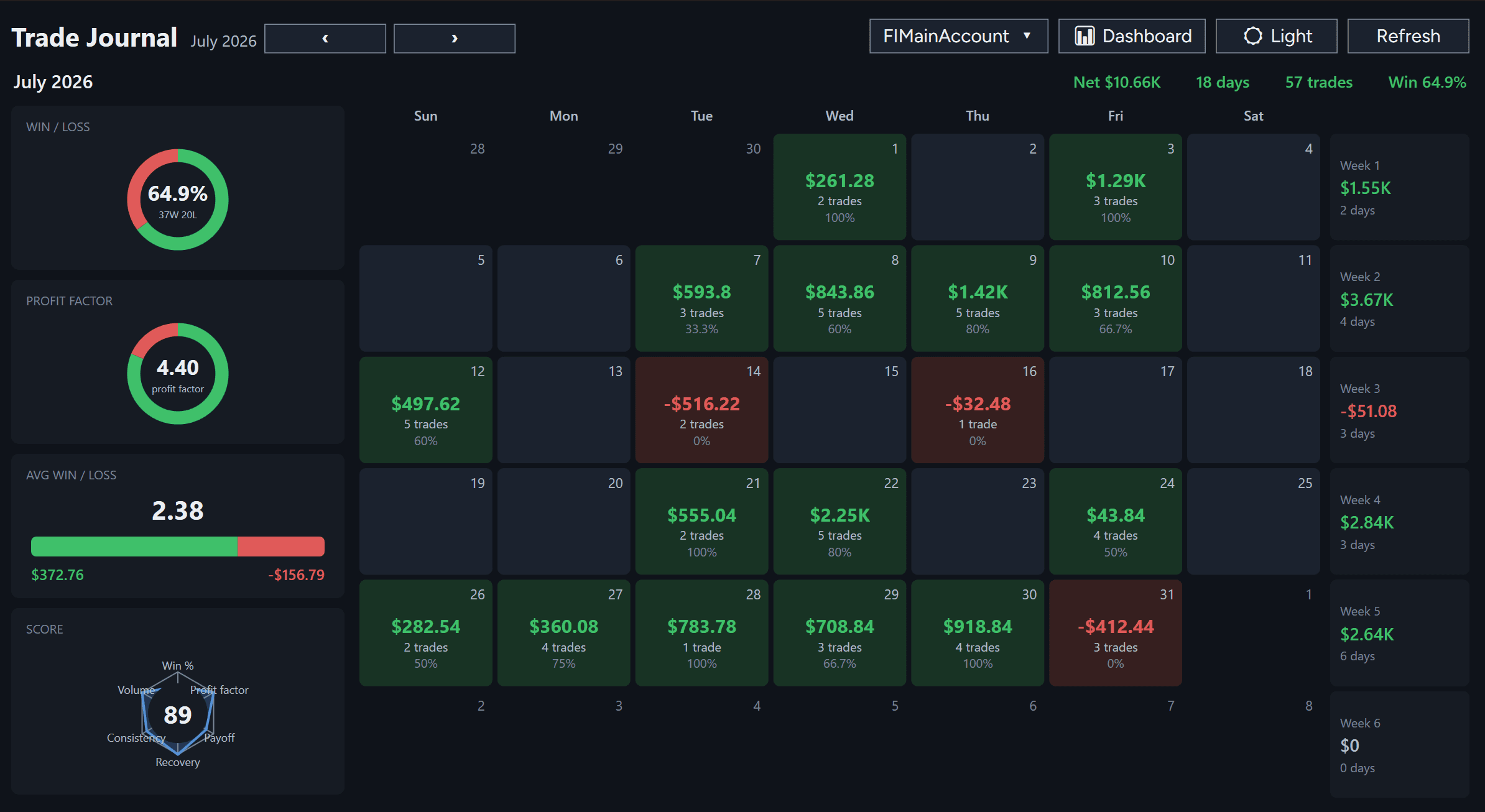
The calendar view gives you a bird's-eye view of your entire month. Every trading day displays your net profit/loss, number of trades, and win percentage for that session — all color-coded so winning days stand out at a glance.
Green Days = Profitable Trading
Winning days appear in green with your profit amount, trade count, and win rate. Instantly see which days your strategy worked and which ones need analysis.
Red Days = Losing Days Surface Patterns
Losing days appear in red with the loss amount. Track whether losses come from drawdowns on good setups, or from trading outside your edge. Click any day to drill into the trades.
Weekly Summary on the Right
The right sidebar shows rolling weekly totals: net P&L, days traded, total trade count, and aggregate win rate. Spot which weeks your edge was firing and which were off.
What this tells you
- Which days align with your best trading psychology
- Whether your edge holds up across different market conditions
- Patterns in profit and drawdown cycles
- Session-to-session consistency and variability
Use the calendar to spot your best and worst trading days, then review the trades from those sessions to understand what market conditions and setups matter most.
Weekly Summary with Charts
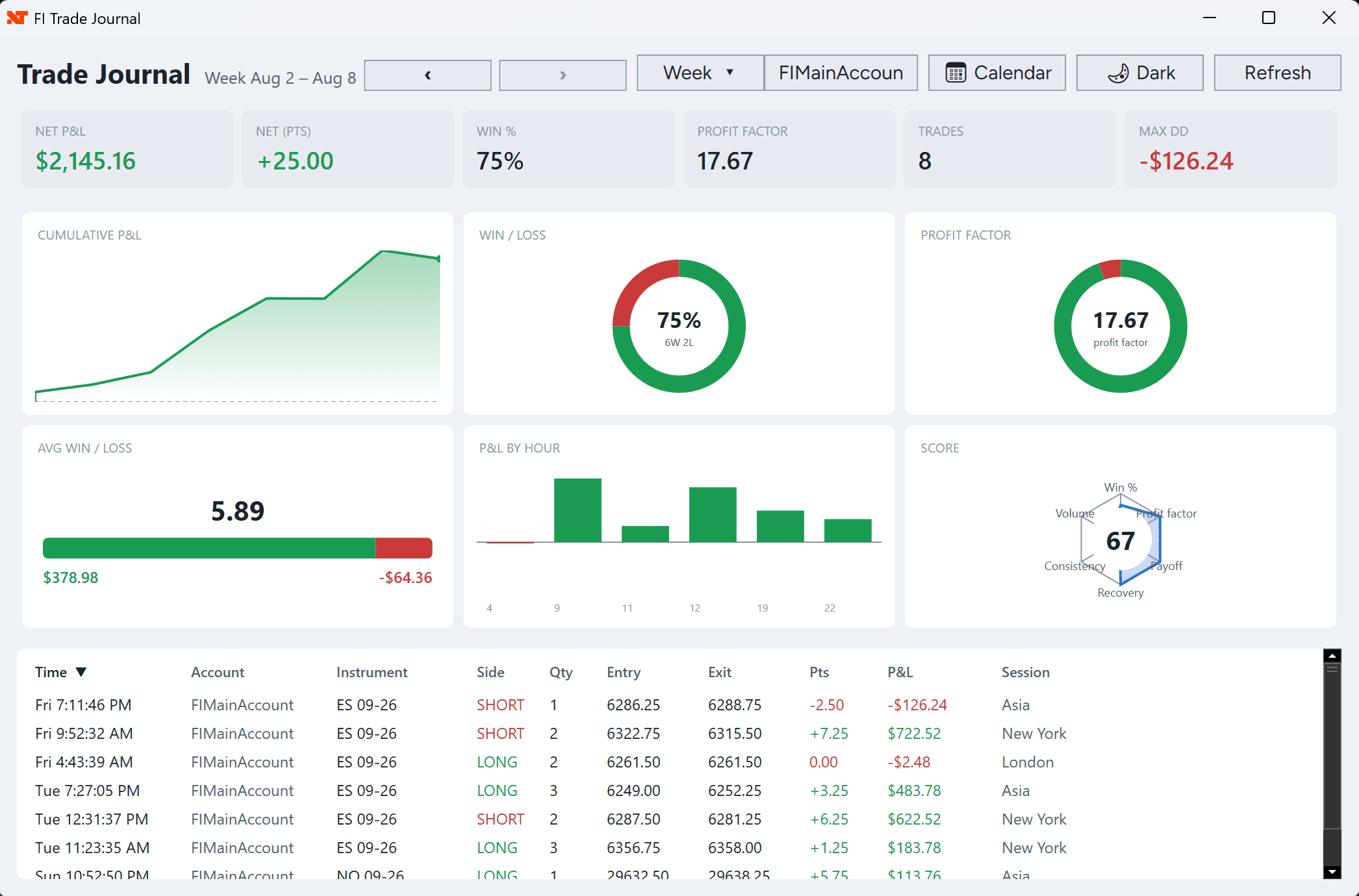
The dashboard view aggregates a week of trading into one screen with professional analytics: cumulative P&L chart, win/loss pie chart, profit factor, max drawdown, and a detailed trades table.
Cumulative P&L Chart
Watch your cumulative profit or loss across the trading week. See exactly when you hit your peak equity and whether losses were recovered in the same session.
Win Rate & Profit Factor
The pie chart shows your win percentage and the profit factor display shows your average win divided by average loss. A profit factor above 2.0 is considered strong.
Key Metrics at a Glance
Net P&L, Net Points, Win %, Profit Factor, Total Trades, and Max Drawdown — all visible above the detailed trades list so you can assess your week in seconds.
What this tells you
- Whether your win rate is sustainable
- If your average win is larger than your average loss
- Peak drawdown in the week and recovery time
- Trading volume and activity patterns per day
A 50% win rate with a 2:1 profit factor (wins 2x the size of losses) is mathematically profitable. Use these metrics to validate that your trading edge actually works.
Drill Into Every Trade
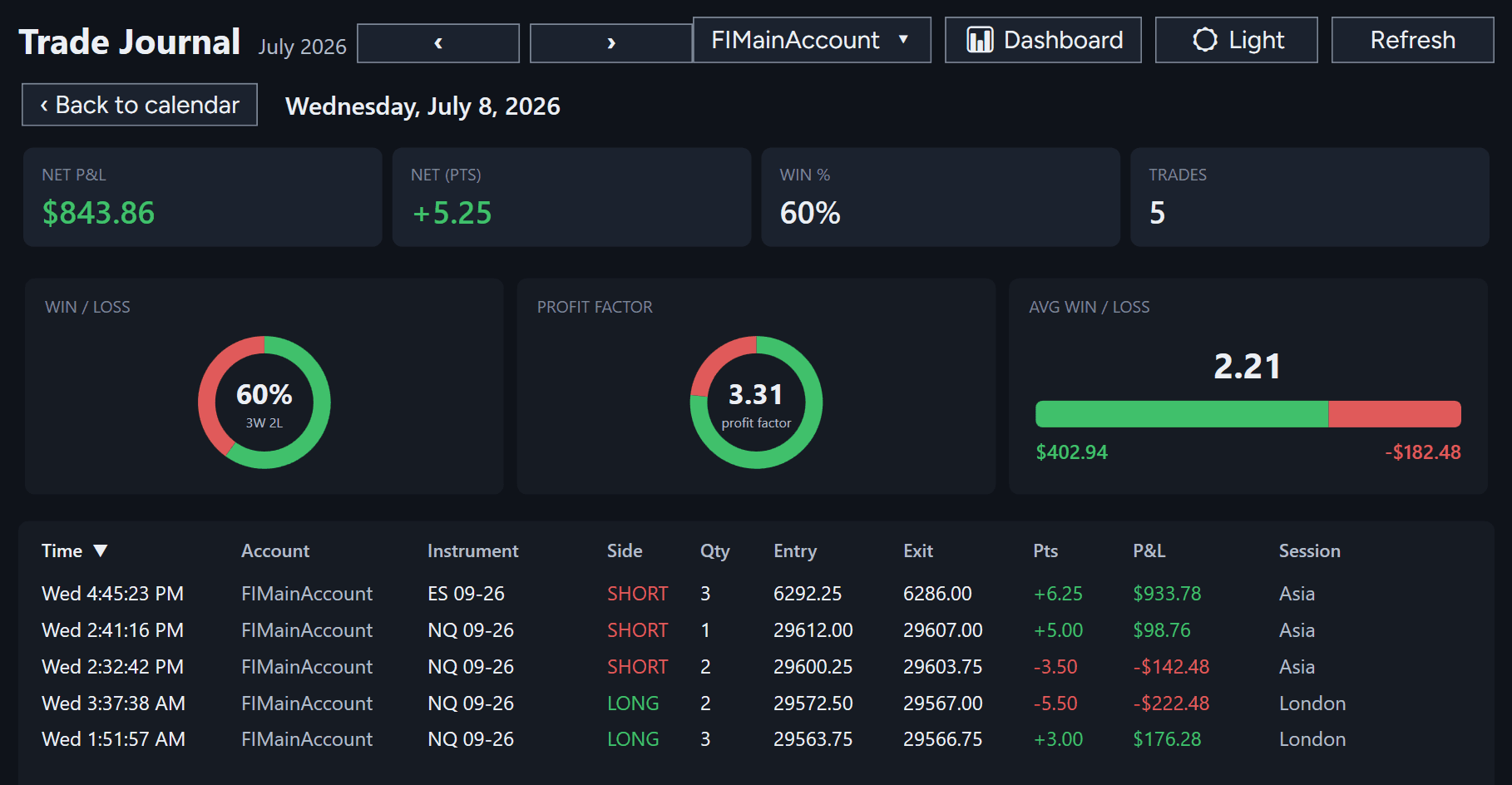
Click any calendar day and the journal switches to day view. You see the session's metrics, performance charts, and a complete table of every single trade: time, instrument, side (long/short), entry price, exit price, quantity, and P&L in dollars and points.
Complete Trade Audit Trail
Every field you need to review a trade is displayed: time of execution, instrument, direction, entry level, exit level, quantity, points gained/lost, P&L in dollars, and trading session zone (Asia, New York, London, etc.). Nothing is hidden.
Session-Level Metrics
At the top of the day view, see your session totals: NET P&L, NET PTS (points), WIN %, TRADES, WIN/LOSS pie chart, PROFIT FACTOR, and AVG WIN/LOSS breakdown. Spot outliers instantly.
Color-Coded Wins & Losses
Profitable trades show in green, losing trades in red, and breakeven trades in gray. Scan the table and your eyes immediately gravitate to problem trades so you can review them.
What this tells you
- Exactly which trades were most profitable
- Whether losses came from one or two bad trades, or consistent bleeding
- Trade timing relative to market sessions and volatility
- Your average winner and loser sizes for that session
Review your biggest 3 winners and 3 losers each week. Pattern matching those trades will reveal what works in your edge and what should be filtered out or avoided.
The Numbers That Matter
The Trade Journal calculates and displays the metrics every serious trader tracks to measure and optimize their edge:
Net P&L
Total profit or loss in dollars across your trades. The bottom line of your trading performance.
Win %
Percentage of trades that are profitable. A 50%+ win rate with proper risk management is tradeable.
Profit Factor
Gross profit divided by gross loss. A 2.0 factor means wins are 2× the size of losses on average.
Max Drawdown
Largest peak-to-trough decline in equity. Shows how much your account could drop in a worst-case sequence.
Avg Win / Avg Loss
Your average profitable trade vs. your average losing trade. Shows your risk:reward asymmetry.
Trade Count
Total number of trades in the period. More data = more reliable statistics about your edge.
Stop Paying for 5 Separate Indicators
Footprint. Volume Profile. Market Profile. Cumulative Delta. Delta Bars. Other platforms charge $50-150/month for each of these separately.
One indicator. One license. Lifetime access.