
Quantum Replay
The open happens once a day. This doesn't. Put Tuesday morning back on the screen on Saturday afternoon — the same tape, the same ladder, the same footprint — and read it as many times as you want. Now with an AI assistant that sets up the screen, reads the chart with you and tests your ideas on the sessions you replay.
Practice order flow when the market is shut. Replay a real NinjaTrader session tick by tick — the same tape, ladder and footprint that printed on the day — at 1x through 30x, as many times as you want, on a Saturday if that is when you have the time.
Version 1.0.34·Released
- Practice after hours — nights, weekends, any session you have
- Replays real recorded sessions, not generated data
- 1x, 2x, 5x, 10x and 30x — 30x is genuinely 30x
- Scrub, jump back an hour, or type a time to land on it
- Footprint, depth ladder and profiles rebuilt from the ticks
- Drawn on the GPU — smooth at every speed
- Seek anywhere in the day without waiting
- Multi-timeframe panes and pop-out windows
- Drawing tools and configurable themes
- Native desktop app — Windows now, macOS to follow
- Included free with FIOrderFlow + FIMarketStructure
Full replay, every study. Cancel any time.
Billed monthly. Cancel from your dashboard whenever you like.
No credit card required. Full access for 5 days.
Own both indicators?
Quantum is FIOrderFlow and FIMarketStructure in one application, so holding both licenses runs it unrestricted — live feed, live trading and replay — at no extra cost.
Five-day trial, no card. The clock starts on first sign-in from the app.
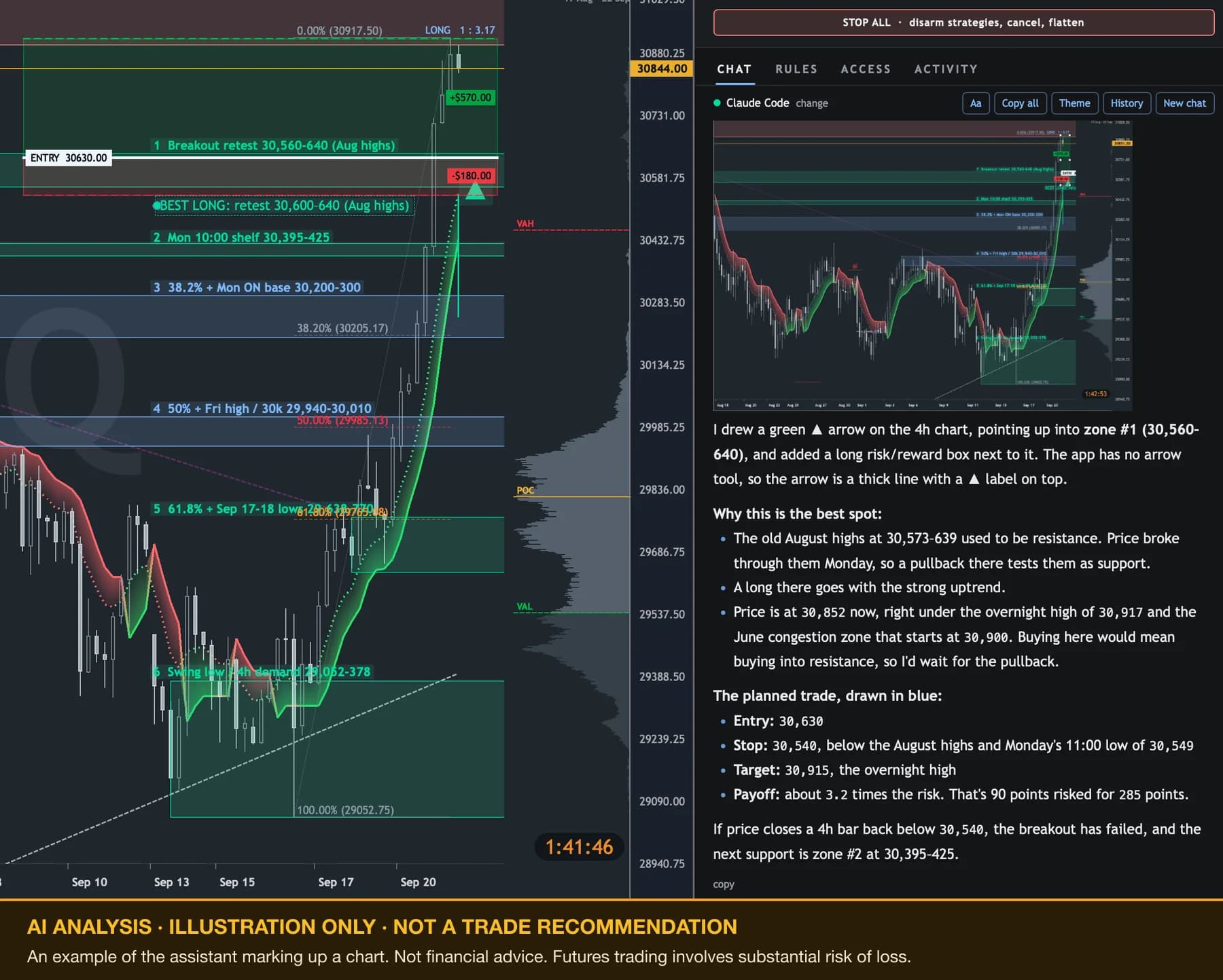
A real reply from AI Control: on the 4-hour chart it drew six numbered zones, the fib levels and a risk/reward box, took a picture of the result for the chat, and explained each level. Shown as an example of the assistant's markup — not a trade recommendation or financial advice. Click to see it at full size.
New · AI Control
Ask for it in plain English
Quantum has an AI assistant built in that works the application itself. Ask it to set up a layout, load a session, read the footprint or test an idea, and it does it on screen in front of you, instead of explaining where to click.
- New tab · MNQ 12-26
- Chart · 5 minute
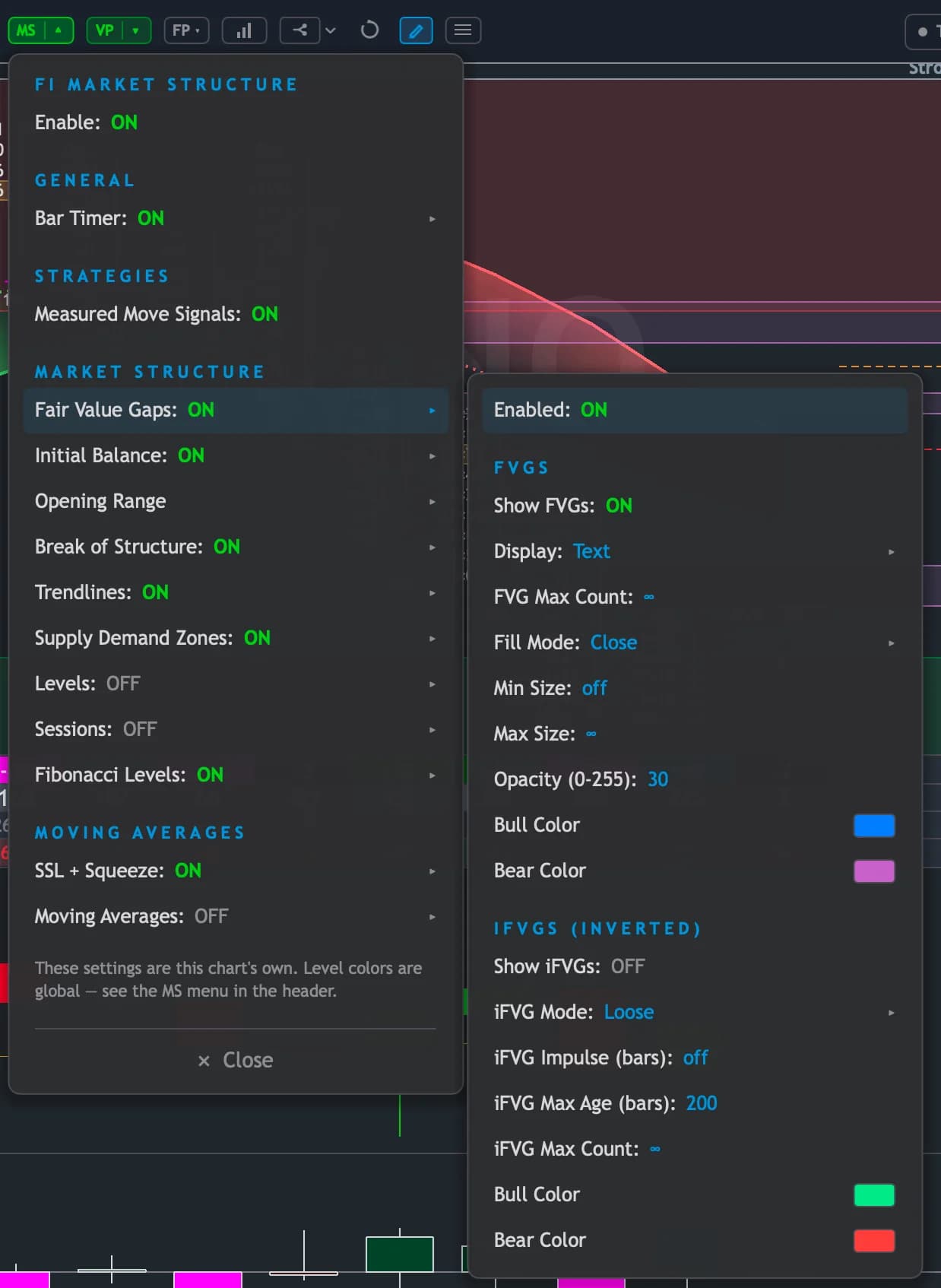
- Added FI Market Structure
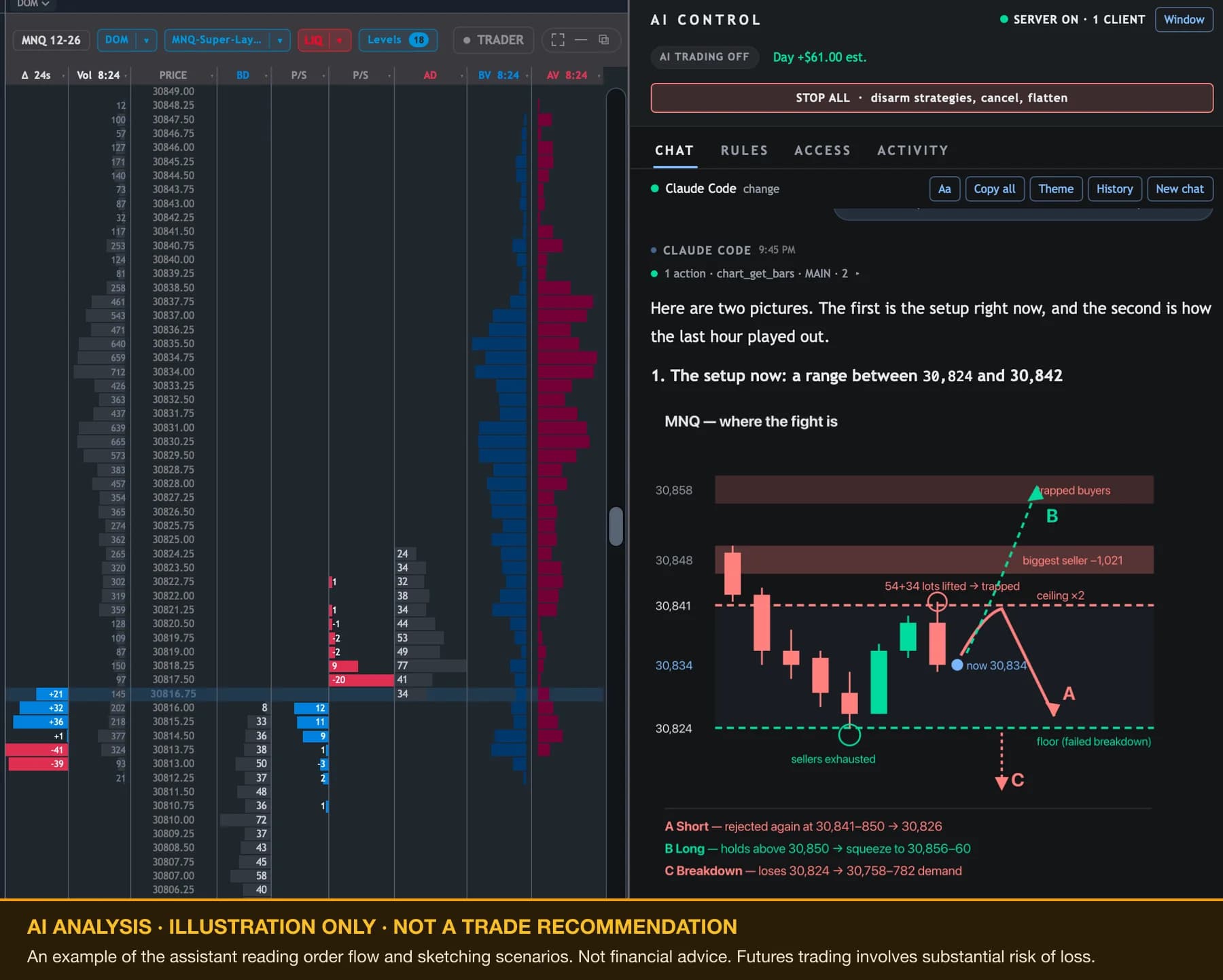
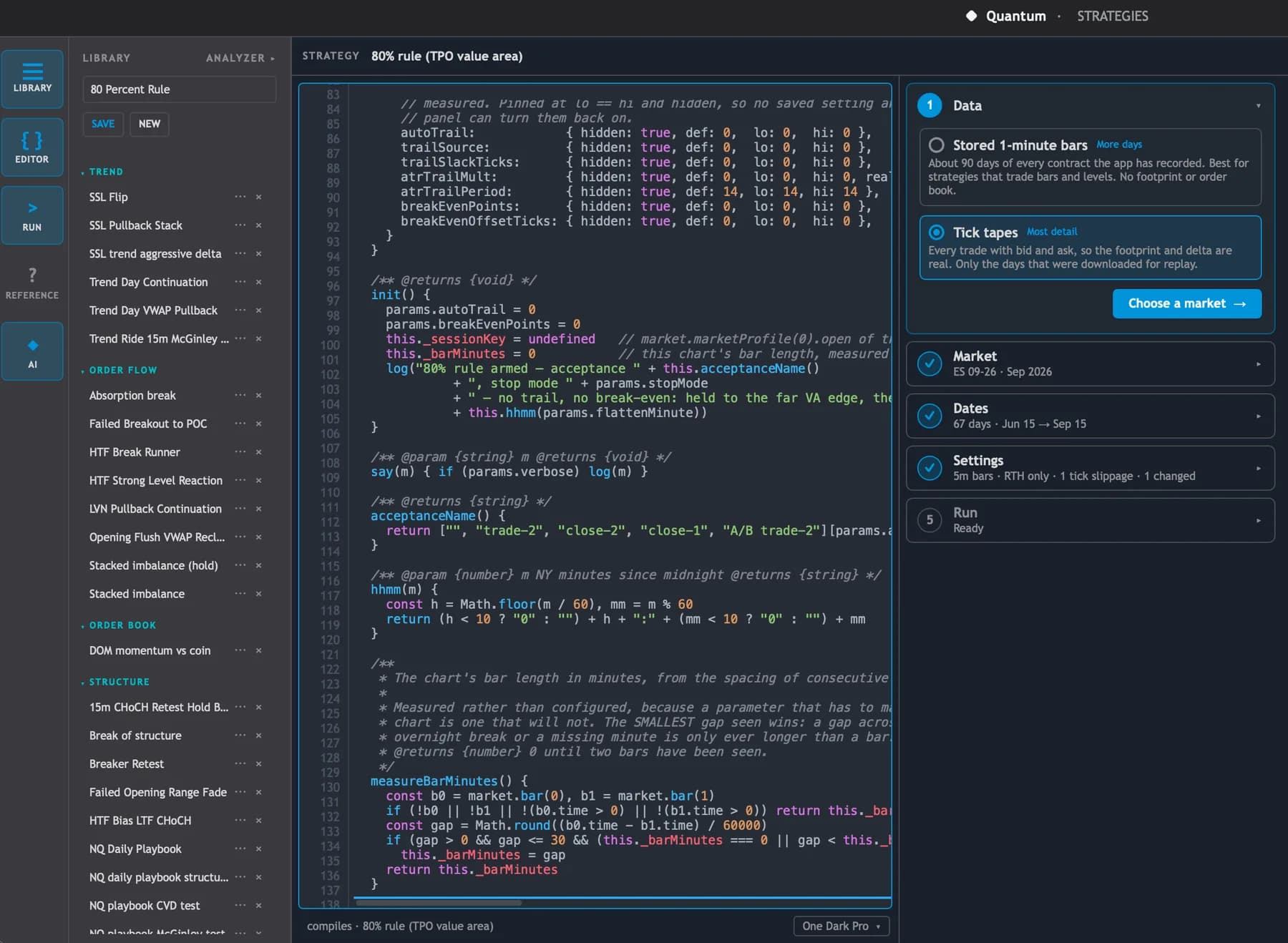
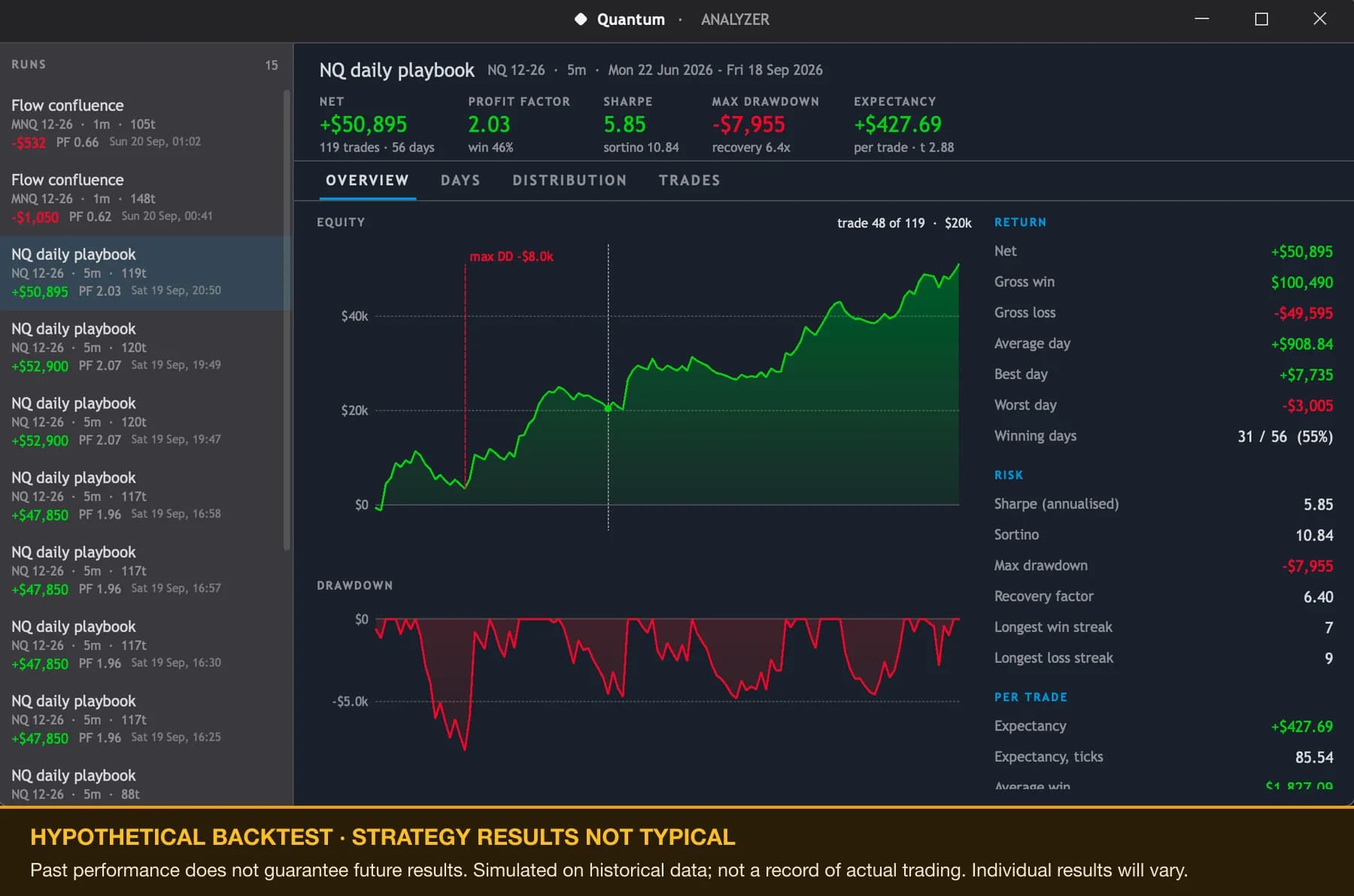
Hypothetical backtest — strategy results are not typical. Past performance does not guarantee future results. Hypothetical or simulated performance results have certain inherent limitations. Unlike an actual performance record, simulated results do not represent actual trading, and may have under- or over-compensated for the impact of certain market factors, such as lack of liquidity. Simulated trading programs in general are also subject to the fact that they are designed with the benefit of hindsight. No representation is being made that any account will or is likely to achieve profits or losses similar to those shown. Individual results will vary. Futures trading involves substantial risk of loss and is not suitable for every investor.
Sets up the screen for you
Workspaces, tabs, panes, timeframes and indicators, arranged the way you describe them. Say what you want to look at and it builds the layout instead of telling you where the menus are.
Reads the chart with you
It reads the same footprint, depth, delta, market profile and structure you are looking at, takes a picture of the chart, and marks it up with lines, zones and notes you can keep or delete.
Writes and tests strategies
Describe an idea in plain English. It writes the strategy, checks that it builds, and backtests it on your recorded sessions, then walks you through the results. The code is yours to read and change.
Runs the replay
Ask for last Tuesday's open on NQ at 10x and it fetches the day, loads it and plays it, pausing or jumping where you tell it to. The Replay window moves in front of you as it does.
From: “Buy the retest of the opening range high, stop under the low of the bar.”
What you see when the assistant wants to trade. Nothing moves until you choose.
Orders
You approve every trade
The assistant can prepare an order, but it goes nowhere until you approve it — or until you have set rules for it to trade inside. Orders carry a stop by default. Live orders need both indicator licenses; on the subscription and the trial, it trades replay sessions only.
Nothing is sent without you
Every order, every flatten and every armed strategy stops at a confirmation window first. It waits for you to press Approve. Walk away and it gives up on its own after a minute.
Or set the rules it trades inside
Off until you turn it on, one account at a time. You set the contract size, risk per order, daily loss limit, order count and trading hours. Anything outside them comes back to you for a decision.
One button stops everything
Turns AI trading off, disarms every strategy, cancels working orders and flattens the position. It is your button — the AI cannot press it, and cannot switch its own limits off.
A record of every decision
Each request is logged as approved, rejected, held for you or allowed by your rules, so you can see afterward exactly what it asked to do.
Your AI, your account
It uses an AI service you already have. Sign in with Claude Code and it runs on your existing Claude plan, with no key to paste in. Or pick another service and add its key. That usage is billed by the AI provider, not by us.
Or drive it from outside
Already work in Claude Code or Claude Desktop? Turn on outside access in Quantum's settings, paste the command it gives you, and the same controls are available from there. It is off until you turn it on, it only answers apps on your own computer, and you choose which areas are open — layouts, charts, drawings, strategies, replay, trading.
Every tool it offers is written up in the AI Control reference.
Why replay
The open happens once. Practice it a hundred times.
Learning to read order flow takes repetition, and the market hands out one open a day. So most people end up practicing in the worst place for it — live, mid-session, with a sim account and a live chart a click away. Replay moves the reps to the hours you actually have.
Nights and weekends
The session does not care what time you open it. Saturday morning with coffee is a better place to study Tuesday's open than Tuesday's open was.
The same session again
Watch a move you did not understand, then watch it again knowing how it ends, and again slowly through the part that mattered. You cannot ask the market to do that.
Nothing live in front of you
Studying a chart during the session with sim orders enabled is a short walk from trading it. In replay there is nothing to click into by accident.
30x is genuinely 30x. The screen keeps up with the clock instead of quietly falling behind it while the data piles up, which is the way most fast-forwards fail. Thirty minutes of the overnight takes a minute.
Land where you want, without a wait
Jump back an hour or fifteen minutes, drag the scrubber anywhere in the day, or type a time and go straight to it. No progress bar between deciding to look at something and looking at it.
Step one print at a time
Where it matters, stop the clock and advance by prints. The ladder, the delta and the imbalances move as they moved, rather than jumping a whole bar at a time.
Your Market Replay days, as they are
The sessions you have already downloaded in NinjaTrader are the sessions you can play. Pick the instrument, pick the date, and it is ready.
A replay is kept apart from live
Replaying a day never touches what has been captured live, so a profile you built on a real session stays exactly as it was.
Access
Two ways to run it
Quantum encompasses both of our indicators, so owning both is what unlocks it in full. If you don't own them, the subscription gives you the replay side on its own.
Included
You own FIOrderFlow and FIMarketStructure
Quantum is both indicators in one application — the order flow side and the structure side, drawn from the same tick stream. So the two licenses together are what unlocks it: live feed, live order routing through NinjaTrader, and replay, with nothing further to pay.
Sign in and download. Your existing licenses unlock it.
Subscription
Replay on its own
Every study, every pane and the full replay transport, running on recorded sessions. No live tick feed and no order routing — those come with the two perpetual licenses, which is the same line the trial sits on.
$49/month, cancel any time. Five-day trial first.
| What you get | Owns both indicators | Subscriber |
|---|---|---|
| Session replay — scrub, pause, step | Included | Included |
| Replay library and session history | Included | Included |
| Every study, pane and pop-out window | Included | Included |
| Drawing tools, themes, saved layouts | Included | Included |
| AI Control — layouts, chart reads, strategies, backtests | Included | Included |
| Live tick feed from NinjaTrader | Included | Not included |
| Live order routing, including AI orders you approve | Included | Not included |
Open documentation
Read the whole API before you buy anything
Strategies are plain JavaScript, and everything the chart computes is readable from one — the footprint ladder, market structure, the profiles and their overnight desks, 183 indicators. All of it is documented in the open, so you can see exactly what you would be writing against.
No account needed to read any of it.
Full walkthrough
Trading the open with Quantum
The whole application at work through a real open — the tape and the ladder as it goes, the footprint filling in behind it, and the profiles either side.
How it works
Connect, pick a day, press play
Quantum connects to NinjaTrader for its data and replays the Market Replay sessions you have exported. There is nothing to wire up and nothing to configure — the days you have are the days you can play.
01
It connects to NinjaTrader
Point it at the platform you already trade on and it reads the same market data you already have. No second data subscription, no separate feed to buy.
02
It replays your exported sessions
Quantum plays back NinjaTrader's Market Replay data, so you are stepping through a real session rather than a reconstruction of one — the prints, in the order they happened.
03
It draws on the GPU
The whole workspace is rendered on the graphics card. That is what keeps the footprint, the ladder and the profiles smooth at 30x instead of turning a fast-forward into a slideshow.
What is on screen
The same studies, live or replayed
You practice with the same instruments you would have on the screen live — nothing is held back from replay, and every pane can be popped into its own window across as many screens as you have.
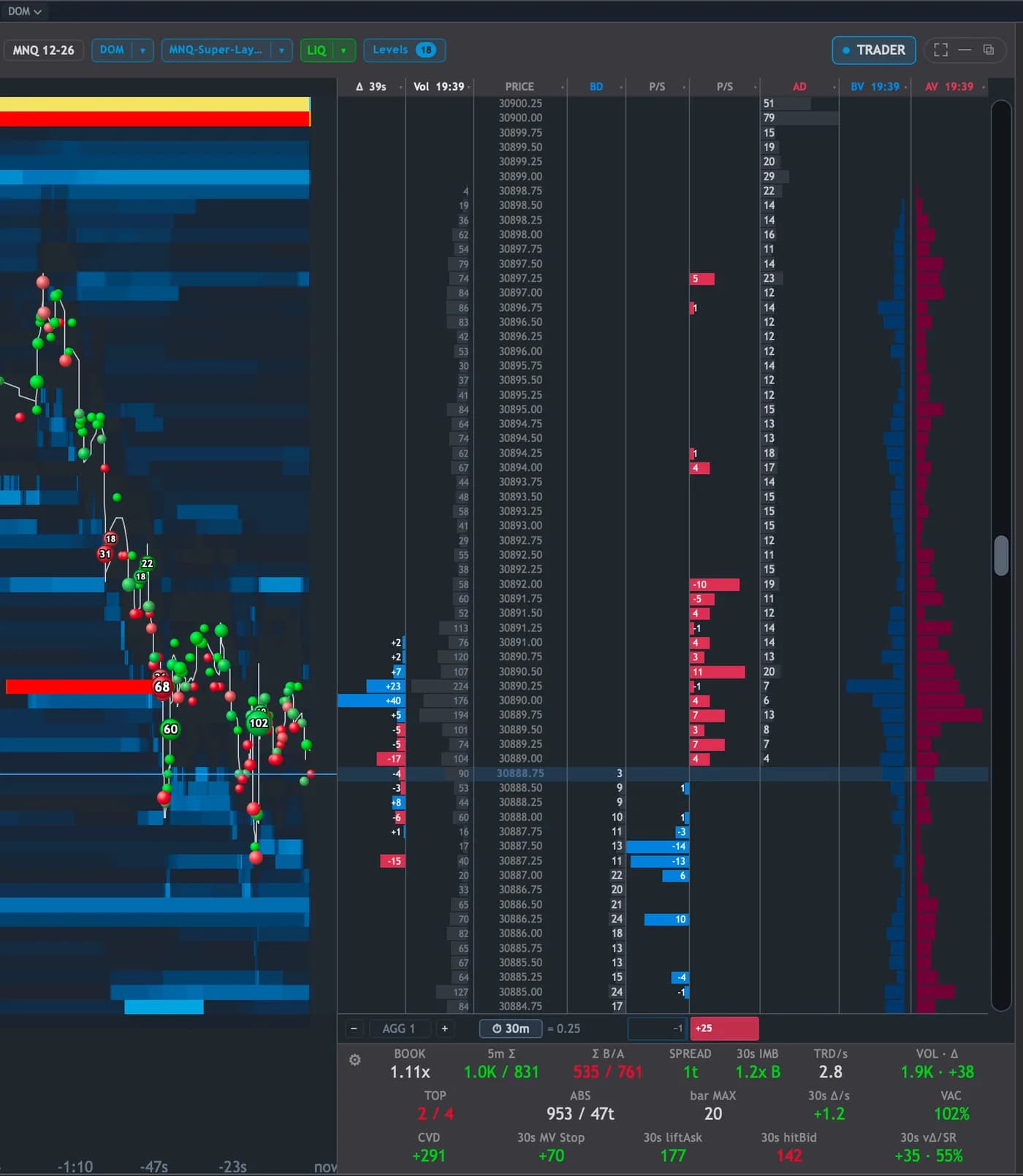
Depth ladder
Resting bid and ask size at every price, with a heatmap and per-price delta beside it.
Footprint
Bid and ask volume inside each bar, with imbalances marked where one side is being lifted through.
Volume at price
Session and composite profiles, maintained incrementally rather than re-aggregated on a timer.
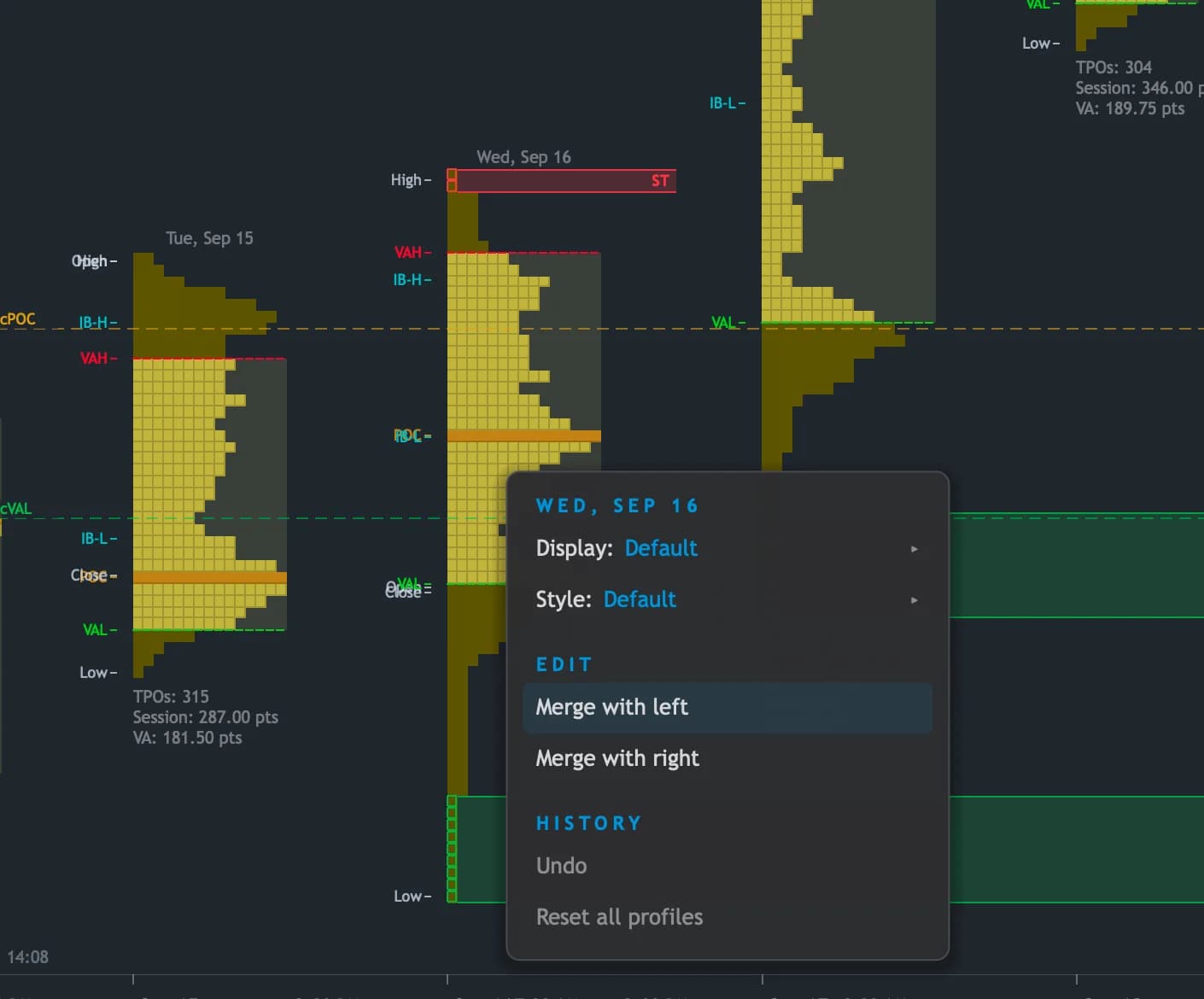
TPO profiles
Time price opportunity letters with value area, initial balance, single prints and tails.
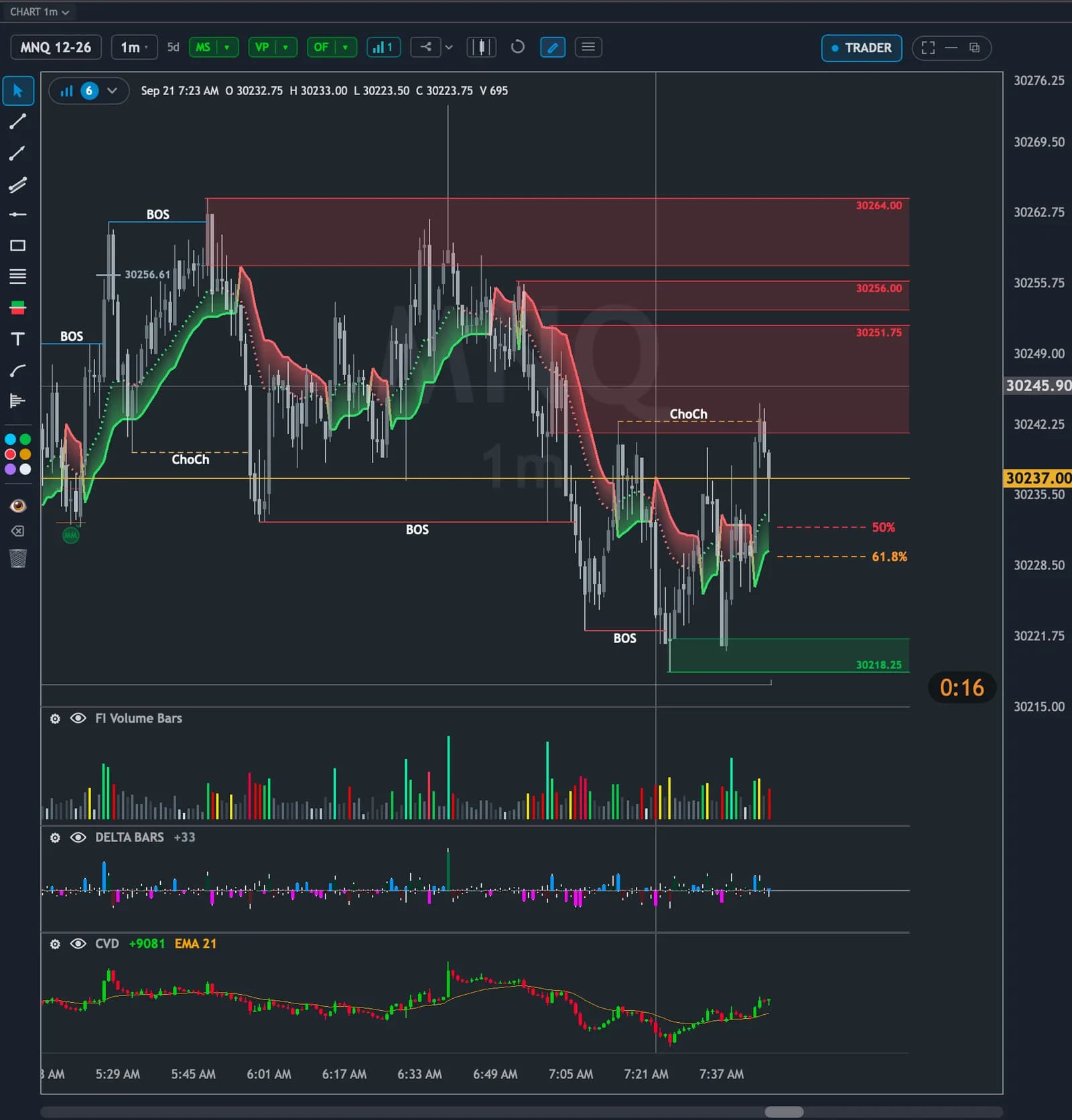
Market structure
BOS, CHoCH, strong and weak highs and lows, and measured moves on every timeframe at once.
Liquidity map
Where resting size has been sitting, and where it has been pulled.
Performance
Fast enough to be worth doing
Replay is only useful if you can move through a day quickly and stop dead where it matters. The rendering runs on the GPU and the indicator engine is native C++ compiled into the app — nothing is interpreted bar by bar, which is why the whole workspace keeps up: every pane, every profile, at every speed.
Seek without waiting
Drag the scrubber, jump back an hour, or type a time. It lands there and carries on — there is no rebuild to sit through between one part of the day and another.
The maths runs on bare metal
183 indicators, the footprint ladder, the profiles and market structure are all compiled C++ working on the data in memory. Strategies are JavaScript for the parts you write, and every number they ask for comes from that engine rather than being recomputed in script.
Smooth at every speed
The footprint, the depth ladder and the profiles are all live at 30x, not frozen until you slow down. Nothing is dropped from the screen to keep the clock moving.
As many panes as you need
Timeframes, instruments and studies in their own windows across as many screens as you have, all replaying in step with each other.
What you need to run it
NinjaTrader 8
Quantum connects to it for data, and it needs to be open for replay as well as live. The free license is enough — you do not need a paid plan to run your own data through it.
A market data connection
Whatever you already trade on: Kinetick, CQG, Rithmic or your broker's feed. Quantum reads what NinjaTrader receives and adds no data subscription of its own.
Windows or macOS, and a graphics card
Any modern GPU, including the integrated one in a laptop — that is what the charts are drawn on. On a Mac, NinjaTrader runs in a Windows virtual machine and Quantum connects to it.
Questions
Is this a NinjaTrader indicator?
No. Quantum is a separate desktop application with its own window, its own layouts and its own charts. It connects to NinjaTrader for data rather than living inside a NinjaTrader chart.
Do I need NinjaTrader to use the subscription?
Yes, and it needs to be open — for replay as well as live. Its free license is enough; you do not need a paid NinjaTrader plan to run your own data through it.
Is this a simulator?
No — it is the real session. Quantum plays back recorded NinjaTrader Market Replay data print by print, so the tape, the ladder and the footprint are the ones that actually happened on that day, not generated data that behaves how a simulator thinks a market behaves.
Why not just practice on sim during the session?
You can, and most people do — but the market gives you one open a day, and being in front of a live chart with a sim account is a short walk from trading it. Replay gives you the same session on a Sunday morning, as many times as you like, with nothing live in front of you.
Which sessions can I replay?
The Market Replay days you have downloaded in NinjaTrader. Pick the instrument, pick the date, press play — nothing to export or convert first.
Why does the free version need both indicators?
Because Quantum is both of them in one application. The order flow side — footprint, depth, delta, profiles — and the structure side — BOS, CHoCH, measured moves, key levels — are drawn from the same tick stream in the same window. Owning both licenses is what unlocks it in full.
Can I place live orders on the monthly plan?
No. The subscription and the trial are replay only. The live tick feed and order routing come with the two perpetual licenses.
What happens when my subscription ends?
You stay signed in and your recorded sessions stay on your machine, but Quantum stops opening them until you resubscribe. Cancelling leaves access running to the end of the period you have already paid for.
Which AI does AI Control use, and does it cost extra?
Whichever you choose: Claude, ChatGPT, Gemini, Grok, or a model running on your own machine. We don't charge anything extra for it. If you use Claude Code, it runs on your existing Claude plan; with any other service you add your own key, and that usage is billed by the provider.
Can the AI place trades?
Only the ones you allow. By default every order, flatten and armed strategy waits in a confirmation window for you to press Approve. You can instead set rules for it to trade inside — account by account, with limits on contracts, risk per order, daily loss and order count — and anything outside them still comes back to you. One button stops all AI trading and flattens the position. Live orders need both indicator licenses, and strategies it arms run on replay sessions in the current version.
Does it run on a Mac?
Yes — Quantum has a native macOS build as well as the Windows one. NinjaTrader itself only runs on Windows, so on a Mac you run NinjaTrader in a Windows virtual machine, such as Parallels, and Quantum connects to it there.
What does the trial include?
Five days of replay, with no card required. The clock starts the first time you sign in from the app rather than when you click the button, so setting it up does not cost you a day.
Five days of replay, no card
Pick a session you remember — one that trapped you, or one you sat out — and step through it print by print at whatever speed you can actually read. Tonight, rather than at 9:30 tomorrow.
No credit card required. Full access for 5 days.