
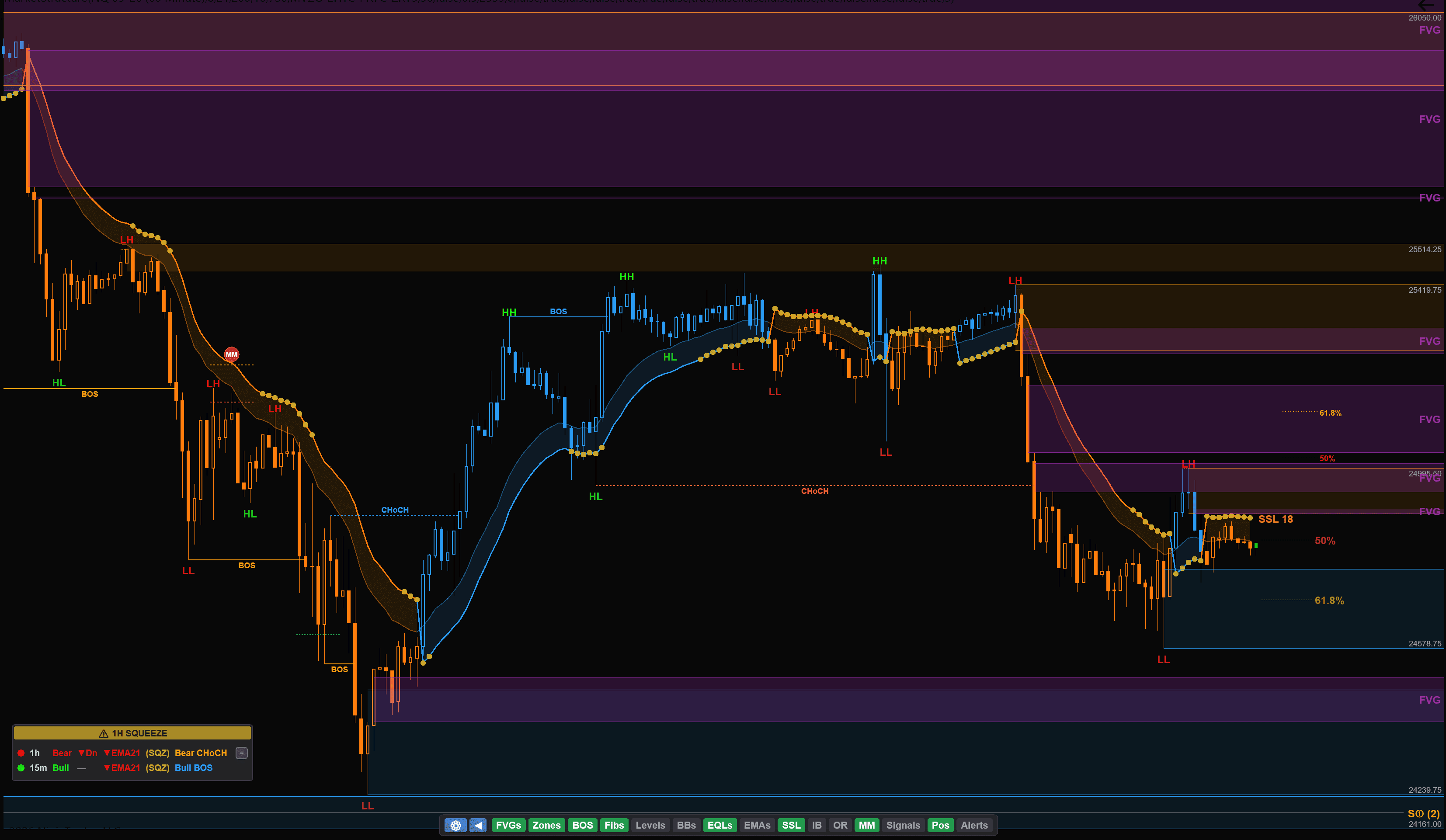
One Indicator. Everything You Need.
Market Structure, Volume Profile, Risk/Reward, Fibonacci Retracements, Measured Moves, Opening Range, Initial Balance, EMAs, SSL Channel, Squeeze, Multi-Timeframe Trend, Position Calculator, Key Levels, and Economic News — all in one indicator for NinjaTrader 8. Stop paying for 15 separate tools.
No payment or credit card required — just your email. Your license key is active for 5 days.
Features
Why Traders Choose Our Indicator
Replace 6+ separate indicators with one powerful tool. No other NinjaTrader indicator packs this much into a single package.
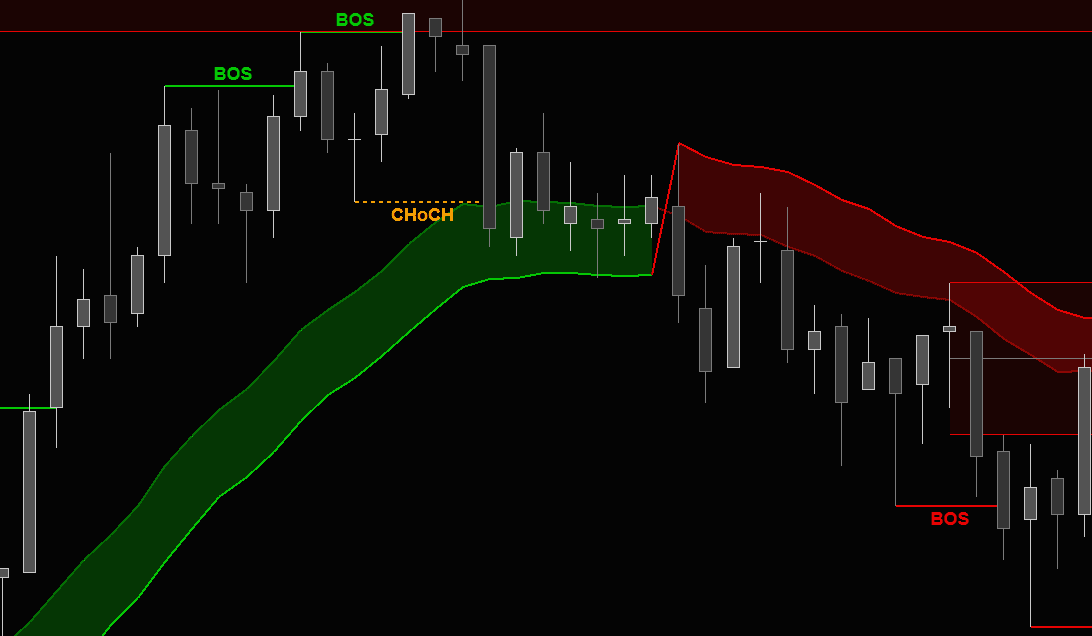
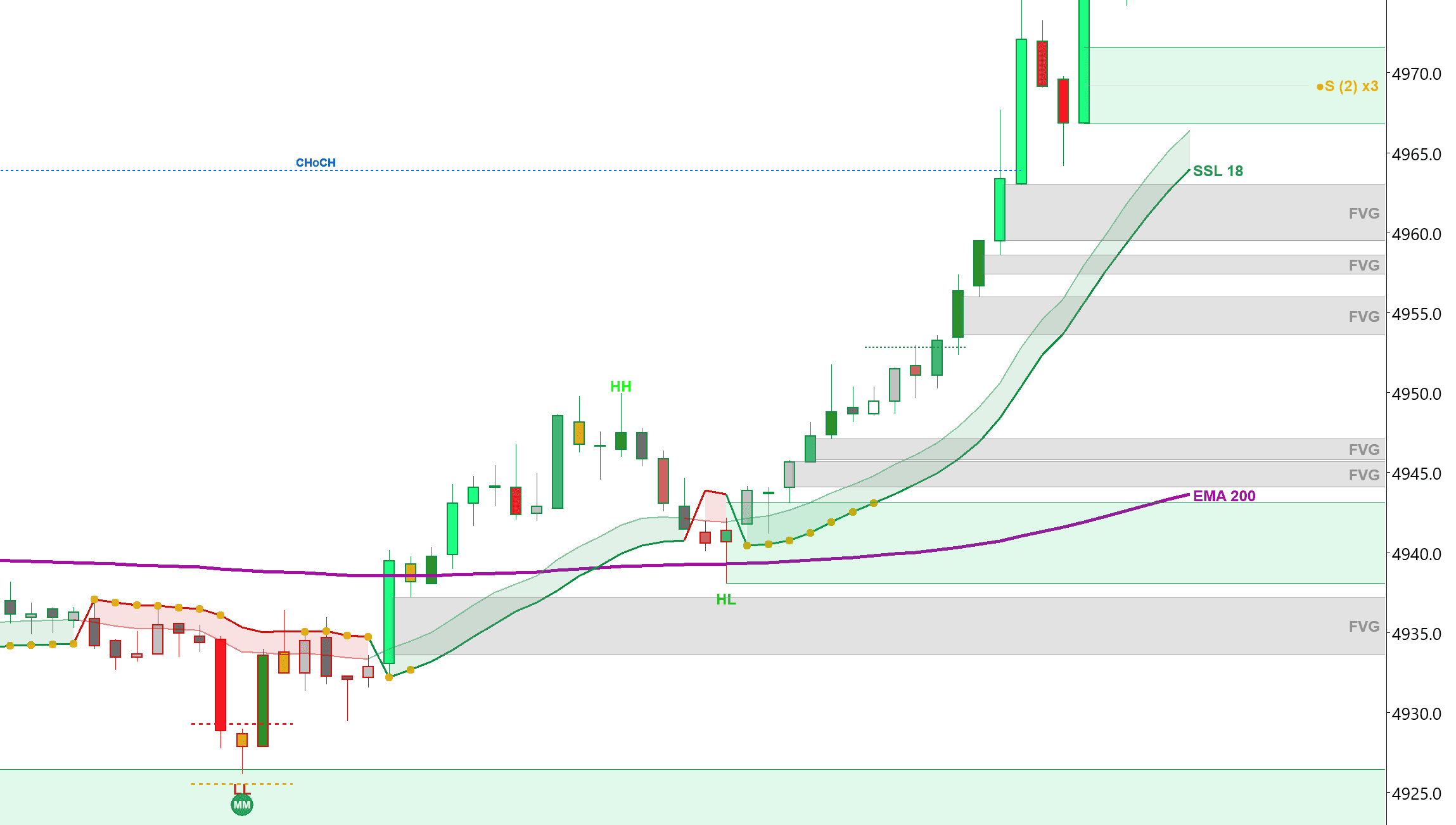
BOS & CHoCH Detection
Automatic Break of Structure and Change of Character labels in real-time. Never miss a trend shift or reversal.
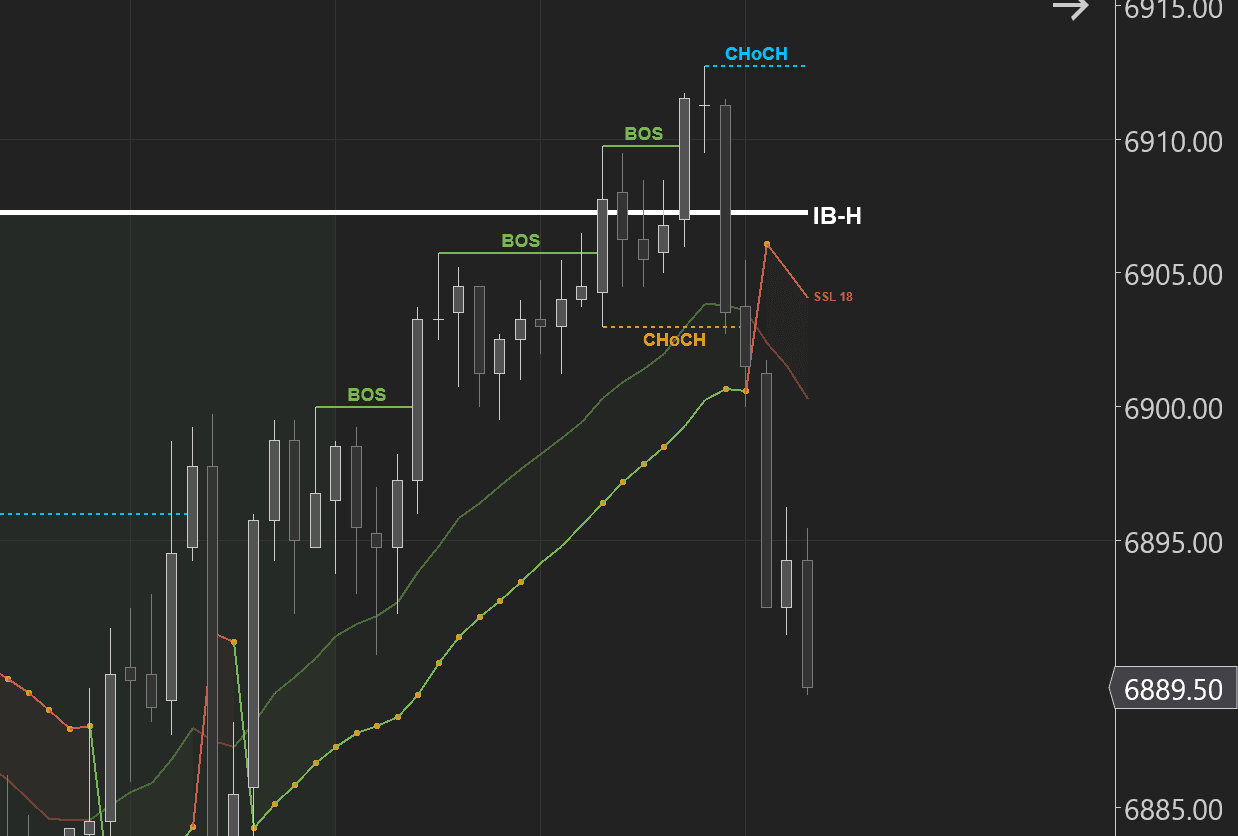
Opening Range & Initial Balance
Auto-plots OR and IB levels every session. Know the key zones before price even gets there.
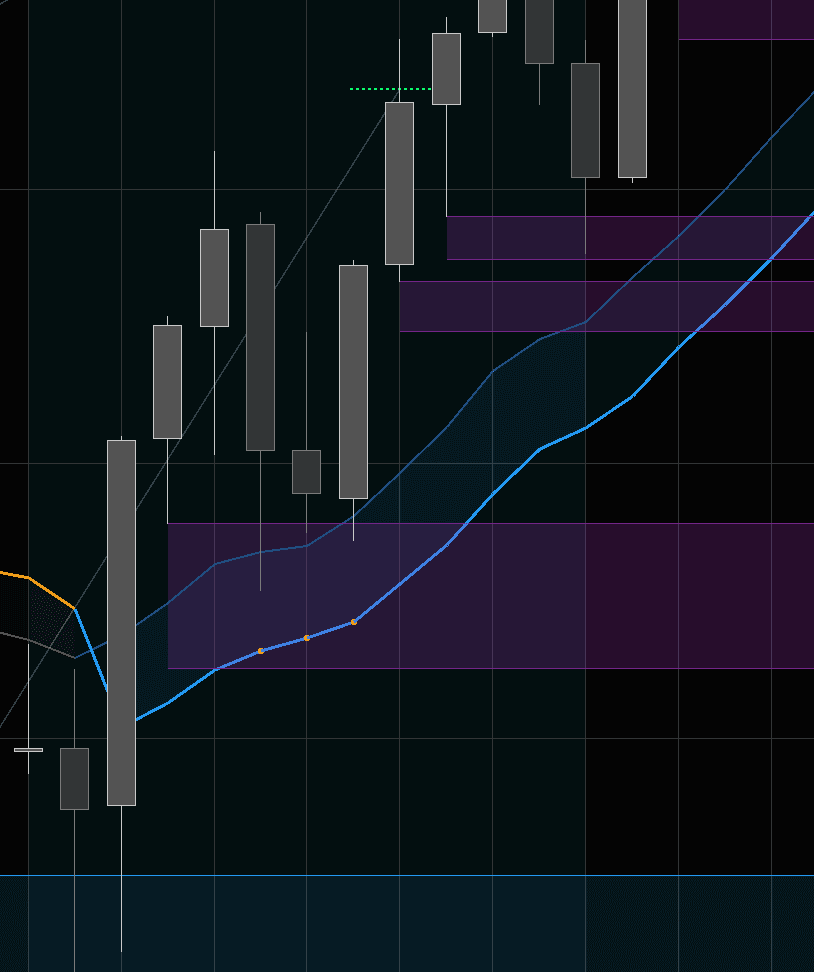
EMAs & SSL Channel
Built-in EMAs and SSL Channel with full customization. Trend direction at a glance, no extra indicators needed.
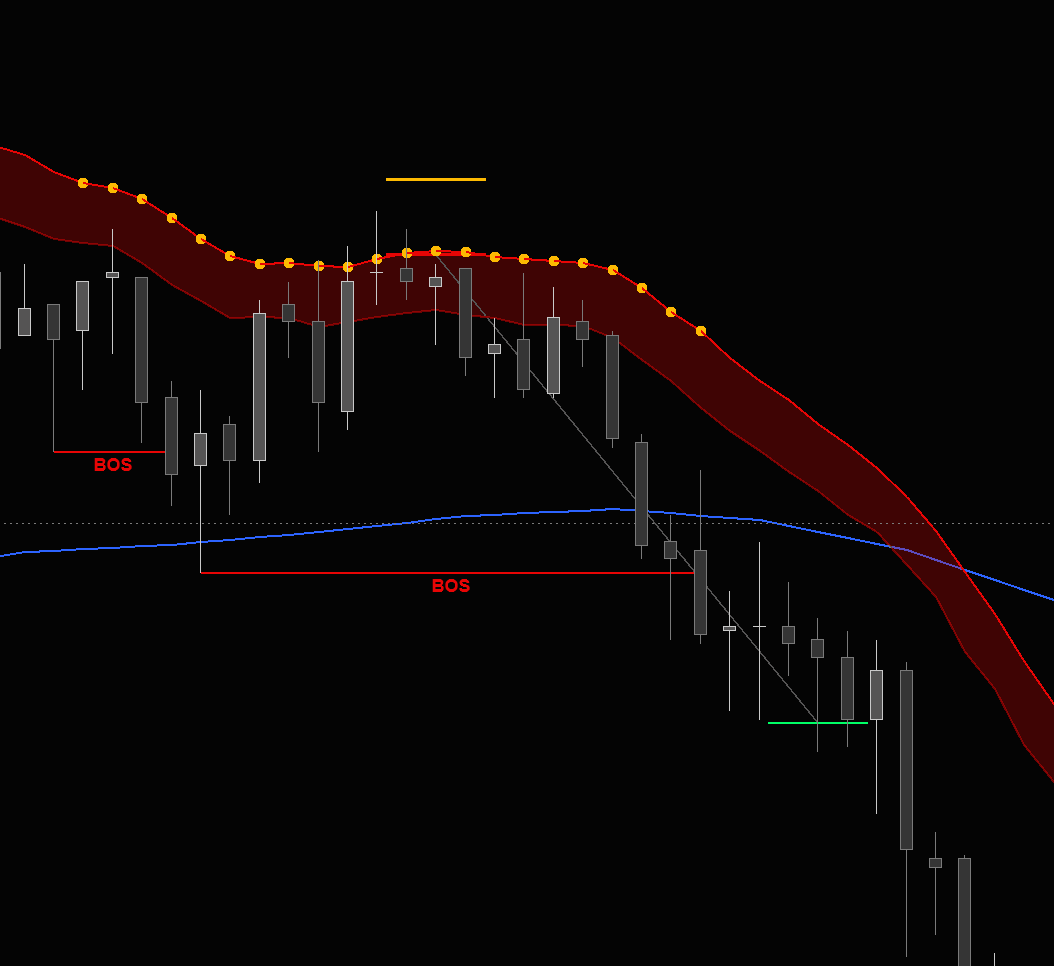
Squeeze Momentum
Integrated Squeeze shows when volatility is compressing and ready to explode. Spot breakouts before they happen.
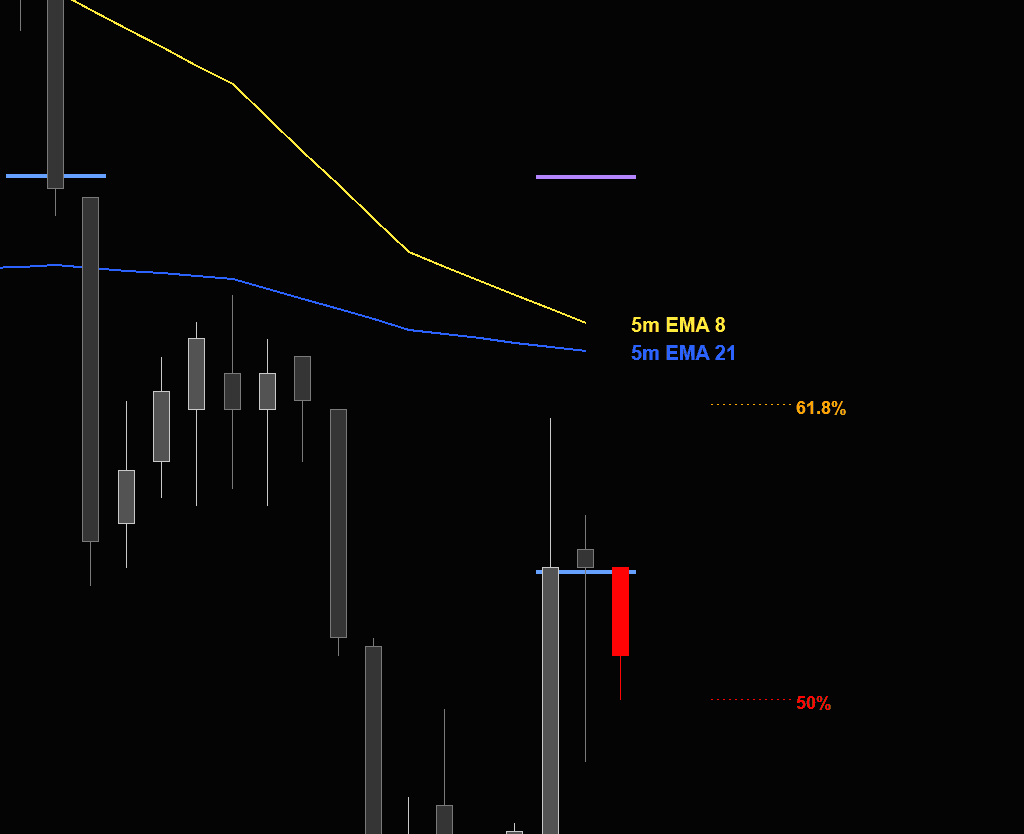
Multi-Timeframe EMAs
Plot EMAs from any timeframe directly on your chart. See the 5m, 15m, or hourly EMAs without switching charts.
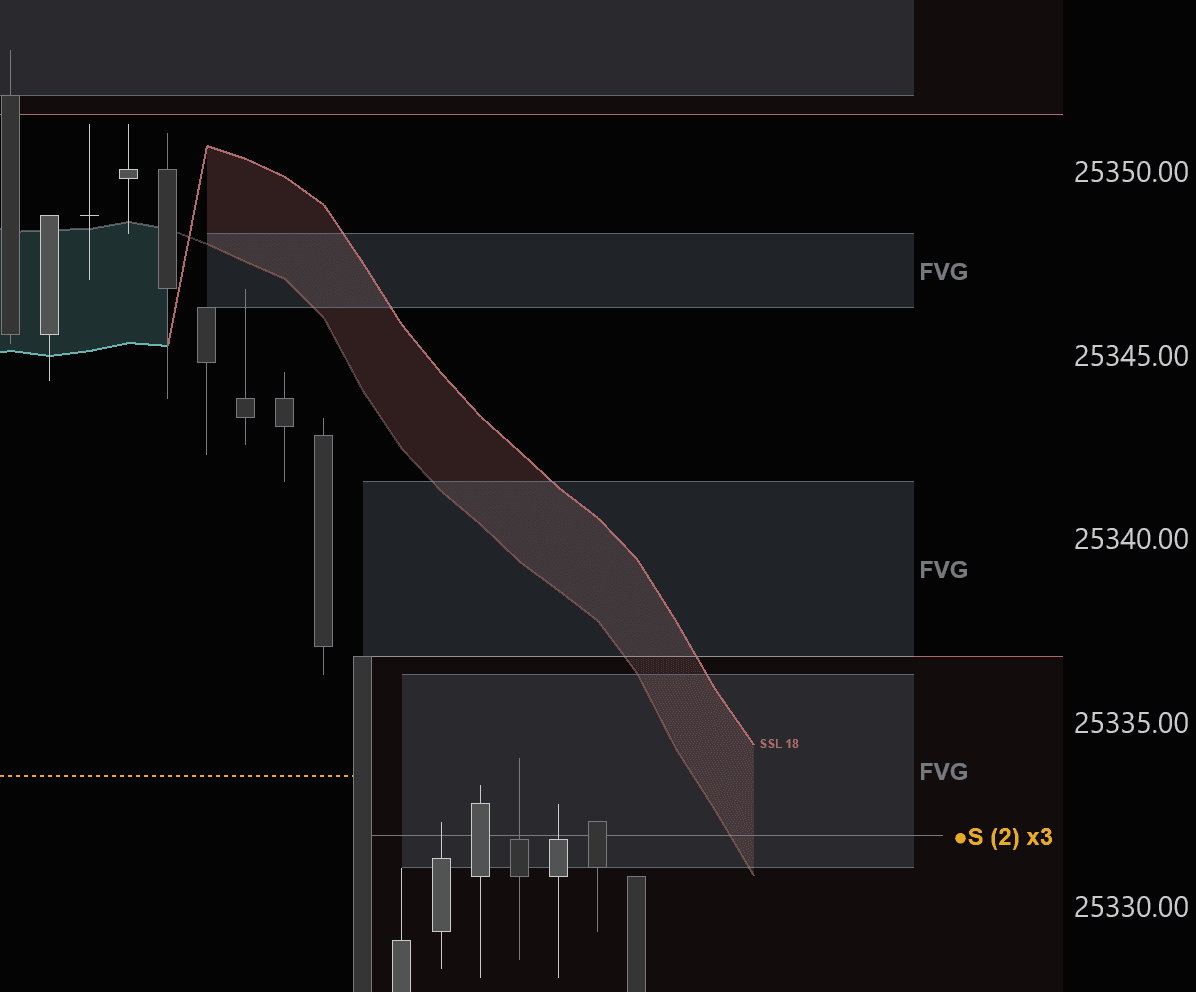
FVGs & Order Blocks
Automatic Fair Value Gap and Order Block zone mapping. See where institutional players are positioned.
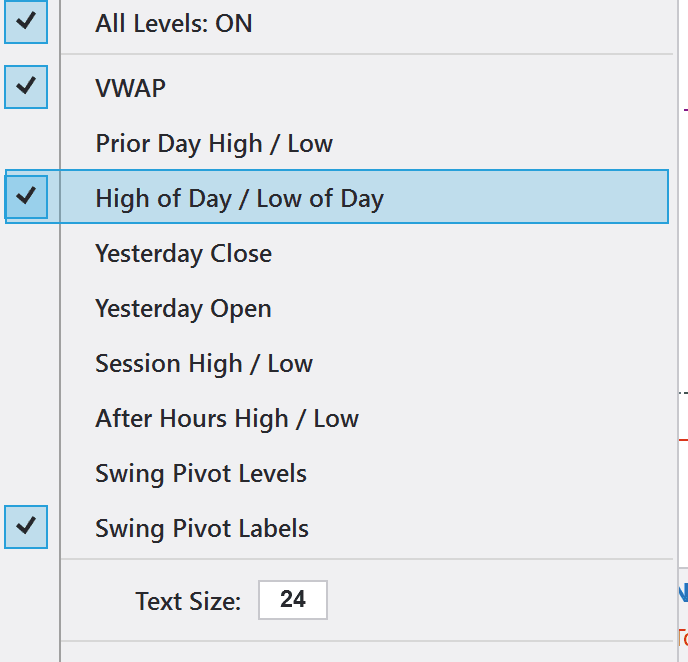
Key Levels & VWAP
VWAP, prior day high/low, session levels, swing pivots — all auto-plotted with full color and style customization.
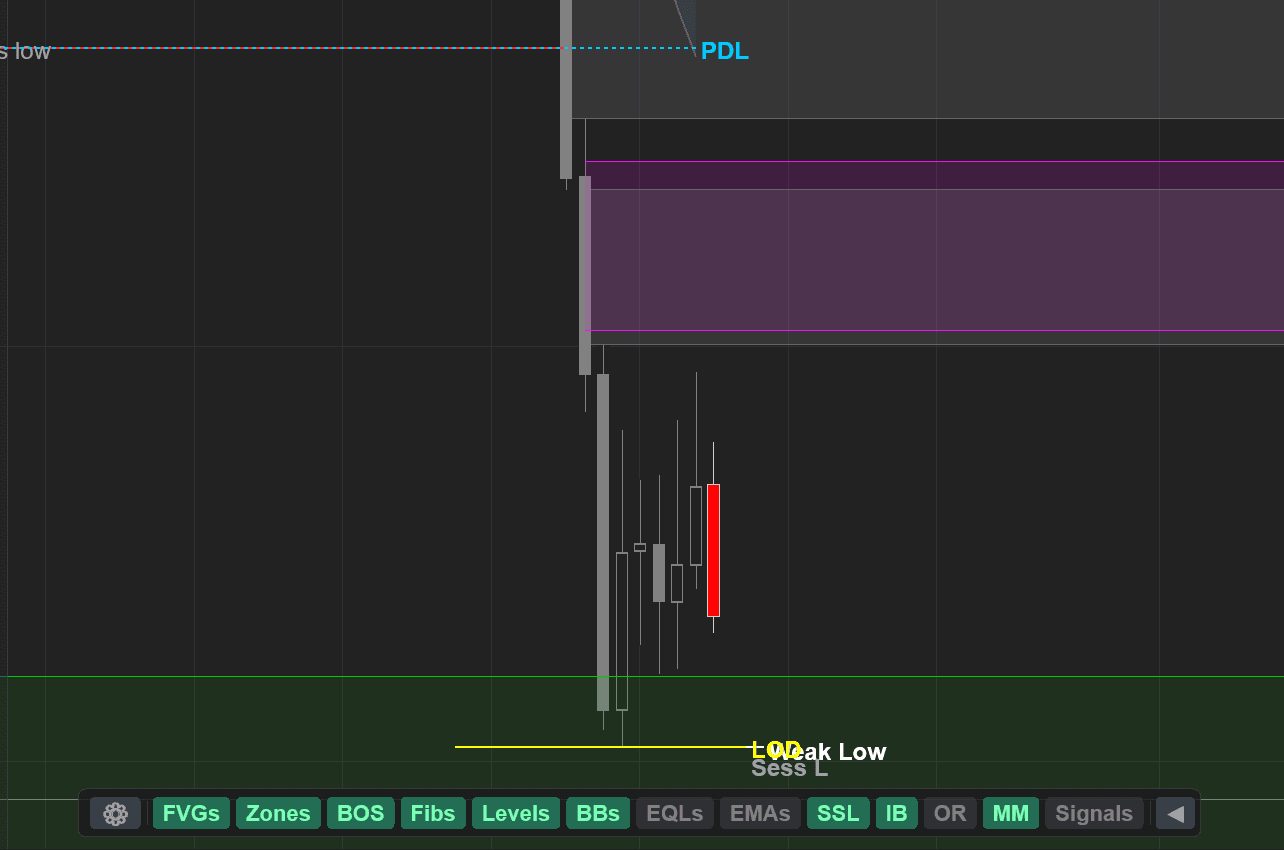
All-In-One Settings Menu
One indicator replaces 6+. Every feature toggled from a single organized menu — no more digging through NinjaTrader's clunky property grids.
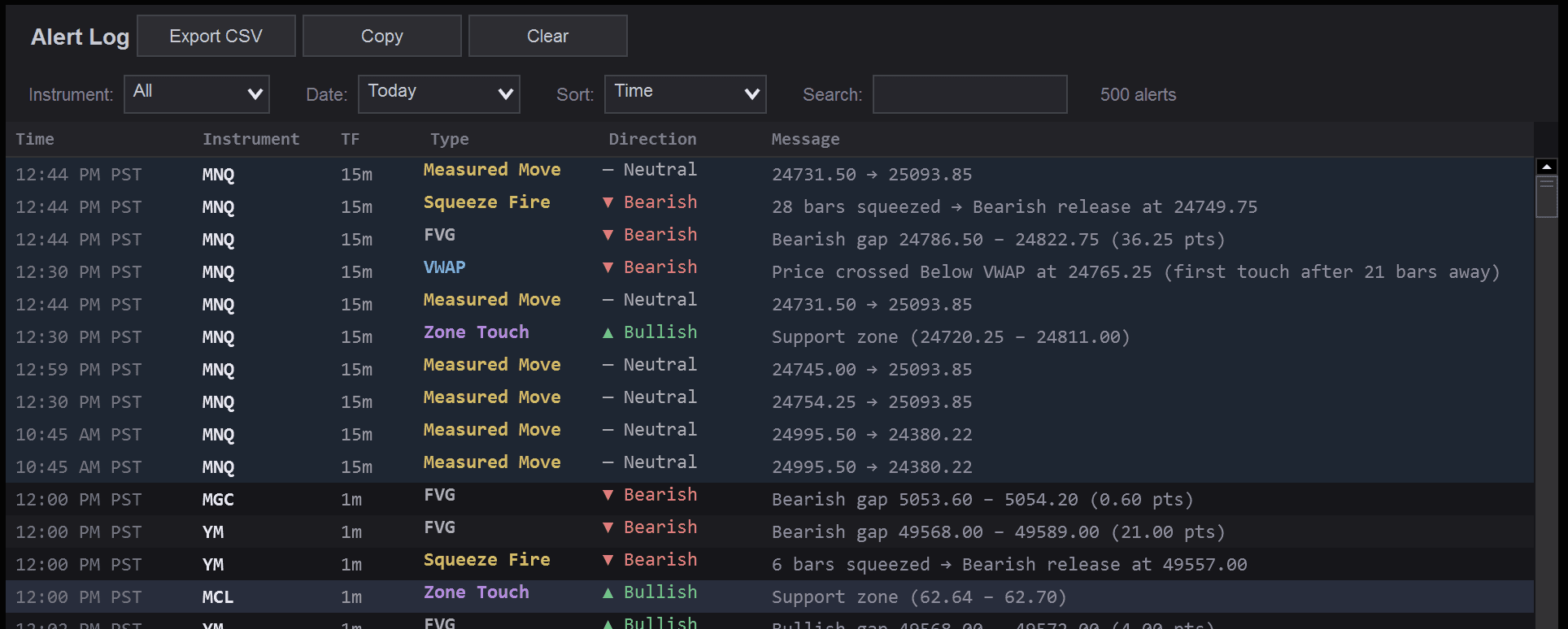
Real-Time Alert Log
Centralized alert dashboard tracks BOS, CHoCH, zone touches, squeeze fires, and more across all instruments and timeframes.
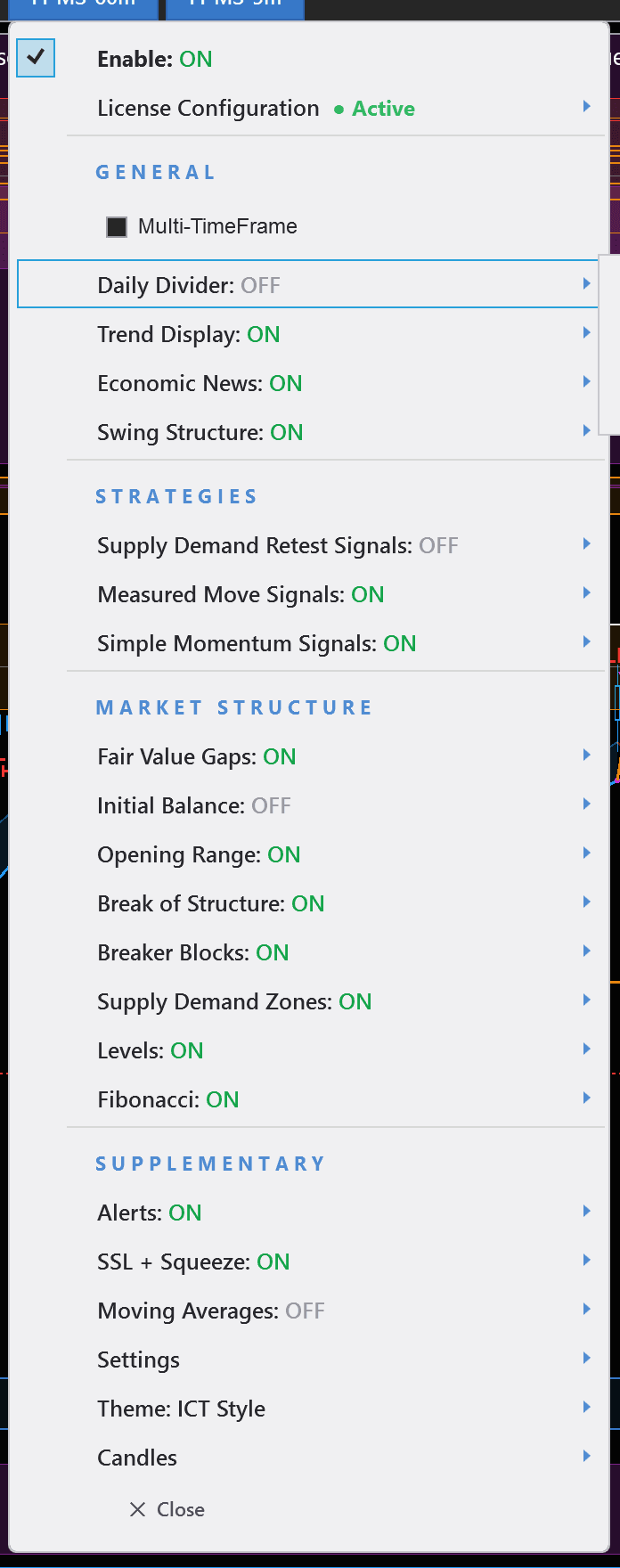
Auto Light & Dark Mode
Menu and panels automatically adapt to your NinjaTrader theme. Clean light mode for bright setups, dark mode for night trading.
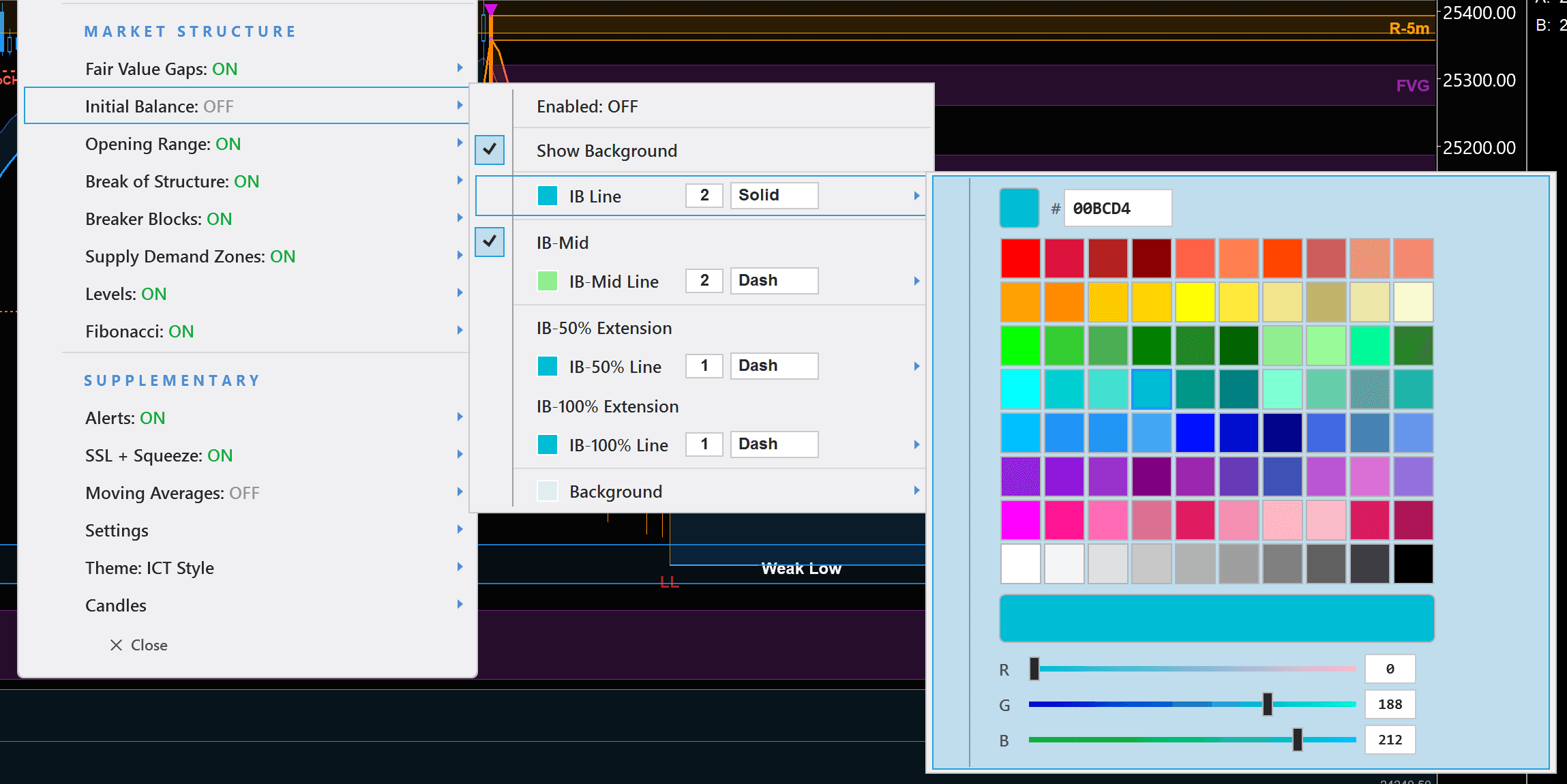
Full Color Customization
80-color swatch palette, hex input, and RGB sliders for every element. Make the indicator match your exact style.
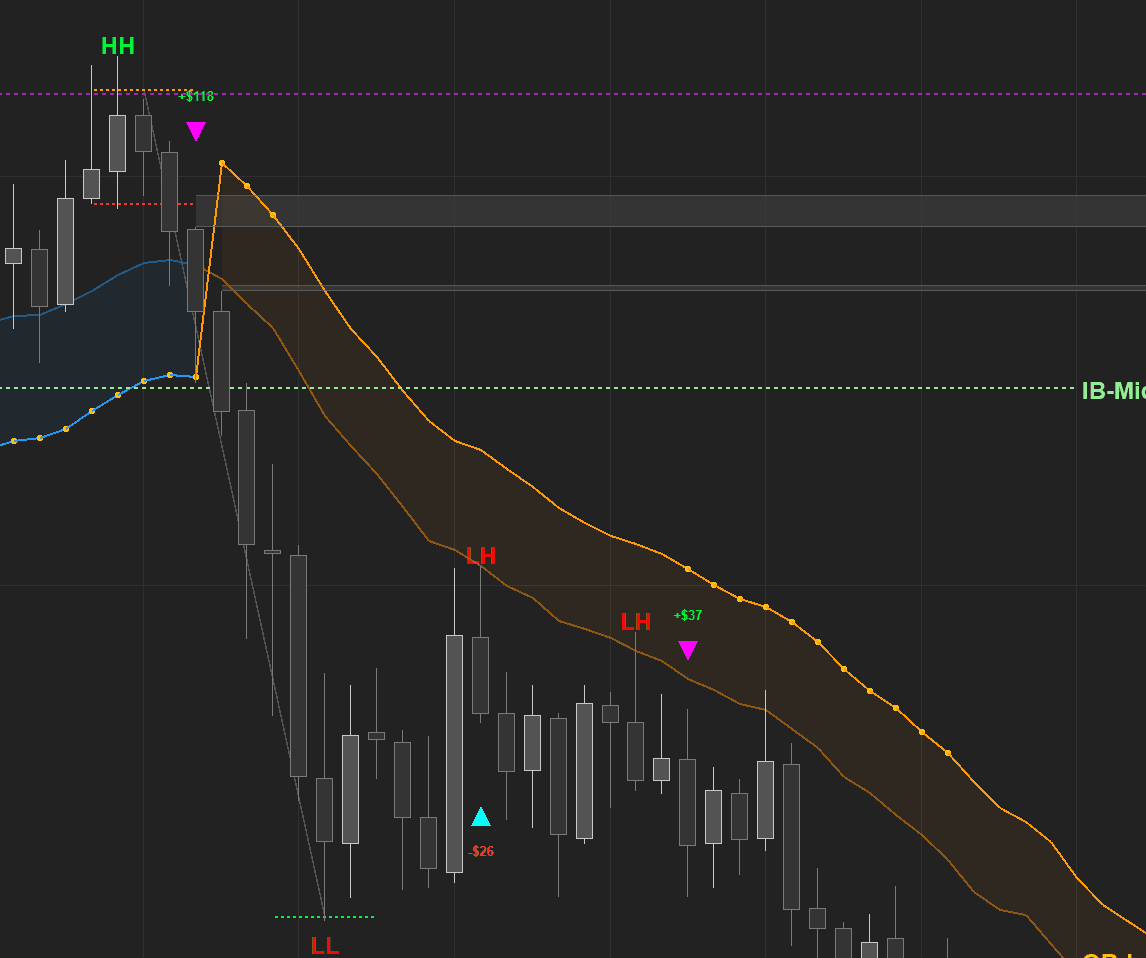
Buy & Sell Signals
Supply/demand retest and momentum-based signals with customizable colors and shapes. Clear entries and exits on every chart.
See It In Action
Indicator Overview & Trade Review
A walkthrough of the Market Structure Indicator's core features and a review of real trades — BOS, CHoCH, measured moves, and squeeze setups.
Light & Dark Mode
Your Chart, Your Theme
Every panel, menu, and overlay automatically detects your NinjaTrader theme and adapts instantly — no manual toggle needed. Light mode for daytime setups, dark mode for night sessions. It just works.
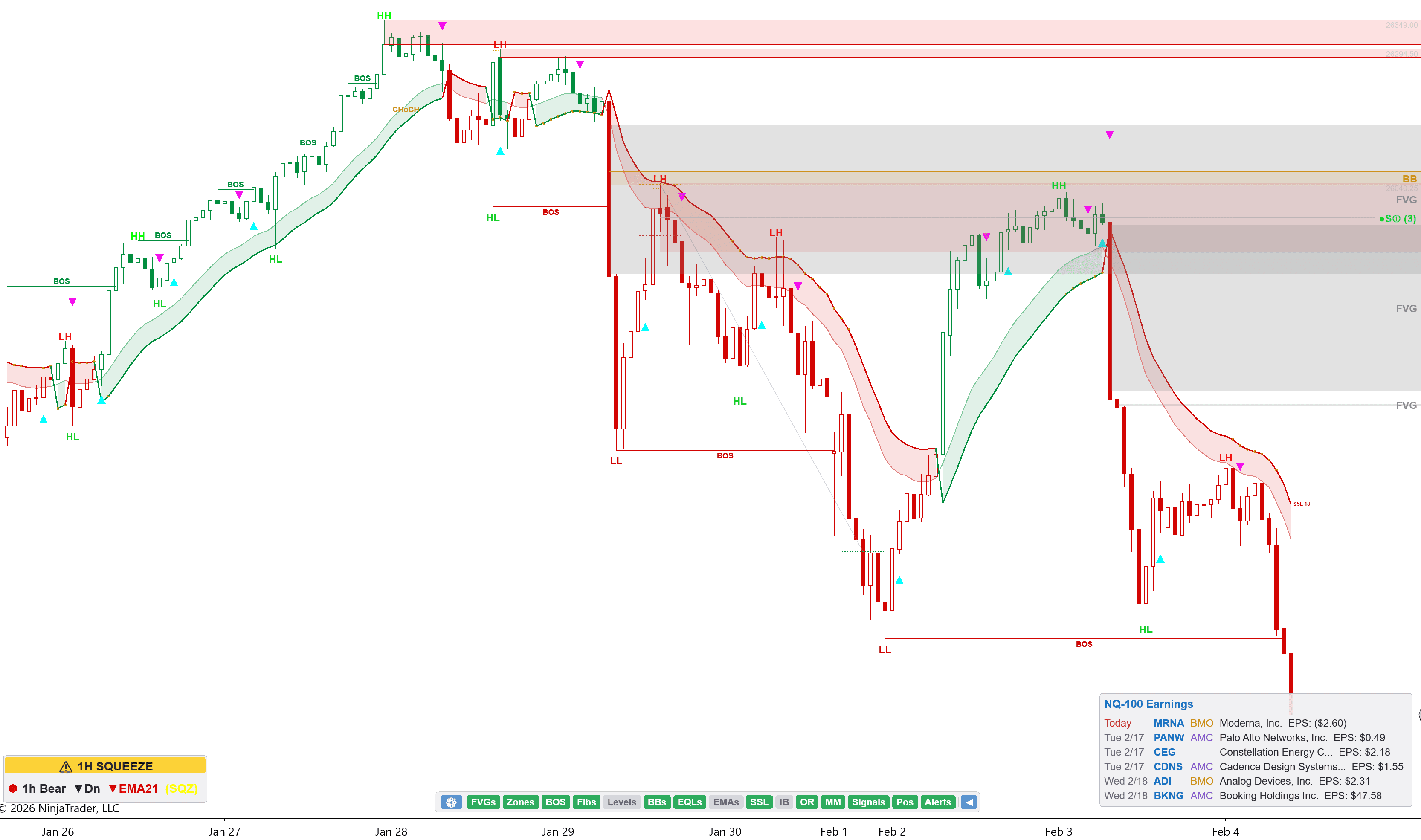
Quick Toggle Bar
One Click. Feature On or Off.
If you've ever used NinjaTrader, you know the pain: turning a feature on or off means right-clicking, digging through menus, waiting for a reload. It kills your flow and wastes precious seconds during active trading.
Our Quick Toggle Bar lives directly on your chart — a compact row of buttons for every major feature. Click once to toggle FVGs, Zones, BOS, Fibs, Levels, SSL, and more. Instant. No menu. No reload. No interruption. It's the TradingView-style experience that NinjaTrader has always been missing.
✕ The NinjaTrader Problem
Right-click → scroll through properties → find the setting → toggle → apply → wait for indicator reload. Repeat 10x per session.
✓ Our Solution
Click the button. Done. Feature toggles instantly with zero reload. Just like TradingView — but on NinjaTrader.
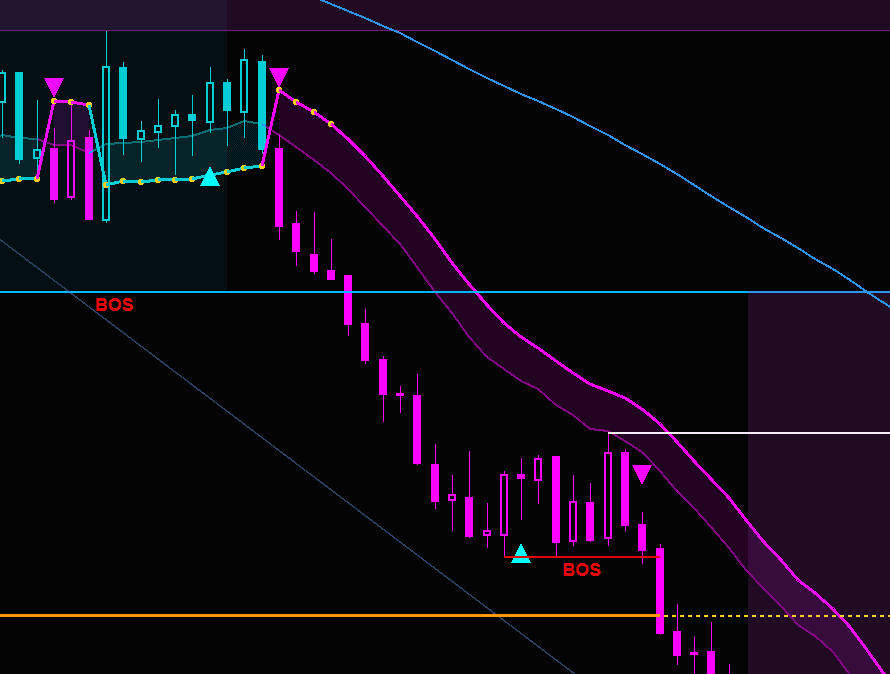
SSL Trend Bar Coloring
Cut the Noise. See the Trend.
Some traders don't want all the lines and zones — they just want to see which way the market is moving. SSL Trend Bar Coloring replaces your candlestick colors with the SSL trend direction. Green bars when bullish, red when bearish. Clean, simple, instant.
Toggle it on from the Quick Toggle Bar — no indicator reload needed. Supports hollow candles for even cleaner visuals.
Consolidated Trend Display
See the Full Picture Across Every Timeframe
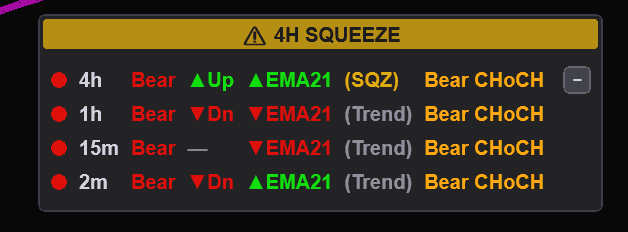
The consolidated trend panel pulls data from every chart you have open in NinjaTrader and displays it in one place — trend direction, BOS status, EMA alignment, squeeze state, and CHoCH across all timeframes. No multi-timeframe mode needed.
Trading inside a higher-timeframe squeeze is the fastest way to blow up your account. Bigger players are consolidating for the move — making price action unbearable with chop and stop hunts. The move will happen. The MTF alignment helps you prepare: see it coming, stay out of the chop, and be ready to strike when volatility expands.
Measured Moves
The Algorithm That Dominates the Market
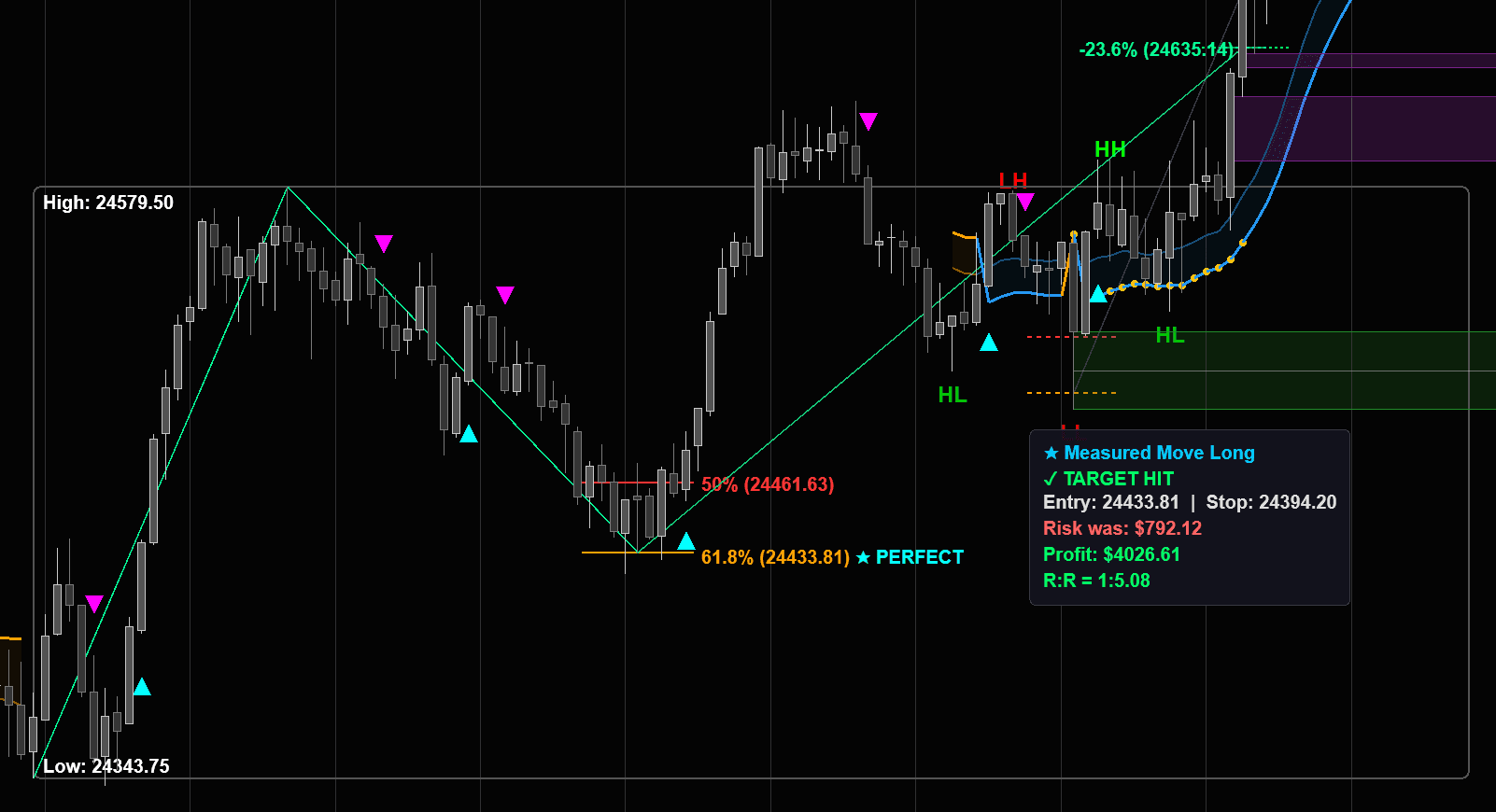
50% → 61.8% → -23.6% extension. This is the measured move pattern that drives price action across every instrument and every timeframe. Our indicator maps it automatically with built-in risk-reward calculations.
Markets often consolidate at the 50% and 61.8% zones for hours — trapping traders into thinking it's a bullish continuation when it's really accumulation for a major dump. The measured move tool shows you the full picture: where price is in the pattern, where the target is, and what your risk-reward looks like before you enter.
Breaker Blocks
Failed Order Blocks Become Breaker Blocks
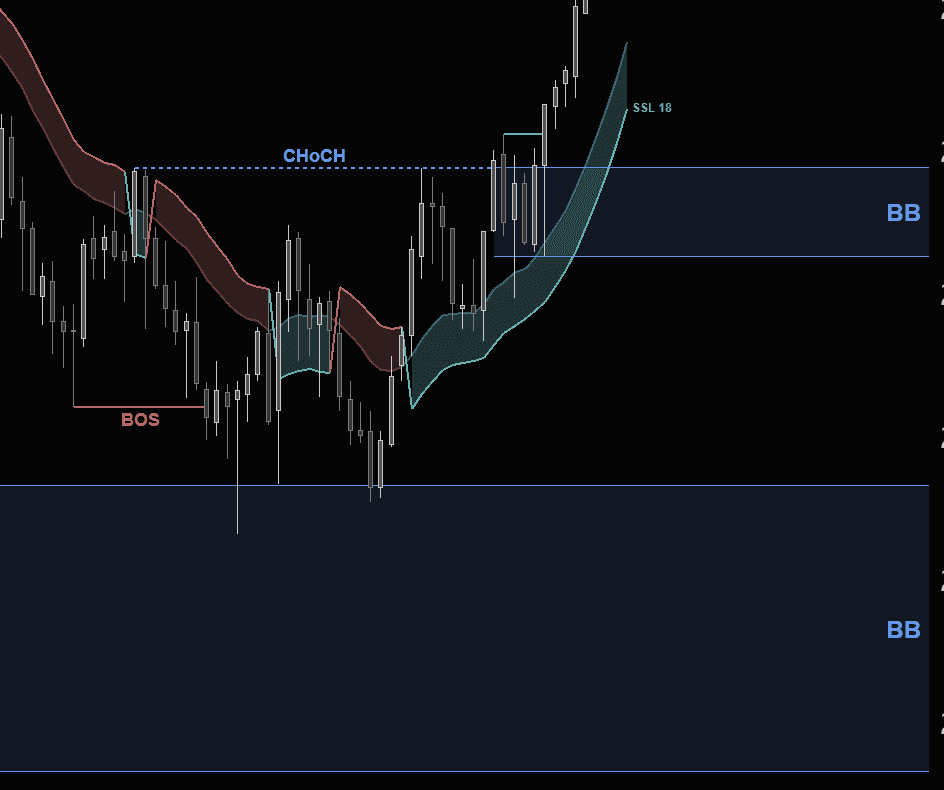
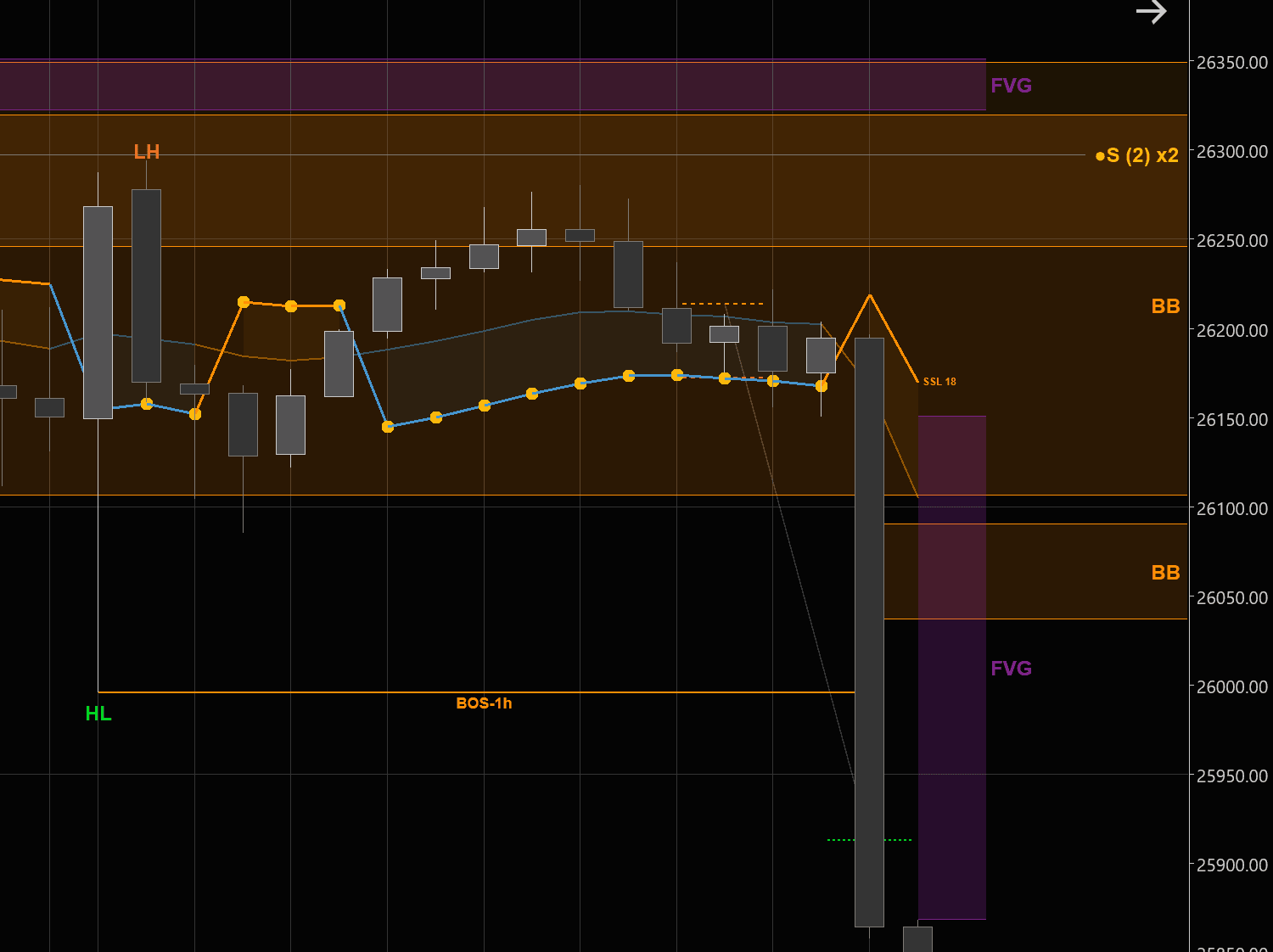
When an order block fails and price breaks through it, the zone flips into a breaker block — one of the most powerful reversal and continuation signals in smart money trading. Our indicator detects these automatically.
Breaker blocks mark where institutional positions were invalidated and liquidity was swept. Price often returns to these zones before continuing in the new direction. The indicator highlights them in real-time so you can plan entries at high-probability reaction zones instead of chasing.
Squeeze Momentum
Compression. Then Explosion.
Some of our traders only trade squeezes — and for good reason. Price goes nowhere, chops around in a tight range, and then explodes. The built-in squeeze indicator shows you exactly when volatility is compressing and a big move is loading.
Trading inside the squeeze is brutal — choppy, indecisive price action that shakes out most traders. But when the squeeze fires, the entire range breaks and price commits hard in one direction. The indicator lets you sit on your hands during the noise and strike when the move is ready.
Supply & Demand Zones
Scored Zones. Smarter Entries.
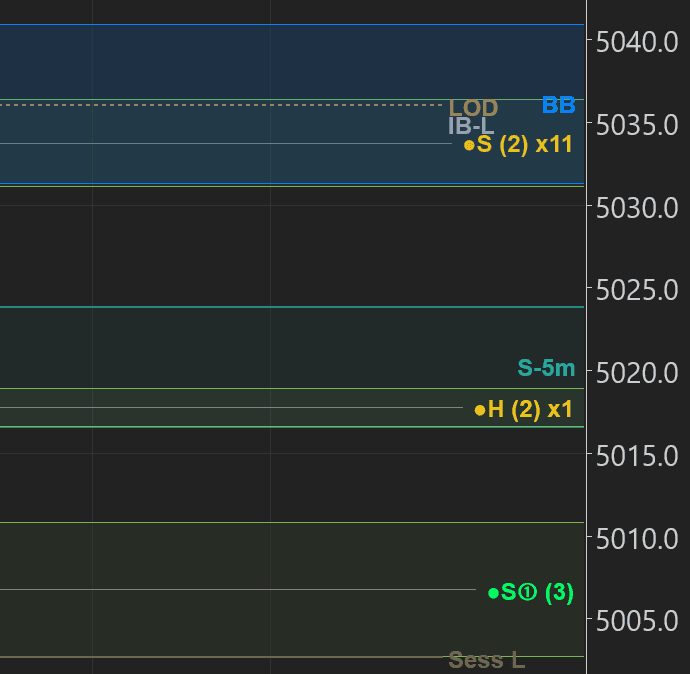
Not all supply and demand zones are equal. Our indicator scores every zone based on how it was created — the strength of the departure, the freshness of the level, and whether it aligns with the higher-timeframe trend.
A high-score demand zone formed by an aggressive BOS with a clean FVG behind it is a completely different trade than a weak zone that's already been tested twice. The scoring system removes the guesswork so you focus on the zones that actually matter.
How to Read Zone Labels
Economic News Panel
Never Get Blindsided by News Again
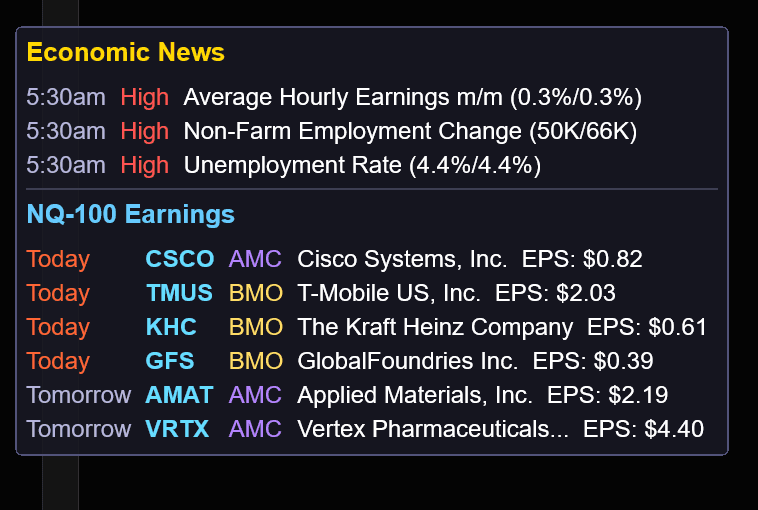
High-impact economic events move markets in seconds. The built-in news panel shows today's economic calendar and NQ-100 earnings right on your chart — no browser tabs, no alt-tabbing, no surprises.
See FOMC, CPI, NFP, and other market-moving events with impact ratings, forecasts, and previous values. Plus NQ-100 earnings dates so you know when your favorite names are reporting before or after the bell.
Pro Drawing Tools. Built In.
Volume Profile, Risk/Reward, and Fibonacci Retracement — right on your chart. Other vendors charge $300+ just for volume profile alone. We include all three because they should be standard.
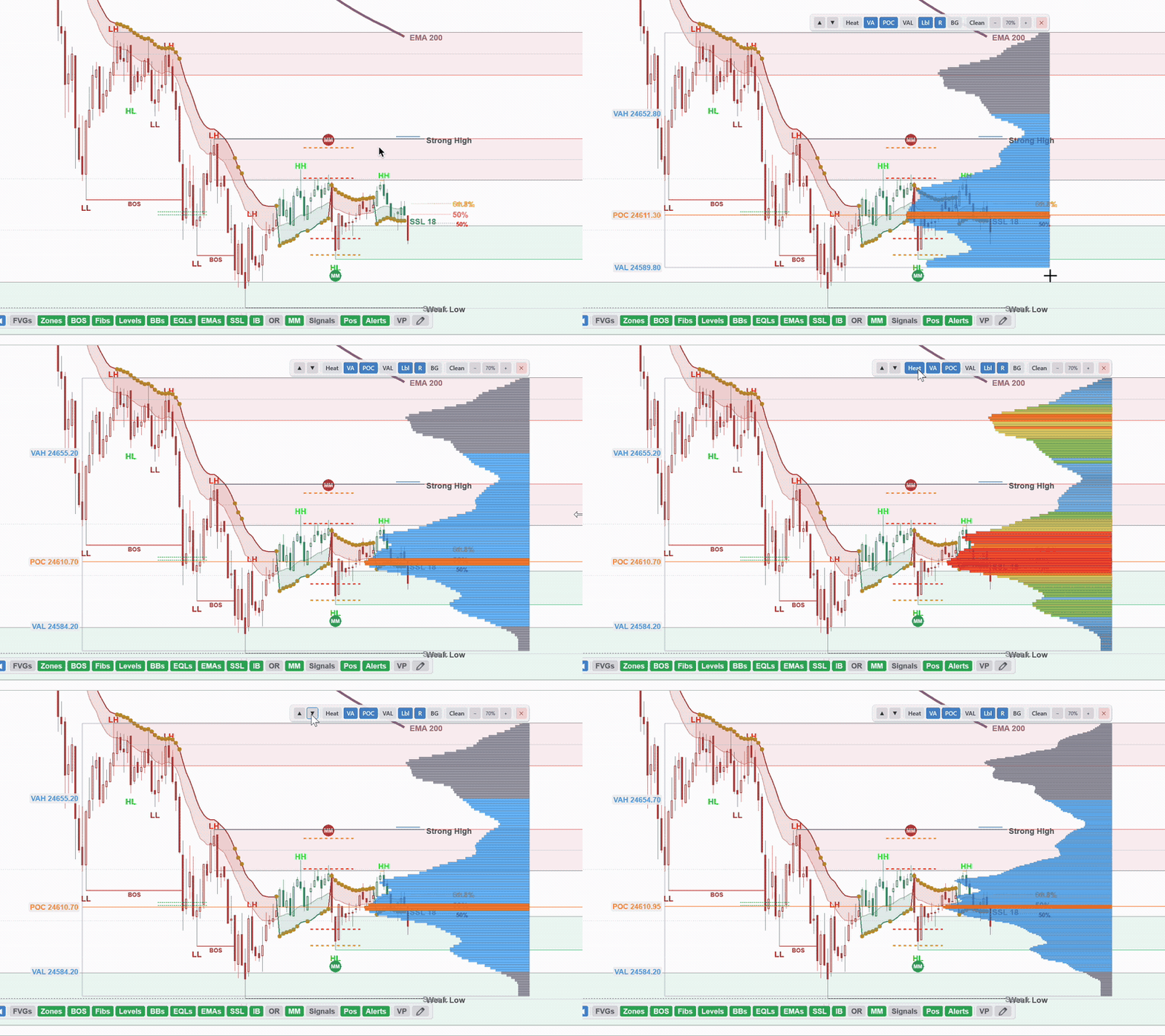
Volume Profile
Click and drag to build a volume profile for any range on your chart. See exactly where the real volume traded — POC, Value Area, VAH/VAL — with a built-in toolbar to toggle every element instantly.
Risk/Reward
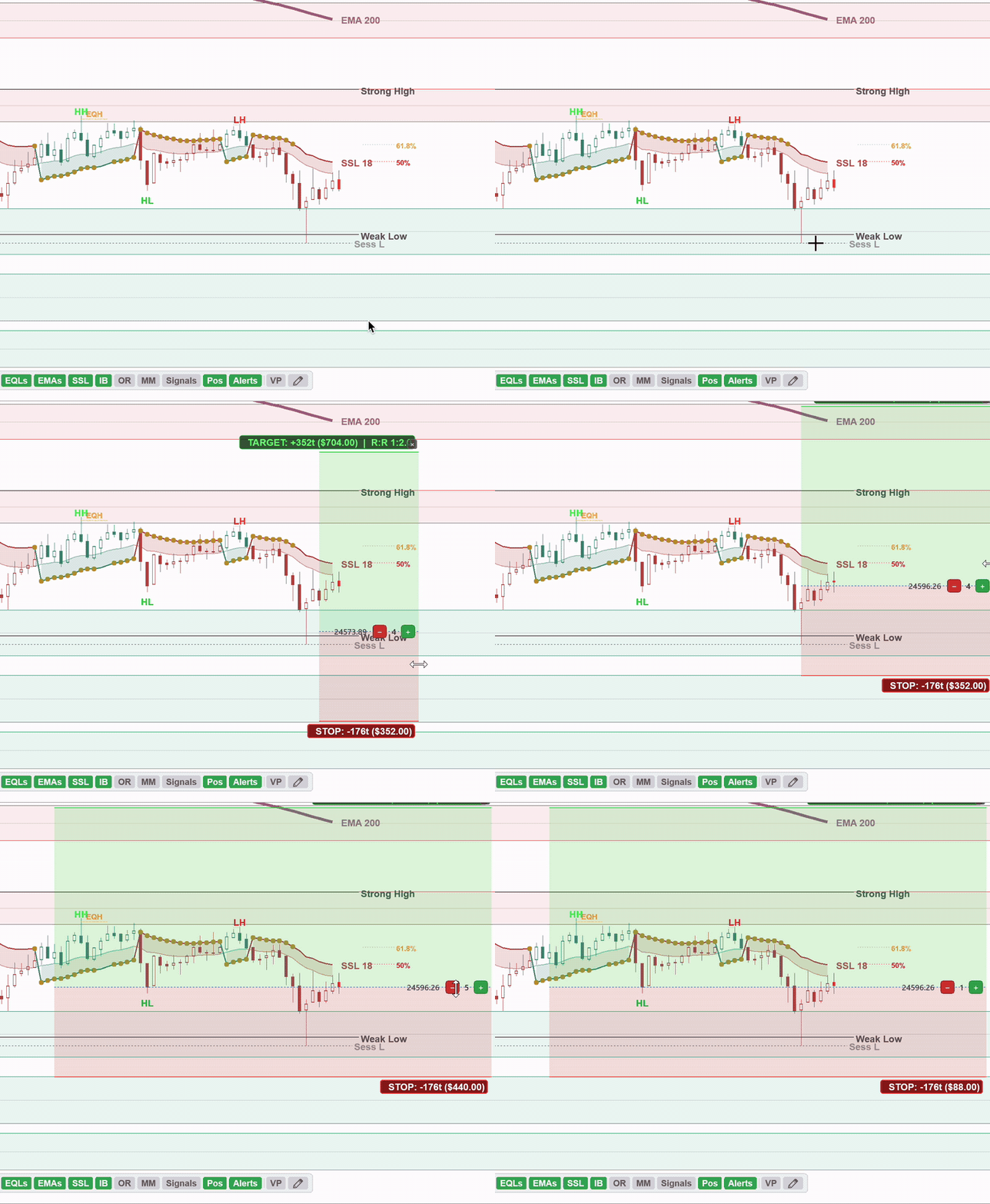
Click and drag to place a position risk/reward overlay directly on your chart. See your stop loss, profit target, ticks, dollar risk, and R:R ratio update in real-time. Adjust contracts with +/- buttons right on the drawing.
Simple by design. We wanted a dead-simple risk/reward calculator that measures your risk in seconds — no clutter, no learning curve. Other vendors charge $300+ just for this feature. We believe risk management tools should come standard.
Fibonacci Retracement
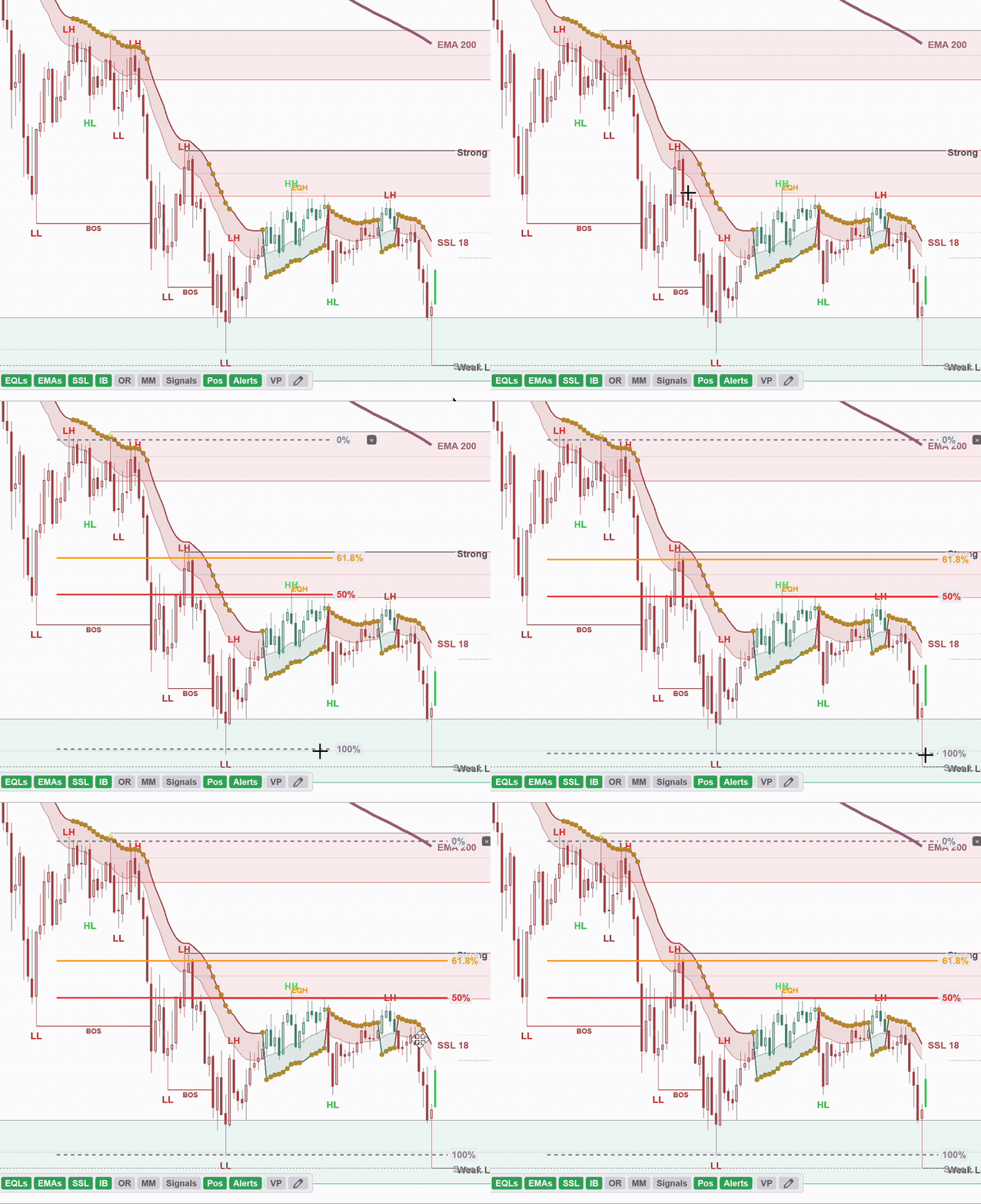
Click two points to draw Fibonacci retracement levels instantly. Drag the anchor points or the body to reposition. The golden zone (50% and 61.8%) is highlighted so you can spot high-probability entries at a glance.
All Drawing Tools Included — No Extra Charge
Every drawing tool comes with your indicator license. No add-ons, no upsells, no “pro tier” required. Volume Profile alone costs $300+ from other vendors.
POC, VA, VAH/VAL, Heatmap, Toolbar
Stop, Target, R:R, Ticks, Contracts
All Levels, Zone Fills, Draggable
Volume Bars. See the Move Before It Happens.
Measure 1x, 2x, and 3x relative volume directly on your chart. When volume spikes at a key level, that's your clue — real participants are engaged and it's time to pay attention.
Relative Volume
Volume is the one thing that can't be faked. When you see 2x or 3x relative volume printing at a key support or resistance level, that's a clue — real participants are active and something is about to happen. It won't tell you the direction, but it tells you to pay attention. Volume Bars make this instantly visible without cluttering your chart.
Normal Volume
Baseline activity — market is moving at its usual pace
Elevated Volume
Something is happening — buyers or sellers are stepping in
Extreme Volume
Institutional-level participation — pay close attention to price action here
Volume is a clue, not a signal. When increased volume appears at a key level — a demand zone, a BOS, or the opening range boundary — it tells you real participants are engaged. Combine it with your price action read to time entries with conviction. Fully configurable thresholds, colors, and display options so you can dial it in to your exact trading style.
Know When to Stay Out
Low volume kills profits. When bars are printing at 0.5x or below normal volume, price gets pushed around with no confirmation from real buyers or sellers. It's chop — and choppy markets eat stop losses for breakfast. Volume Bars make this painfully obvious so you can protect your capital.
Low volume = lose your profits. The biggest edge isn't finding entries — it's knowing when not to trade. Volume Bars turn that instinct into a visual system you can rely on every session.
Built Different
Built for Speed. Not for Lag.
NinjaTrader is notorious for chart lag when indicators get complex. Load up BOS detection, supply & demand zones, squeeze momentum, and multi-timeframe analysis on a single chart and most indicators will grind your platform to a halt. High-volatility sessions make it even worse — exactly when you need speed the most.
Most NinjaTrader indicator developers are traders who learned to code — and there's nothing wrong with that. But it means performance engineering gets overlooked. Our indicator was built by professional software engineers who trade. We applied production-grade architecture and advanced data caching strategies so that your charts load fast, stay responsive during high-volatility sessions, and never miss a beat when it matters most.
Most traders turn off their indicators before FOMC, CPI, and NFP releases because they know their charts will freeze the moment volatility spikes. We don't want you to have to do that. The moments when the market moves the fastest are exactly when you need your tools the most — and that's when ours performs best.
3s → 1s
Benchmarked Chart Load
We benchmarked a chart reload from 3 seconds down to 1. That may not sound like much — but in indicator development, it's a massive win
Zero
Wasted Computation
The indicator is smart about what it recalculates — only new data triggers work
100%
Accuracy Preserved
Speed without compromise — every level, zone, and signal is always accurate
Instant Chart Reloads
Switch timeframes, change days to load, reopen a chart — the indicator picks up where it left off. No waiting, no progress bars, no staring at a frozen screen.
High-Volatility Ready
During fast markets, every millisecond counts. The indicator stays responsive when other tools choke — so you can focus on the trade, not the loading spinner.
Always In Sync
Change your settings or load a different date range and the indicator automatically adapts. No stale data, no manual resets — it just works.
Shaving 2 seconds off a chart load doesn't sound like much — until you realize how hard it is. In NinjaTrader indicator development, performance is the hardest problem to solve. Most developers never even attempt it. We packed more features into one indicator than most traders run across six — and engineered it to run faster than any of them individually. That's the difference between an indicator built by traders who code and one built by engineers who trade.
Buy & Sell Signals
Simple Directional Arrows. Powerful Context.
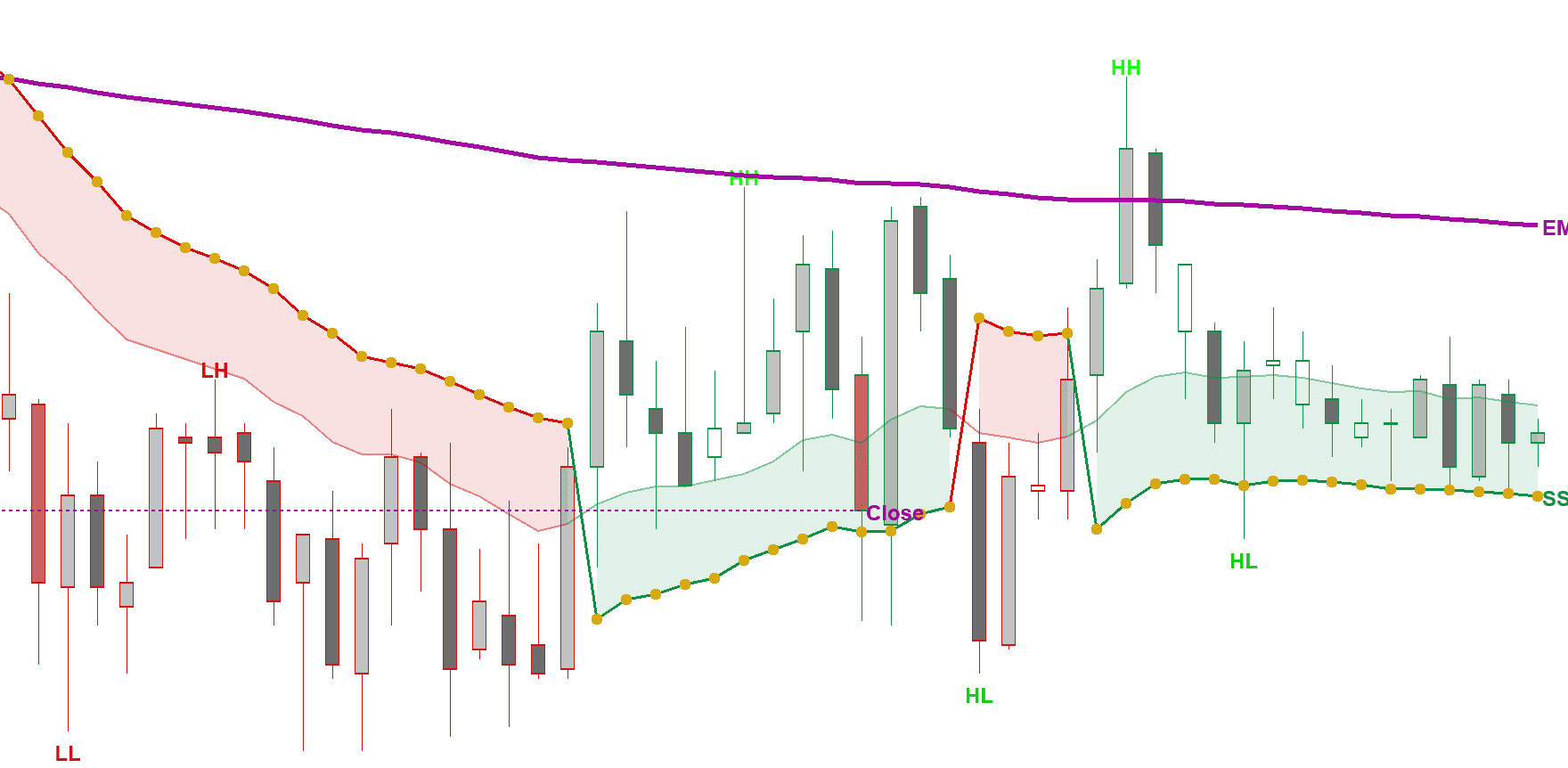
Clean buy and sell arrows show you where the market wants to go next. They're not meant to be traded blindly — but combined with structure, EMAs, and squeeze analysis, they become a powerful confirmation tool.
In this example on the MNQ 5-minute chart, price hit the 61.8% measured move level at the top and rejected hard. From there the market started printing lower lows and lower highs below the 20-period SSL inside a range — a textbook short setup. The sell arrows confirmed direction while structure, the measured move rejection, and SSL provided the confluence for a clean entry.
Disclaimer: Buy and sell signals are analytical tools only and do not constitute financial advice or recommendations to buy or sell any security. All trading involves risk, including the loss of principal. We are not responsible for any financial losses incurred from using this indicator. Past performance is not indicative of future results.
Get Started
Up and Running in Minutes
Purchase
Choose your indicator and complete your purchase securely with Stripe or PayPal.
Download & Install
Get instant access to your download. Import into NinjaTrader 8 with our simple installation guide.
Start Trading
Apply the indicator to any chart and immediately start seeing market structure with crystal clarity.
Pricing
Simple, One-Time Pricing
No subscriptions, no recurring fees. Buy once and own it forever.
Market Structure Indicator
For NinjaTrader 8
$349
One-time payment • Lifetime license
- Quick Toggle Bar — One-Click Controls
- BOS & CHoCH Detection
- Opening Range & Initial Balance
- EMAs & SSL Channel
- Squeeze Momentum
- Multi-Timeframe Trend Analysis
- FVG Zones & Order Blocks
- Buy & Sell Directional Signals
- Economic News & Earnings Panel
- 15+ Themes & Full Customization
- Free Lifetime Updates & Support
No payment or credit card required — just your email.
Secure checkout powered by Stripe & PayPal
FAQ
Frequently Asked Questions
Which version of NinjaTrader is supported?
Our indicator is built for NinjaTrader 8. It is not compatible with NinjaTrader 7 or earlier versions.
How do I install the indicator?
After purchase, you'll receive a download link. Simply import the .zip file into NinjaTrader using the Control Center > Tools > Import menu. A detailed installation guide is included.
Can I use it on multiple computers?
Each license is valid for one machine. If you need to transfer your license to a new computer, you can deactivate it from your dashboard and reactivate on the new machine.
Do I get free updates?
Yes! Your one-time purchase includes free updates for life. When we release new features or improvements, you'll get them automatically.
Can I customize the colors and settings easily?
Yes — this is one of the biggest pain points we solved. NinjaTrader's default property grids are notoriously hard to navigate. Our indicator has its own built-in settings menu with 15+ pre-made themes you can switch instantly, plus full control over every color, line style, and toggle. No digging through property panels.
What markets does it work with?
The indicator works with any market available in NinjaTrader — futures (ES, NQ, YM, CL, etc.), stocks, forex, and crypto.
What is your refund policy?
We offer a 14-day money-back guarantee. If you're not satisfied with the indicator, contact us within 14 days of purchase for a full refund.